

What's changed: Initial version (topic 1.03, subtopics 1.03.1–1.03.5)
3.5Basic File Editing with an Editor
Learn the standard editor vi (vim): switching between normal mode and insert mode (i, o, a, ESC), moving with h/j/k/l, editing (dd, yy, p, c, d, y), searching (/ and ?), saving and quitting (ZZ, :w!, :q!, :e!), and changing the default editor (EDITOR, nano, emacs).
A server may lack a GUI, but vi is always there. Fixing one line in a config or commenting it out makes minimal vi a shared language among Linux admins. Ninety percent of stumbling is the mode concept, so start there.
3.5.1The two modes
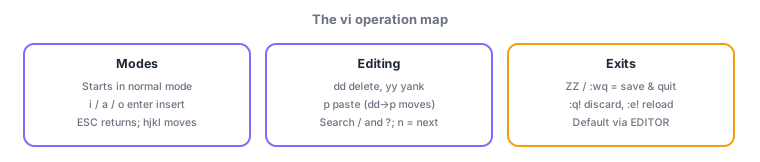
- Normal mode (at startup): keys are commands. Insert mode: keys type text. Enter insert with i (at cursor), a (after), o (new line below); return with ESC.
- Move in normal mode with h (left), j (down), k (up), l (right).
- Search with /text (forward) and ?text (backward); n jumps to the next match.
3.5.2Editing, saving, quitting
- Line editing: dd (delete a line into the yank buffer), yy (copy/yank a line), p (paste). d, y, c (change = delete then insert) combine with motions (dw = delete a word).
- Save/quit: ZZ (save and exit), :w! (force write), :q! (quit without saving), :e! (reload the last saved state). :wq also saves and exits.
- Change the default editor via the EDITOR variable (
export EDITOR=nano). nano (keys shown on-screen—beginner-friendly) and emacs are the other big names.
Staples: discard and quit = :q!, save and quit = ZZ (or :wq), delete line = dd, copy = yy, paste = p, "typing does nothing" → you are in normal mode (press i). Changing which editor crontab and friends launch = the EDITOR variable—also frequent.
Walk one full config-edit round trip. vi /etc/hosts opens in normal mode. Jump with /192.168, duplicate the line with yy then p, enter insert mode with i to fix the IP, and return with ESC. Delete the obsolete line with dd. Feel you broke more than you fixed? :e! reloads the last saved state wholesale, and :q! abandons the session entirely. Satisfied? ZZ (or :wq) saves and exits. Knowing these always-safe exits (:q!, :e!) is the single biggest trick to using vi without fear. And since dd and yy pair with p through the yank buffer (dd→p = move a line), learn the operations as combinations.
| Goal | Keys/command | Note |
|---|---|---|
| Enter insert mode | i / a / o | ESC returns to normal |
| Delete / copy / paste a line | dd / yy / p | dd then p moves a line |
| Save+quit / discard+quit | ZZ (:wq) / :q! | :e! reloads last save |
| Change default editor | export EDITOR=nano | Used by crontab, etc. |
Trap: ":q! saves and exits" is wrong—:q! quits without saving (discard); saving exits are ZZ / :wq. And "you can type text right after opening vi" is wrong—vi starts in normal mode; until you enter insert mode with i, keys are commands (j just moves the cursor down).
3.5.3Section summary
- Normal ⇔ insert (i/a/o and ESC), move with hjkl, search / and ?; edit with dd/yy/p (yank buffer)
- Exits = ZZ/:wq (save), :q! (discard), :e! (reload); default editor via EDITOR (nano/emacs)
Sign in to track progress — Log in.
Quick check
(just a quick review)Q1. You edited a config in vi but want to discard all changes and quit. Which command?
Q2. In vi normal mode, you want to copy the current line and paste it below. Which key sequence?
Q3. You want crontab -e to launch nano. Which environment variable do you set?
Keep track of your progress
The full study guide is free to read. Sign up free to practice with the question bank, track what you have read, review your mistakes, and highlight passages.