

What's changed: Initial version (topic 1.03, subtopics 1.03.1–1.03.5)
3.3Streams, Pipes, and Redirects
Learn to rewire command I/O: the three streams (stdin, stdout, stderr), redirection (<, >, >>, 2>&1), chaining with pipes (|), turning output into arguments with xargs, and forking output to screen and file with tee.
This section is the plumbing for the tools you just stocked. Every command has three streams—stdin (0), stdout (1), stderr (2). Redirection re-points them; pipes connect commands directly.
3.3.1Redirection basics
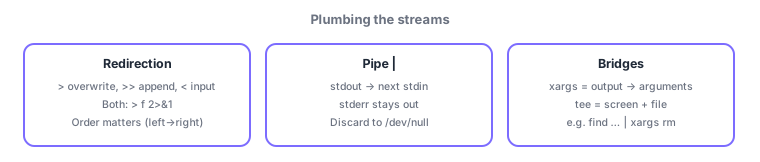
>sends stdout to a file (overwrite);>>appends;<feeds a file to stdin.- Errors only:
2> err.log. Both together:command > all.log 2>&1(order matters: point 1 at the file first, then 2 at wherever 1 goes). - Discard unwanted output into /dev/null (
2> /dev/nullhides errors).
3.3.2Pipes, xargs, and tee
- A pipe (|) connects the left command's stdout to the right one's stdin (
ps aux | grep nginx). stderr does not enter the pipe (add 2>&1 first if you need it). - xargs turns incoming text into arguments for the next command (
find . -name "*.tmp" | xargs rm)—the bridge to commands that take arguments, not stdin. - tee duplicates the stream to both the screen (stdout) and a file (
make 2>&1 | tee build.log);-aappends.
Essentials: > overwrites vs >> appends, save errors too = > file 2>&1, only stdout enters a pipe, arguments = xargs, forked output = tee. The classic trap: 2>&1 > file (wrong order—errors stay on screen) vs > file 2>&1.
Trace why order matters in > file 2>&1: redirections apply left to right. > file first points stream 1 (stdout) at the file; then 2>&1 means "point 2 (stderr) at wherever 1 points now"—the file. Both land in the file. With 2>&1 > file, stderr is first bound to "current 1" = the screen, and only stdout then moves to the file—errors stay on screen. The key insight: &1 copies stream 1's destination at that moment. xargs also makes sense mechanically: rm does not read filenames from stdin, so find … | rm fails; find … | xargs rm is the correct form—whereas stdin-reading commands like grep pipe directly. For long builds, command 2>&1 | tee log is the staple: watch progress live and keep a complete log.
| Syntax | Meaning | Typical use |
|---|---|---|
| > / >> | stdout overwrite / append | Save results / append logs |
| 2> / 2>&1 | stderr only / same as stdout | Split errors / capture everything |
| | and xargs | stdout→stdin / stdout→args | To grep-likes / to rm, mkdir-likes |
| tee | Duplicate to screen and file | Recording build logs |
Trap: "command 2>&1 > file captures both streams in file" is wrong—in that order errors stay on screen (correct: > file 2>&1). And "pipes forward stderr too" is wrong—only stdout enters a pipe.
3.3.3Section summary
- 0 = stdin / 1 = stdout / 2 = stderr;
>overwrite,>>append, capture both with> file 2>&1(order is everything), discard to /dev/null - Pipe = stdout→stdin (stderr excluded); convert to arguments with xargs, fork to screen+file with tee
Sign in to track progress — Log in.
Quick check
(just a quick review)Q1. You want both stdout and stderr of a batch job saved to result.log. Which command is correct?
Q2. You must delete many temp files found by find, but rm does not read names from stdin. Which command?
Q3. You want to watch a long build's output on screen while also recording it to build.log. Which command?
Keep track of your progress
The full study guide is free to read. Sign up free to practice with the question bank, track what you have read, review your mistakes, and highlight passages.