

What's changed: Initial version (topic 1.03, subtopics 1.03.1–1.03.5)
3.2Processing Text Streams with Filters
Learn filters—commands that transform stdin to stdout: viewers (cat, less, head, tail), extract/format (cut, sort, uniq, wc, nl, tr), join/split (paste, join, split), and others (sed, od, expand/unexpand, fmt, pr).
The UNIX philosophy: combine small tools. Chaining single-purpose filters with pipes turns log analysis and CSV munging into one-liners. This section stocks the toolbox; the next covers the plumbing (pipes).
3.2.1Viewing, extracting, counting
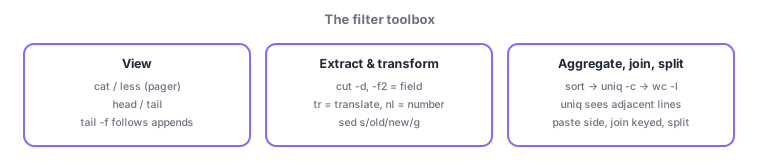
- View with cat (concatenate all), less (pager, both directions), head/tail (first/last n lines;
tail -ffollows a growing log). - Extract with cut (
-d, -f2= delimiter and field); translate with tr (character replace/delete,tr a-z A-Z); number lines with nl. - Aggregate with sort (
-nnumeric,-rreverse) → uniq (dedupe adjacent lines;-ccounts) → wc (-llines). Rule: uniq expects sorted input.
3.2.2Joining, splitting, and the rest
- paste glues files side by side by line; join merges two files on a common field; split cuts a large file into fixed-size/line chunks.
- sed is the stream editor (
sed 's/old/new/g'substitution; more in 3.4); od dumps binary in octal/hex. - Whitespace/layout: expand/unexpand (tabs ⇔ spaces), fmt (reflow line width), pr (paginate for printing).
Standard pairings: skim a log = less, watch appends = tail -f, 2nd CSV column = cut -d, -f2, count duplicates = sort → uniq -c, uppercase = tr, tabs→spaces = expand. The top trap: uniq alone cannot remove non-adjacent duplicates (sort first).
One real pipeline makes the roles click. "Top IPs in an access log": cut -d' ' -f1 access.log | sort | uniq -c | sort -nr | head -5—cut grabs field 1 (the IP) → sort makes equal IPs adjacent → uniq -c dedupes with counts → sort -nr orders by count desc → head keeps the top 5. Each filter never edits the file; it transforms the stream and passes it on—internalize that and you are exam-ready. join is a relational merge on a key (employee ID ⇔ name); do not confuse it with paste, which just glues lines side by side. split takes an output prefix: split -l 1000 big.log part_. With od for peeking into binaries and pr for print layout, learn the tools as a when-to-use table.
| Goal | Command | Key point |
|---|---|---|
| Watch a growing log | tail -f | Follows in real time |
| Extract a CSV field | cut -d, -f2 | -d delimiter, -f field |
| Count duplicate lines | sort | uniq -c | uniq sees adjacent lines only |
| Merge two tables on a key | join | Side-by-side glue is paste |
Trap: "uniq removes all duplicate lines in a file" is wrong—uniq only compares adjacent lines, so sort first. "cat is best for viewing large files" is also practically wrong—less pages both ways; cat is for concatenation and small files.
3.2.3Section summary
- View = cat/less/head/tail(-f), extract = cut, translate = tr, aggregate = sort → uniq(-c) → wc (uniq after sort)
- Combine = paste (side) / join (keyed), split = split; plus sed/od/expand/fmt/pr
Sign in to track progress — Log in.
Quick check
(just a quick review)Q1. You want only the second field from a comma-separated CSV. Which command?
Q2. You want duplicate lines listed with their occurrence counts. Which combination?
Q3. You want to continuously display lines as they are appended to a live application log. Which command?
Keep track of your progress
The full study guide is free to read. Sign up free to practice with the question bank, track what you have read, review your mistakes, and highlight passages.