

What's changed: Initial version (topic 1.04, subtopics 1.04.1–1.04.4)
4.1Package Management with apt
Learn repository-based package management on Debian/Ubuntu: installing, updating, and removing with apt (apt-get, apt-cache, apt-file), finding which package contains a given file, and repository configuration in /etc/apt/sources.list.
Installing software on Linux is not "download and run"—you fetch packages from repositories and manage them with their dependencies. On Debian/Ubuntu the front door is apt, whose biggest value is automatic dependency resolution.
4.1.1Core apt operations
- Install with
apt install nginx; remove withapt remove nginx(apt purgealso deletes config); refresh the index withapt update(fetch latest repo metadata); upgrade packages withapt upgrade. - apt-get and apt-cache are the traditional lower-level tools (apt consolidates their common features for interactive use). Search/info:
apt-cache search keyword,apt-cache show pkg(orapt search,apt show). - Find which package provides a file with apt-file (
apt-file search /usr/bin/convert—covers packages not yet installed; needsapt-file update). - Repositories are defined in /etc/apt/sources.list (plus /etc/apt/sources.list.d/); indexes and packages come from the URLs listed there.
The top distinction: apt update = refresh the index (does not upgrade packages) / apt upgrade = upgrade packages. Pair it with file→package lookup including uninstalled = apt-file and repo definitions = /etc/apt/sources.list.
The classic "nginx stays old even though I upgraded" comes from misunderstanding apt update: apt works from the local index (a catalog of available packages), so the correct two-step is apt update to refresh the catalog, then apt upgrade (or a targeted apt install nginx). The remove/purge difference matters operationally: remove deletes the program but keeps config files (reinstall restores settings); purge deletes config too. For reverse lookups—"which package ships ImageMagick's convert?"—choose by scope: dpkg -S (next section) for installed packages, apt-file to include uninstalled ones. When adding a corporate mirror or extra repo to /etc/apt/sources.list, remember the follow-up apt update, or the new repo is never seen.
| Goal | Command | Key point |
|---|---|---|
| Refresh the index | apt update | Upgrades nothing |
| Upgrade packages | apt upgrade | Run after update |
| Remove incl. config | apt purge | remove keeps config |
| File → package lookup | apt-file search | Covers uninstalled packages |
Trap: "apt update brings installed packages up to date" is wrong—update refreshes only the repository index; upgrading packages is apt upgrade. And "apt remove deletes config files too" is wrong—that is purge.
4.1.2Section summary
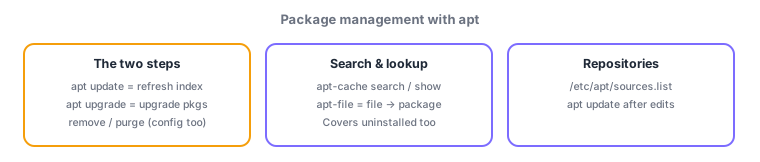
- update = index, upgrade = packages—in that order; install/remove/purge; search via apt-cache (apt search)
- File lookup = apt-file (incl. uninstalled); repos defined in /etc/apt/sources.list
Sign in to track progress — Log in.
Quick check
(just a quick review)Q1. On Ubuntu, you want to fetch the latest package info and then bring installed packages up to date. Correct sequence?
Q2. You want to find which package provides /usr/bin/convert, including packages not yet installed. Which command?
Q3. Which file defines the repository URLs apt uses?
Keep track of your progress
The full study guide is free to read. Sign up free to practice with the question bank, track what you have read, review your mistakes, and highlight passages.