

What's changed: Initial version (topic 1.04, subtopics 1.04.1–1.04.4)
4.4RPM Package Management
Learn direct handling and querying of rpm packages without a repository: obtaining version/status/dependency/integrity/signature information with rpm (-q family), listing a package's files (-ql), and reverse lookup of a file's owner (-qf).
Beneath yum, rpm does the actual work (the same relationship dpkg has to apt). It resolves no dependencies, but its query features for installed packages are rich—you reach for it directly in audits and troubleshooting.
4.4.1The -q query family
- Basics:
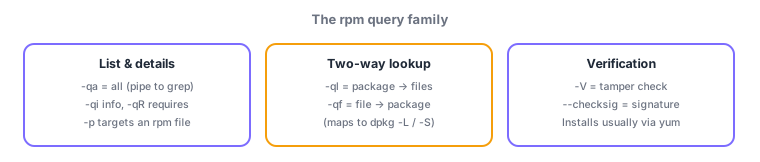
rpm -q pkg(version),rpm -qa(all installed—rpm -qa | grep httpdis the idiom),rpm -qi(details). - File directions:
rpm -ql pkg(package → file list),rpm -qf /path(file → owning package). - Dependencies with
rpm -qR(requires). Inspect a file not yet installed by adding-p(rpm -qlp package.rpm). - Integrity/signature:
rpm -V pkg(verification—detects size/hash/permission changes),rpm --checksig package.rpm(signature check).
The four keys: -qa = list all, -ql = package→files, -qf = file→package, -V = tamper verification. Map them to dpkg (-ql ↔ dpkg -L, -qf ↔ dpkg -S) to handle questions on either family. Like dpkg, rpm resolves no dependencies (yum does).
Picture a security incident's first response and rpm queries come alive. "Found an unfamiliar binary /usr/local/bin/x" → rpm -qf tells which package owns it (owned by none = manually placed, investigate). "Suspected tampering" → rpm -V coreutils reports changes since install (S size, 5 hash, M mode, shown as flags). "What does this package require?" → rpm -qR. Install operations exist (rpm -ivh, upgrade -Uvh, erase -e), but to avoid dependency hell normal installs go through yum; direct rpm shines at querying and verifying standalone rpm files. As with dpkg, -p switches between the installed DB and an rpm file itself.
| Question | RPM family | Debian family (equiv.) |
|---|---|---|
| List all packages | rpm -qa | dpkg -l |
| Package → files | rpm -ql | dpkg -L |
| File → package | rpm -qf | dpkg -S |
| Verify integrity | rpm -V | (dpkg --verify) |
Trap: "rpm -i fetches and resolves dependencies from the repository" is wrong—rpm handles only the given file; dependency resolution is yum's job. And "-qf lists the files a package owns" is wrong—that is -ql; -qf goes the other way (file → package).
4.4.2Section summary
- rpm = master of queries, no dependency resolution: -qa list, -qi info, -qR requires, -V verify (-p targets rpm files)
- Learn by direction: -ql = pkg→files ↔ dpkg -L / -qf = file→pkg ↔ dpkg -S
Sign in to track progress — Log in.
Quick check
(just a quick review)Q1. You want to know which package installed /etc/httpd/conf/httpd.conf. Which command?
Q2. You want to verify that an installed package's files have not been altered since installation. Which command?
Q3. You want to find httpd-related entries among all installed packages. The standard command?
Keep track of your progress
The full study guide is free to read. Sign up free to practice with the question bank, track what you have read, review your mistakes, and highlight passages.