

What's changed: Initial version (topic 1.05, subtopics 1.05.1–1.05.3)
5.1Hardware Fundamentals and Configuration
Learn how Linux recognizes and controls hardware: kernel module operations (lsmod, modprobe, insmod, rmmod), storage differences (HDD, SSD, optical), hardware information (lsusb, lspci, /sys/, /proc/, /dev/), and the concepts of sysfs, udev, and D-Bus.
On Linux most device drivers ship as kernel modules, loaded into the kernel only when needed. When a USB device is not recognized or a NIC driver must be swapped, module operations and info commands are your hands and feet.
5.1.1Managing kernel modules
- lsmod lists loaded modules (
lsmod | grep e1000is the idiom). - modprobe loads/unloads a module with its dependencies (
modprobe e1000e/modprobe -r e1000e)—first choice in practice and on the exam. - insmod/rmmod load/unload a single module (no dependency handling; takes a file path)—the low-level workers beneath modprobe.
5.1.2Storage devices and hardware information
- Mass storage: HDD (magnetic, cheap and large, moving parts) / SSD (flash, fast, shock-resistant, limited write cycles) / optical (DVDs—distribution/archival).
- Inspect with lspci (PCI devices—NICs, GPUs) and lsusb (USB devices).
- Windows into the kernel: /proc/ (process/kernel state; /proc/cpuinfo, /proc/meminfo), /sys/ (sysfs—the device tree), /dev/ (device files like /dev/sda).
- udev detects hot-plug events and creates/names device files in /dev/ dynamically (rules can pin names). D-Bus is the IPC that notifies desktops and services of events.
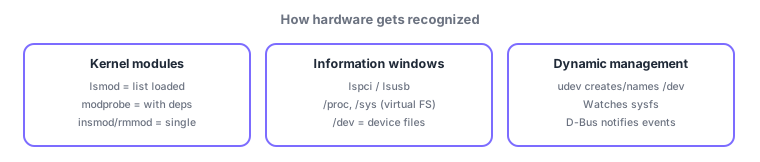
Standard pairings: load with dependencies = modprobe / single = insmod, PCI = lspci, USB = lsusb, dynamic /dev management = udev. Also frequent: unloading via modprobe -r (or rmmod), and /proc & /sys being virtual filesystems with no on-disk presence.
Trace "USB stick inserted → usable" and the pieces connect. The kernel detects insertion, auto-loads the right kernel module (usb-storage), and publishes device details in sysfs (/sys/). udev, watching sysfs, creates the device file (e.g., /dev/sdb) per its naming rules, while D-Bus notifies the desktop ("new device arrived"—why your file manager pops up). Troubleshoot in reverse: no device file → check physical recognition with lsusb/lspci → check the driver is loaded with lsmod → load manually with modprobe drivername if needed. insmod needs a file path (insmod /path/to/driver.ko) and resolves nothing, so preferring name-only modprobe matches both the exam and real practice.
| Goal | Command/place | Key point |
|---|---|---|
| List loaded modules | lsmod | Usually piped to grep |
| Load/unload with deps | modprobe / modprobe -r | Takes just a name |
| Inspect PCI / USB | lspci / lsusb | Confirms physical detection |
| Dynamic device files | udev (/dev/) | Watches sysfs, notifies via D-Bus |
Trap: "insmod takes a module name and loads dependencies" is wrong—name-based, dependency-aware loading is modprobe; insmod loads one file by path. And "/proc contents are stored on disk" is wrong—/proc and /sys are virtual filesystems generated in memory by the kernel.
5.1.3Section summary
- Modules: check with lsmod, modprobe (with deps), insmod/rmmod (single)
- Info via lspci/lsusb, /proc, /sys (sysfs), /dev; udev manages /dev dynamically, D-Bus notifies
Sign in to track progress — Log in.
Quick check
(just a quick review)Q1. You want to load the e1000e NIC driver together with its dependencies. Which command?
Q2. You want to check whether a USB device attached to the server is recognized. Which command?
Q3. Plugging in a USB stick automatically creates a device file like /dev/sdb. Which mechanism does this?
Keep track of your progress
The full study guide is free to read. Sign up free to practice with the question bank, track what you have read, review your mistakes, and highlight passages.