

What's changed: Initial version (topic 1.05, subtopics 1.05.1–1.05.3)
5.3Creating, Managing, and Mounting Filesystems
Learn to make partitions usable: creating filesystems with mkfs (traits of ext4, XFS, VFAT, Btrfs, tmpfs), swap (mkswap, swapon/swapoff), mount/umount, boot-time mounts in /etc/fstab, identification by UUID and label, and /media.
A fresh partition is still "bare land". Only after you create (format) a filesystem and mount it somewhere in the directory tree can files live there. Unlike Windows drive letters, Linux joins everything into one tree.
5.3.1Creating filesystems
- Create with the mkfs family (
mkfs.ext4 /dev/sdb1,mkfs.xfs,mkfs.vfat;mkfs -t ext4is equivalent). Data is destroyed—double-check the target device. - Traits: ext4 (the general-purpose Linux standard, journaling; its predecessor ext3 is the same journaling family, with ext4 as the successor), XFS (large-scale, parallel workloads; RHEL default), VFAT (FAT—interoperable with Windows; USB sticks, the ESP), Btrfs (new generation with built-in snapshots), tmpfs (in-memory, vanishes on reboot).
- Swap: initialize with
mkswap /dev/sdb2, enable with swapon (disable with swapoff); check viaswapon --show.
5.3.2Mounting and /etc/fstab
- Manual:
mount /dev/sdb1 /data(/data is the mount point); detach withumount /data(fails while busy—a shell or process inside blocks it). - Boot-time mounts: one line in /etc/fstab (device, mount point, FS type, options, dump, fsck order).
mount -aapplies fstab now—essential to verify before rebooting. - Prefer UUID (
UUID=xxxx-…) or label (LABEL=data)—immune to device-order changes where /dev/sdb becomes /dev/sdc. Inspect with blkid. - Removable media mounts under /media (auto-mounted by desktops). Allow non-root users to mount via the user option in fstab.
Staples: Windows-shared USB = VFAT, in-memory temp space = tmpfs, swap = mkswap then swapon, fstab is robust with UUID/LABEL, umount fails → something is using it (find with lsof/fuser). Editing fstab and rebooting without mount -a verification—then failing to boot—is the classic failure both in practice and on the exam.
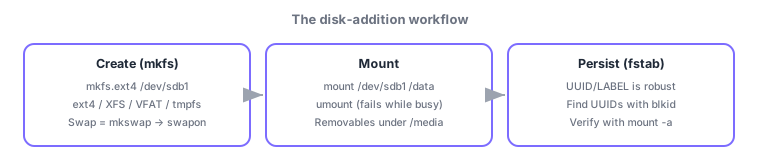
Finish with the full disk-addition workflow:
① confirm the new disk (/dev/sdb) with fdisk -l →
② partition it (previous section) →
③ mkfs.ext4 /dev/sdb1 to create the filesystem →
④ mkdir /data && mount /dev/sdb1 /data for a trial mount →
⑤ note the UUID via blkid /dev/sdb1 and append UUID=xxxx /data ext4 defaults 0 2 to /etc/fstab →
⑥ verify with umount /data && mount -a (catching typos here prevents an unbootable system). Journaling (ext4/XFS) records writes before applying them, keeping the filesystem consistent through power loss—reassurance for servers. tmpfs backs /tmp and fast scratch space, but remember: it consumes RAM and vanishes on reboot.
| Filesystem | Traits | Typical use |
|---|---|---|
| ext4 | General purpose, journaling | Default Linux choice |
| XFS | Large scale, parallel | RHEL-family default |
| VFAT | Windows-compatible | USB sticks, the ESP |
| tmpfs | In-memory, volatile | /tmp, fast scratch space |
Trap: "editing /etc/fstab mounts it immediately" is wrong—fstab is read at boot (and by mount -a); writing alone does nothing. "umount always detaches instantly" is wrong too—busy filesystems cannot be unmounted; identify users with lsof/fuser first. And "tmpfs survives reboots" is wrong (it lives in RAM).
5.3.3Section summary
- Create with mkfs.<type> (ext4 general, XFS large, VFAT interop, Btrfs new-gen, tmpfs in-memory); swap = mkswap → swapon
- mount/umount (not while busy); persist in /etc/fstab (prefer UUID/LABEL), verify with mount -a; removables under /media
Sign in to track progress — Log in.
Quick check
(just a quick review)Q1. You want to format the new partition /dev/sdb1 as ext4. Which command?
Q2. You want /dev/sdb1 auto-mounted at /data on boot, robust against device-order changes. Which specification?
Q3. umount /data fails with "target is busy". Which explanation is correct?
Keep track of your progress
The full study guide is free to read. Sign up free to practice with the question bank, track what you have read, review your mistakes, and highlight passages.