

What's changed: Initial version (topic 1.05, subtopics 1.05.1–1.05.3)
5.2Disk Layout and Partitioning
Learn partition design: the ESP (EFI System Partition) required for UEFI boot, choosing among fdisk, gdisk, and parted, allocation policy for / (root), /var, /home, /boot, and swap, and LVM basics (physical/logical volumes, online growth, snapshots).
A disk is divided into partitions before use. The ledger of divisions is the partition table—legacy MBR or the current mainstream GPT. How you divide is a design decision that directly affects stable operation.
5.2.1Partition tables and tools
- MBR: 2 TB limit, four primary partitions (extended as the workaround). GPT: practically no size limit, many partitions, paired with UEFI boot.
- The ESP (EFI System Partition) is a FAT-formatted partition holding the boot loader for UEFI boot (mounted at /boot/efi).
- Tools: fdisk (the interactive staple; originally MBR, now GPT too), gdisk (fdisk-style, GPT-only), parted (both tables, strong at non-interactive scripting).
fdisk -llists disks and partitions.
5.2.2Allocation policy and LVM
- Standard splits: /var (logs/spools grow—isolate so / survives), /home (user data—survives OS reinstalls), /boot (kernels), swap (overflow for RAM). The rest is / (root).
- LVM pools disks (physical volumes, PV) into a volume group (VG) and carves out logical volumes (LV)—an abstraction layer.
- LVM pros: online grow/shrink (more flexible than raw partitions) and snapshots (point-in-time frozen copies—great for consistent backups). Con: one more layer of complexity.
Staples: UEFI boot requires an ESP, GPT-only interactive tool = gdisk, /var is split to protect root from growth, online growth / snapshots → LVM. The MBR limits (2 TB, four primaries) vs GPT contrast is frequent too.
Understand the "why" through failure scenarios. When runaway logs fill a filesystem, a separate /var contains the damage to /var, preventing a full root filesystem from destabilizing the whole OS. Splitting /home enables "reinstall the OS, keep user data", and swap is the safety valve when RAM runs short. The weakness of static partitions—hard to rebalance later—is what LVM solves: register disks as PVs → pool into a VG → carve LVs per purpose. When the /var LV runs tight, grow it online from free space in the VG. Snapshots freeze a point-in-time state—used for consistent backups and as insurance before upgrades. Tool choice: quick interactive work = fdisk (gdisk for GPT), scripted automation = parted—a rule that holds on the exam and in practice.
| Separated area | Reason | Note |
|---|---|---|
| /var | Protect root from log growth | Critical on servers |
| /home | Survives OS reinstall | Holds user data |
| /boot & ESP | Kernels / boot loader | ESP required for UEFI, FAT |
| Swap | Overflow for RAM | Enable via mkswap/swapon |
Trap: "MBR fully handles disks over 2 TB" is wrong (MBR has the 2 TB limit; GPT is effectively unlimited). "An LVM snapshot instantly makes a full physical copy" is wrong too—snapshots are lightweight freezes tracking changes, not full copies. And "use gdisk on an MBR disk" is wrong—gdisk is GPT-only.
5.2.3Section summary
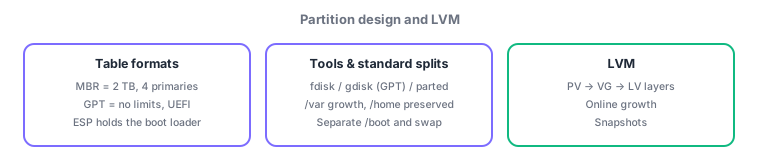
- MBR (2 TB, 4 primaries) → GPT (UEFI, ESP required); tools: fdisk / gdisk (GPT-only) / parted (scriptable)
- Split /var (growth), /home (preservation), /boot, swap; for flexibility use LVM (PV→VG→LV, online growth, snapshots)
Sign in to track progress — Log in.
Quick check
(just a quick review)Q1. You are partitioning a disk on a new UEFI-boot server. Which dedicated partition holds the boot loader?
Q2. To keep runaway logs from filling the root filesystem, which area should get its own partition?
Q3. You want volumes that grow online and support point-in-time snapshots for backups. Which technology?
Keep track of your progress
The full study guide is free to read. Sign up free to practice with the question bank, track what you have read, review your mistakes, and highlight passages.