

What's changed: Initial version (topic 1.04, subtopics 1.04.1–1.04.4)
4.2Debian Package Management
Learn direct handling of deb packages without a repository: install/upgrade/remove with dpkg, listing installed packages (-l), listing a package's files (-L), reverse lookup (-S), and re-configuration with dpkg-reconfigure.
Beneath apt works dpkg. When a vendor hands you a .deb file, or when you inspect installed packages, you use dpkg directly. dpkg does not resolve dependencies—the decisive difference from apt.
4.2.1Core dpkg operations
- Install/upgrade with
dpkg -i package.deb(upgrades if already present); remove withdpkg -r(keeps config) ordpkg -P(purge—config too). - Query with
dpkg -l(installed list),dpkg -L pkg(files the package owns),dpkg -S file(file → owning package, installed only). - dpkg-reconfigure re-runs a package's install-time dialog (
dpkg-reconfigure tzdatafor time zone is the classic example).
Staples: dpkg -i resolves no dependencies (on errors, use apt instead), -L = package→files, -S = file→package, redo configuration = dpkg-reconfigure. Swapping -L and -S is the most common trap.
Think of apt as the front desk (procurement) and dpkg as the back room (actual work). Behind apt install nginx, the deb files for nginx and its dependencies are fetched from the repo and finally unpacked/registered by dpkg. Hence dpkg -i single.deb handles only that one file and stops with "dependency problems" if anything is missing (modern systems: apt install ./single.deb resolves dependencies too). The query options are audit/troubleshooting weapons—"what is installed here?" = dpkg -l; "where did nginx put its files?" = dpkg -L nginx; "which package owns this mystery file?" = dpkg -S /etc/nginx/nginx.conf. Pick the option by the direction of the question.
| Question | Command | Direction |
|---|---|---|
| What is installed? | dpkg -l | List |
| Which files does this package own? | dpkg -L nginx | Package → files |
| Which package owns this file? | dpkg -S /path/file | File → package |
| Redo the configuration | dpkg-reconfigure pkg | Re-run install dialog |
Trap: "dpkg -i automatically downloads and resolves dependencies" is wrong—dpkg knows no repositories and handles only the given deb file; dependency resolution is apt's job. Options describing -S as "list a package's contents" are wrong too—that is -L.
4.2.2Section summary
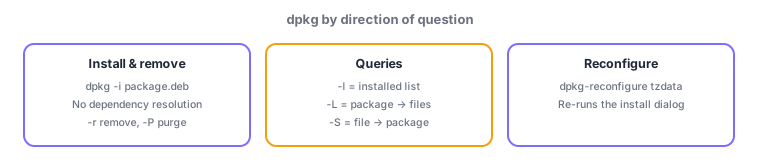
- dpkg = direct deb handling (no dependency resolution): -i install, -r remove, -P purge
- Query by direction: -l list, -L pkg→files, -S file→pkg; redo setup with dpkg-reconfigure
Sign in to track progress — Log in.
Quick check
(just a quick review)Q1. Installing a vendor's app.deb with dpkg -i fails with dependency errors. Which statement about dpkg is correct?
Q2. You want to list which files the installed nginx package placed where. Which command?
Q3. You want to redo the interactive time zone setup chosen at install time. Which command?
Keep track of your progress
The full study guide is free to read. Sign up free to practice with the question bank, track what you have read, review your mistakes, and highlight passages.