

What's changed: Initial version (topic 1.10, subtopics 1.10.1–1.10.4)
5.4Cloud Security Basics
Learn what changes for Linux servers on public clouds: the division of responsibilities with on-premises (the management console, cloud-side firewalls, routing), the meaning of region selection (domestic/foreign constraints), ephemeral storage, provider-driven maintenance and reboots, and console access paths and authentication (multi-factor authentication, one-time passwords).
Inside the OS, a cloud Linux server works like on-premises—but everything outside the OS—power, the network front door, physical location—is held by the cloud provider. Understanding this "outside = provider, inside = you" split is the heart of this subtopic (a modern addition in Version 10.0).
5.4.1Division of functions and access paths
- The management console is the provider's web-based control plane: create/stop VMs, configure networking, and reach the system console—the last door when SSH is dead.
- Because the console is reached over the internet, harden its provider-supplied auth with multi-factor authentication (MFA) / one-time passwords (OTP). Leaked console credentials nullify all in-OS defenses—that account can delete every server.
- Network defense is two-layered: the cloud-side firewall (security groups, outside the instance) plus in-OS firewalld/iptables. Routing is likewise governed first by the virtual network.
5.4.2Regions, ephemeral storage, provider constraints
- Choosing a region decides where data physically lives—directly tied to domestic law, industry regulation, data sovereignty (cross-border constraints), and user latency.
- Ephemeral storage is fast scratch space that vanishes on stop or failure—use it only for caches and temp files; anything durable belongs on persistent volumes.
- Provider maintenance means reboots/migrations on the provider's schedule. Subscribe to notices and design for it—autostart (systemctl enable) and redundancy.
Staples: harden console auth with MFA/OTP (the most critical door), never put durable data on ephemeral storage, region choice = regulation and data sovereignty, defense = cloud firewall + in-OS firewall, two layers. The tested skill is rejecting the inside-only fallacy—"a hardened OS makes console protection unnecessary".
Grasp it by contrasting on-premises intuitions. Physical access: on-prem locks the server room; in the cloud the equivalent is protecting the console account—MFA is the "machine-room key". Network: on-prem was border router + OS firewall; in the cloud, security groups (outside the instance) form layer one, with in-OS firewalld as layer two (defense in depth). Storage: the on-prem instinct that "disks survive power-off" fails on ephemeral storage—design data placement assuming some volumes vanish on stop. Availability: instead of planning hardware maintenance yourself, you now follow the provider's notices—which is exactly why reboot-tolerant design (systemctl enable, multi-instance redundancy) becomes the Linux admin's responsibility. This shifted line of responsibility is what the subtopic tests.
| Aspect | On-premises | Public cloud |
|---|---|---|
| Physical-access equivalent | Locked server room | Console auth (MFA/OTP) |
| Network layer one | Border router/appliance | Cloud firewall (SGs) |
| Storage | Survives power-off | Some volumes ephemeral |
| Maintenance control | You plan it | Provider schedule + notices |
Trap: "ephemeral storage is fast, so it is ideal for database files" is wrong—it vanishes on stop or failure; caches and temp files only. "Configuring in-OS firewalld makes the cloud firewall unnecessary" is wrong—the two layers play different roles (cloud side first). And "any region is the same for performance and law" is wrong.
5.4.3Section summary
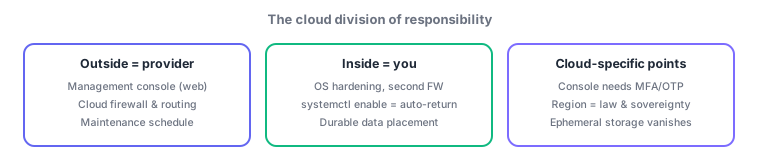
- Outside = provider (console, cloud FW, maintenance) / inside = you (OS, second-layer FW, reboot-tolerant design); console needs MFA/OTP
- Region = regulation, sovereignty, latency; no durable data on ephemeral storage; prepare for provider maintenance with notices + enable
Sign in to track progress — Log in.
Quick check
(just a quick review)Q1. What is the most important protection for the cloud management console account?
Q2. What is an appropriate use of an instance's ephemeral storage?
Q3. Which consideration most directly drives choosing a domestic region over a foreign one?
Keep track of your progress
The full study guide is free to read. Sign up free to practice with the question bank, track what you have read, review your mistakes, and highlight passages.