

What's changed: Initial version (topic 1.10, subtopics 1.10.1–1.10.4)
5.2Host Security Configuration
Learn to shrink the host attack surface: shadow passwords and blocking logins with /etc/nologin, stopping unused network services (systemctl, /etc/init.d/, chkconfig, service, legacy inetd/xinetd), and firewall overview (iptables, firewalld).
The first principle of host defense: what is not running cannot be attacked. Stop unneeded services to shrink the attack surface, then narrow the remaining doors with a firewall—this two-layer basic is the section's core.
5.2.1Stopping services and blocking logins
- Current = systemctl:
systemctl stop(now) plussystemctl disable(from next boot)—two steps. Inventory withsystemctl list-unit-files --state=enabled. - Legacy = service start/stop, chkconfig (RHEL-family autostart), and /etc/init.d/ scripts—the right answers in older-environment questions.
- inetd/xinetd are super-servers that spawn services on demand (config in /etc/inetd.conf, /etc/xinetd.d/). Superseded by systemd sockets, they appear as legacy entrances to disable.
- Shadow passwords isolate hashes in /etc/shadow (root-only; recap of 3.1). /etc/nologin: its mere existence blocks non-root logins (an instant maintenance gate; its content becomes the message shown).
5.2.2Firewall overview
- iptables drives the kernel packet filter (netfilter) directly via rule chains (INPUT/OUTPUT/FORWARD).
- firewalld manages by zones (public, internal…) and service names (
firewall-cmd --add-service=https --permanent→--reload). Without --permanent, rules vanish on reboot. - Policy: default deny, allow only what is needed. Operate together with the 1.10.1 inside-ss vs outside-nmap comparison.
Staples: stop (now) vs disable (from next boot) are different—permanent shutdown needs both, /etc/nologin's existence blocks ordinary logins, firewalld = zones + service names, --permanent required, xinetd = the on-demand super-server (legacy). "Do not run iptables and firewalld simultaneously" also appears among options.
Turn new-server hardening into a procedure.
① Inventory with systemctl list-unit-files --state=enabled; for anything outside requirements (unused cups, avahi…) run systemctl stop X && systemctl disable X—now and future both.
② Check remaining LISTENs with ss -tlnp, repeating
① until they match the expected list (22/80/443…).
③ Narrow the default firewalld zone and open only what is needed: firewall-cmd --add-service=ssh --add-service=https --permanent && firewall-cmd --reload—forget --permanent and you get "it closed/opened itself after reboot" incidents.
④ For planned maintenance, echo "Maintenance until 03:00" > /etc/nologin pauses non-root logins; delete the file to reopen. The exam's favorite scenario: "the service came back after reboot" → you forgot disable.
| Goal | Current tool | Legacy / note |
|---|---|---|
| Stop a service (now) | systemctl stop | service X stop |
| Disable autostart | systemctl disable | chkconfig X off |
| Manage the firewall | firewalld (zones, --permanent) | iptables (raw chains) |
| Pause ordinary logins | Create /etc/nologin | Contents become the message |
Trap: "systemctl stop keeps the service down after reboot" is wrong—stop is now only; if still enabled it returns at boot (permanence needs disable). "firewall-cmd --add-service=https alone persists" is wrong—--permanent + --reload are required. And "/etc/nologin blocks root too" is wrong (root can still log in—the recovery path stays open).
5.2.3Section summary
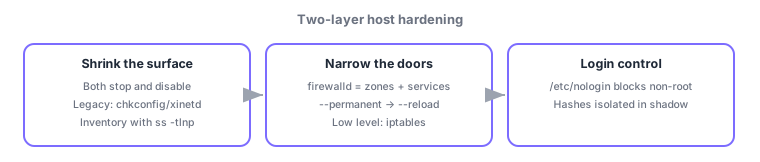
- Harden = inventory → stop + disable → verify with ss → firewalld default-deny, open only what is needed (--permanent)
- nologin = its existence blocks ordinary logins (root allowed); legacy = service/chkconfig/init.d; xinetd = on-demand spawning
Sign in to track progress — Log in.
Quick check
(just a quick review)Q1. You must stop the unused cups service now and keep it off after reboots. Which procedure?
Q2. For maintenance you want to temporarily refuse new logins from non-root users. Simplest method?
Q3. Under firewalld you must permanently allow HTTPS. Which command sequence is correct?
Keep track of your progress
The full study guide is free to read. Sign up free to practice with the question bank, track what you have read, review your mistakes, and highlight passages.