

What's changed: Initial version (topic 1.10, subtopics 1.10.1–1.10.4)
5.1Performing Security Administration Tasks
Learn routine host security checks: auditing SUID/SGID files (find -perm), password aging (chage, passwd, usermod), discovering open ports (ss, netstat, nmap, lsof, fuser), login visibility (who, w, last), resource limits (ulimit), sudo (/etc/sudoers, su), and auto-logout (TMOUT).
Security is recurring inspection work, not set-and-forget. This section stocks the audit toolbox: find dangerous files, manage account expiry, count open doors, and see who is inside.
5.1.1File audits and password aging
- Audit SUID/SGID with
find / -perm -4000(SUID) and-perm -2000(SGID). Unexpected SUID files are privilege-escalation fuel—inventory them regularly (applying 2.1 knowledge). - Password aging via chage (
chage -l user01shows status;-M 90= 90-day maximum;-d 0= force change at next login). passwd and usermod offer some equivalents. - Login visibility: who (current logins), w (plus activity and load), last (login history, from /var/log/wtmp).
5.1.2Open ports, escalation, and limits
- Open ports: ss -tlnp/netstat (from the host), nmap (scan from outside to see reality). Identify the owning process with lsof -i:80 or fuser.
- su switches users (
su -= root with root's environment). sudo grants per-command privilege with an audit trail; configure /etc/sudoers only via visudo (syntax-checked to avoid lockout). - ulimit caps shell/child resources (
-nopen files,-uprocesses,-ccore size). TMOUT auto-logs-out idle shells after N seconds (unattended-terminal defense; set in profile).
Staples: SUID inventory = find / -perm -4000, password expiry = chage, prefer sudo over su (audit trail, scoped rights), edit sudoers via visudo, idle terminals = TMOUT. Port checks contrast ss from inside vs nmap from outside.
Make the monthly security review one story. List SUID files with find / -perm -4000 -type f 2>/dev/null and diff against last month's inventory—one unexplained addition means immediate investigation (rpm -qf / dpkg -S ownership checks from the previous chapter pay off here). Check privileged users' expiry with chage -l, fixing policy violations via chage -M 90. Reconcile ss -tlnp against the service register; identify unknown LISTENs with lsof. Finish by scanning from outside with nmap <server-ip>—the difference between inside (ss) and outside (nmap) is precisely your firewall's effect. Day to day, keep even admins off raw root: sudo grants only the needed commands (ops ALL=(root) /usr/bin/systemctl restart nginx) and logs every use—the modern standard.
| Check | Tool | What to look at |
|---|---|---|
| SUID/SGID inventory | find -perm -4000/-2000 | Diff vs last time |
| Password expiry | chage -l / -M / -d 0 | Fix policy violations |
| Open ports | ss (in), nmap (out), lsof | Reconcile with the register |
| Logins | who / w / last | Odd hours, odd terminals |
Trap: "sudo and su are equivalent, both audited" is wrong—su hands over a whole shell with little subsequent logging, while sudo gives per-command auditing and scoping. "Edit /etc/sudoers directly with vi" is wrong too—without visudo's syntax check, one typo can lock out every admin. And "TMOUT sets password expiry" is wrong (it is the idle timeout).
5.1.3Section summary
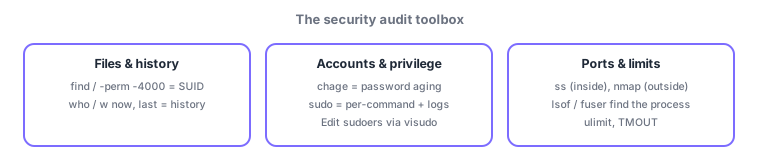
- Audit = find -perm -4000 (SUID), chage (expiry), who/w/last (logins), ss inside / nmap outside + lsof/fuser (ports)
- Privilege via sudo (visudo, logging, least privilege); limits via ulimit (resources) and TMOUT (idle logout)
Sign in to track progress — Log in.
Quick check
(just a quick review)Q1. You want to enumerate all SUID files on the system. Which command?
Q2. You must force user01 to change the password at next login. Which command?
Q3. You want the ops team to run only "restart nginx" with privileges—no full root—and keep an audit trail. Which mechanism?
Keep track of your progress
The full study guide is free to read. Sign up free to practice with the question bank, track what you have read, review your mistakes, and highlight passages.