

What's changed: Initial version (topic 1.09, subtopics 1.09.1–1.09.3)
4.3Mail Transfer Agent (MTA) Basics
Learn on-host mail delivery basics: the MTA role and major implementations (postfix, exim), system-wide forwarding in /etc/aliases applied with newaliases, per-user forwarding via ~/.forward, and the mail and mailq commands.
cron results and system warnings have long been delivered as local mail to root. The MTA (Mail Transfer Agent) handles this. This subtopic is not about building full mail servers—only on-host delivery and alias (forwarding) configuration.
4.3.1MTAs and basic delivery
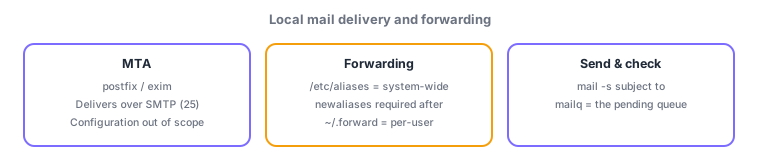
- An MTA accepts and delivers mail (SMTP, port 25). Major ones: postfix (today's de facto standard) and exim (traditional on Debian). Knowing they exist and what they do suffices—their configuration is out of scope (explicit in the official range).
- Test with the mail command (
echo "body" | mail -s "subject" root); check the pending queue with mailq (find stuck mail).
4.3.2Aliases and forwarding
- /etc/aliases is the system-wide alias/forwarding table (
root: admin@example.comsends root's mail to the real admin). Run newaliases after editing to rebuild the database (skip it and nothing changes). - ~/.forward is per-user forwarding—drop a file with the destination in your home; no root needed.
- Division: system/role-account forwarding = aliases (admin work); personal forwarding = .forward (the user's own work).
The single most-tested point: after editing /etc/aliases, run newaliases (no run, no effect). Bundle it with system-wide = aliases vs per-user = ~/.forward, queue check = mailq, and major MTAs = postfix, exim.
The canonical real-world setup: cron failures mail root, but nobody reads root's mailbox. So write root: ops-team@example.com in /etc/aliases and apply with newaliases—now every server warning reaches the ops team's real mail (external delivery needs MTA relay settings, practical knowledge beyond scope). Why newaliases? The MTA reads not the text file but a speed-optimized database (aliases.db)—the number-one cause of "I edited it but nothing forwards". At the personal level, a departing member can drop a successor's address into ~/.forward—self-service forwarding. For stuck mail, read mailq and suspect unreachable destinations (DNS/network) or a stopped MTA—the standard first response.
| Config/command | Scope | Key point |
|---|---|---|
| /etc/aliases | System-wide | newaliases required after edits |
| ~/.forward | Per-user | Self-service, in the home dir |
| mail / mailq | Send test / queue check | Entry point for stuck mail |
| postfix / exim | Major MTAs | Configuration out of scope |
Trap: "/etc/aliases takes effect the moment you save" is wrong—running newaliases to rebuild the MTA's database is mandatory. "~/.forward requires root" is wrong too—users place it themselves in their homes. Watch role swaps like calling postfix a web server (it is an MTA).
4.3.3Section summary
- MTA = postfix/exim (know the role); test with mail, queue via mailq
- Forwarding = system-wide aliases (→ newaliases required) / personal ~/.forward (self-service)
Sign in to track progress — Log in.
Quick check
(just a quick review)Q1. You added "root: admin@example.com" to /etc/aliases, but root's mail is not forwarded. Which command did you forget?
Q2. User suzuki wants to forward her own mail to another address without root privileges. Which method?
Q3. Sent mail seems not to arrive. Which command inspects the MTA's pending queue?
Keep track of your progress
The full study guide is free to read. Sign up free to practice with the question bank, track what you have read, review your mistakes, and highlight passages.