

What's changed: Initial version (topic 1.09, subtopics 1.09.1–1.09.3)
4.2System Logging
Learn collecting, querying, and maintaining logs: rsyslog (facilities, priorities, and actions in rsyslog.conf, forwarding to a central log server), the systemd journal (journalctl queries and filters, journald.conf, /var/log/journal/), manual entries (logger, systemd-cat), and rotation with logrotate (/etc/logrotate.conf, /etc/logrotate.d/).
Incident response always starts with reading the logs (weight 5 in this topic). Modern Linux runs the systemd journal and traditional rsyslog side by side—exams cover querying both, plus growth control (logrotate).
4.2.1rsyslog: facilities and priorities
- rsyslogd is the standard syslog daemon. Rules in rsyslog.conf read "facility.priority action" (e.g.,
mail.err /var/log/mail.err). - A facility classifies the source (auth, authpriv, cron, daemon, kern, mail, user, local0–7); a priority is the severity (low→high: debug, info, notice, warning, err, crit, alert, emerg). A rule matches that severity and above.
- Actions write to files (/var/log/…) or forward to a central log server:
@host(UDP),@@host(TCP)—the receiver enables reception in its rsyslog. - Write manually with logger (
logger -p user.err "test"—from scripts into syslog) and systemd-cat (pipe a command's output into the journal).
4.2.2The systemd journal and logrotate
- journalctl queries the journal:
-u nginx(per unit),-b(this boot),-f(follow, like tail -f),-p err(severity filter),--since "2026-07-06"(time range). - The journal persists if /var/log/journal/ exists (otherwise memory-only, lost on reboot). Configure via /etc/systemd/journald.conf (size caps). Trim with
journalctl --vacuum-size=500Mor--vacuum-time=30d. - logrotate automates rotation, compression, and deletion of text logs: global /etc/logrotate.conf plus per-package /etc/logrotate.d/ (rotate 4, weekly, compress…), run periodically via cron/timers.
Staples: mail.err = the mail facility at err and above, @ = UDP, @@ = TCP forwarding, unit logs = journalctl -u, follow = -f, this boot = -b, journal persistence = the existence of /var/log/journal/, rotation = logrotate (logrotate.d). Never miss the "and above" semantics (err also catches crit).
Structure it as an "nginx went down" response. Start with journalctl -u nginx -b -p warning—this boot, warnings and up—then bracket the window with --since/--until. For traditional daemons not fully in the journal, read /var/log/ (messages, secure…)—which file gets what is decided by rsyslog.conf rules. authpriv.* /var/log/secure routes auth logs to secure; *.info;mail.none /var/log/messages means "info and above, except mail"—selector reading is exam material. For multi-server audit requirements, centralize with *.* @@log01.example.com (TCP forwarding; UDP's single @ is lighter but lossy). The journal is binary—query it with journalctl filters, not grep—while logrotate tends growing text logs with rules like "weekly, keep 4, compress". Draw those role boundaries and the section is complete.
| Goal | Command/config | Key point |
|---|---|---|
| Follow a unit's logs | journalctl -u nginx -f | -b this boot, -p severity |
| Routing rules | rsyslog.conf "fac.pri action" | Matches severity **and above** |
| Forward to central server | @host (UDP) / @@host (TCP) | TCP for audit requirements |
| Growth control | logrotate / --vacuum-* | Text = logrotate, journal = vacuum |
Trap: "mail.err matches only err" is wrong—syslog selectors include that severity and above (err, crit, alert, emerg). "The journal always persists to disk" is wrong—without /var/log/journal/ it is memory-only and lost on reboot. And "logrotate rotates the (binary) journal" is wrong—journal trimming is journald's caps and --vacuum options.
4.2.3Section summary
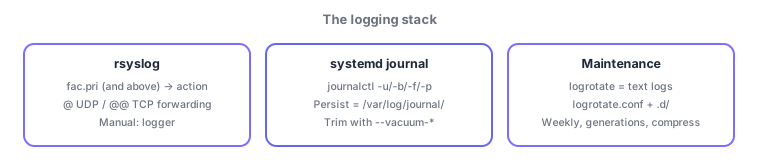
- rsyslog = fac.pri (and above) → action (@UDP/@@TCP forwarding); manual entries via logger/systemd-cat
- journalctl -u/-b/-f/-p/--since; persistence = /var/log/journal/; text growth = logrotate, journal = --vacuum
Sign in to track progress — Log in.
Quick check
(just a quick review)Q1. On a systemd host, you want only the nginx unit's logs since this boot. Which command?
Q2. Which messages does the rsyslog.conf rule "mail.err /var/log/mail.err" match?
Q3. You want text logs under /var/log/ rotated automatically ("weekly, keep 4, compressed"). Which mechanism and config location?
Keep track of your progress
The full study guide is free to read. Sign up free to practice with the question bank, track what you have read, review your mistakes, and highlight passages.