

What's changed: Initial version (topic 1.09, subtopics 1.09.1–1.09.3)
4.1Managing System Time
Learn to keep and synchronize system time: date and the hardware clock (hwclock), time zone configuration (/usr/share/zoneinfo/, /etc/localtime, /etc/timezone, TZ, tzselect, timedatectl), and NTP synchronization (ntpd, ntpdate, ntpq, chronyd, chronyc, pool.ntp.org).
Correlating logs, validating certificates, authentication—accurate time underpins everything. Linux keeps two clocks (the OS-maintained system clock and the motherboard's hardware clock), and the standard practice aligns them to internet time sources via NTP.
4.1.1The two clocks and time zones
- date shows/sets the system clock (
date, formatteddate +%Y-%m-%d). hwclock reads/syncs the hardware clock (hwclock --systohcwrites system→hardware;--hctosysthe reverse). - Time zones live as files under /usr/share/zoneinfo/; configuration means symlinking /etc/localtime to one (Debian family also records the name in /etc/timezone).
- Set with timedatectl (the systemd-era integrated tool:
timedatectl set-timezone Asia/Tokyo, plus status), pick interactively with tzselect, or switch temporarily via the TZ variable (TZ=UTC date).
4.1.2Synchronizing with NTP
- NTP synchronizes with time sources over the network (UDP/123). The standard public source is pool.ntp.org—a worldwide server pool served via DNS.
- Traditional: ntpd (daemon, gradual correction; config in ntp.conf), ntpdate (one-shot immediate set; deprecated), ntpq (
ntpq -pshows peers and sync state). - Current mainstream: chronyd (the successor daemon, robust on flaky links and VMs; config in chrony.conf) with chronyc (
chronyc sourceslists references).
Staples: hwclock --systohc writes system→hardware (direction questions), set zones with timedatectl set-timezone (implemented as the /etc/localtime link), gradual daemon correction = ntpd/chronyd vs one-shot = ntpdate, check sync with ntpq -p / chronyc sources. NTP's UDP/123 also reappears among the 1.07 port questions.
Frame the two clocks operationally. At power-on the OS reads the battery-backed hardware clock to initialize the system clock; thereafter the OS ticks the system clock, and NTP daemons correct that side. Hence the tradition of writing back with hwclock --systohc before shutdown or after large corrections (automated under systemd). Why do ntpd/chronyd correct gradually (slew)? Because time going backwards reorders logs, skips or duplicates cron runs, and can corrupt databases. That is why one-shot tools like ntpdate are dangerous on live servers—the exam-correct instinct is "running systems get gradual daemon correction". VMs drift easily due to host scheduling, a context where chrony is preferred—worth remembering.
| Goal | Command | Key point |
|---|---|---|
| Show/set system time | date / timedatectl | timedatectl integrates it all |
| Write system→hardware | hwclock --systohc | --hctosys is the reverse |
| Change time zone | timedatectl set-timezone | Implemented via /etc/localtime |
| Check sync state | ntpq -p / chronyc sources | Shows peers and reachability |
Trap: "hwclock --systohc applies the hardware clock to the system" is wrong (that is --hctosys; parse systohc = system to hardware clock). And "fix drift on a live production server instantly with ntpdate" is wrong—sudden jumps (especially backwards) cause incidents; gradual daemon correction is the right answer.
4.1.3Section summary
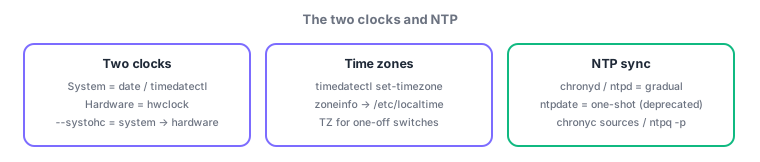
- System clock (date/timedatectl) ⇔ hardware clock (hwclock; mind --systohc's direction); zones = zoneinfo → /etc/localtime link
- Sync via resident ntpd/chronyd (gradual); source = pool.ntp.org; verify with ntpq -p / chronyc sources
Sign in to track progress — Log in.
Quick check
(just a quick review)Q1. You want to write the NTP-corrected system time into the hardware clock. Which command?
Q2. You must permanently set a systemd server's time zone to Asia/Tokyo. Which command?
Q3. A live production database server has drifted by a few minutes. What is the most appropriate fix?
Keep track of your progress
The full study guide is free to read. Sign up free to practice with the question bank, track what you have read, review your mistakes, and highlight passages.