

What's changed: Initial version (topic 1.08, subtopics 1.08.1–1.08.3)
3.3Localization and Internationalization
Learn language and regional settings: internationalization (i18n) vs localization (l10n), locales and their variables (LANG, LC_ALL, LC_*), the locale command, character encodings (ASCII, Unicode, UTF-8, ISO-8859, ISO-2022-JP) with iconv conversion, and why LANG=C helps in scripts.
"Japanese text comes out garbled", "sort orders differ across machines"—the cause is usually the locale or the character encoding. For admins of Japanese systems the pain is familiar, which makes understanding the mechanism doubly valuable.
3.3.1Locales and their variables
- Internationalization (i18n) makes software capable of multiple languages; localization (l10n) adapts it to one language/region.
- A locale combines language, region, and encoding (
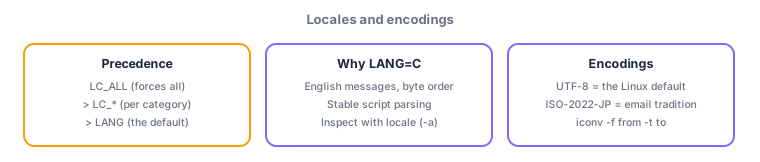
ja_JP.UTF-8). Show current values with locale; list available ones withlocale -a. - Precedence: LC_ALL (forces every category) > LC_* (individual categories like LC_TIME, LC_COLLATE) > LANG (the default).
- LANG=C (the POSIX locale) yields English messages and byte-order sorting. Set LANG=C when scripts parse command output, eliminating translation-induced variation.
3.3.2Encodings and iconv
- ASCII is the 7-bit base set; ISO-8859 the 8-bit European extensions; Unicode assigns numbers to every script on earth, with UTF-8 (ASCII-compatible, today's Linux standard) as its dominant encoding.
- ISO-2022-JP is the 7-bit encoding (JIS) traditional in Japanese email.
- iconv converts encodings (
iconv -f SHIFT_JIS -t UTF-8 old.csv > new.csv—-f from, -t to); list supported ones withiconv -l.
The big three: precedence LC_ALL > LC_* > LANG, LANG=C for parsing command output in scripts, iconv -f source -t target. The standard-vs-encoding distinction—UTF-8 is one encoding of Unicode, not Unicode itself—also appears in options.
See concretely why LANG=C is script insurance. The df -h header reads 使用% in a Japanese locale but Use% in English—grep/awk extraction breaks depending on locale. Pinning the C locale at the top of a script (or per command: LANG=C df -h) guarantees identical English output and byte-order sorting on every server. The other everyday task is rescuing mojibake: a Shift_JIS CSV from Windows garbles on UTF-8 Linux—normalize with iconv -f SHIFT_JIS -t UTF-8 in.csv > out.csv. To internalize precedence, compare LC_TIME=C date with LC_ALL=ja_JP.UTF-8 LC_TIME=C date—in the latter, LC_ALL crushes LC_TIME and the output turns Japanese, a hands-on proof that LC_ALL overrides every category.
| Variable/standard | Role | Key point |
|---|---|---|
| LANG | Default locale | Applies where no LC_* is set |
| LC_ALL | Forces all categories | Highest priority |
| LANG=C | The POSIX baseline | Stabilizes script output |
| UTF-8 | An encoding of Unicode | ASCII-compatible, Linux default |
Trap: "LANG overrides LC_ALL" is wrong—the order is LC_ALL > LC_* > LANG, with LANG as the fallback. "iconv changes a file's locale" is wrong—iconv converts the character encoding of text, unrelated to locale variables. "Unicode and UTF-8 are the same" is also imprecise—UTF-8 is one encoding of Unicode.
3.3.3Section summary
- Precedence LC_ALL > LC_* > LANG; inspect with locale (-a); pin LANG=C when parsing in scripts
- UTF-8 = the Unicode encoding (Linux default); ISO-2022-JP is the email tradition; convert with iconv -f source -t target
Sign in to track progress — Log in.
Quick check
(just a quick review)Q1. Which precedence of locale variables is correct?
Q2. A script parsing command output with grep fails only on Japanese-locale servers. What is the standard fix?
Q3. You must convert a Shift_JIS CSV from Windows to UTF-8. Which command?
Keep track of your progress
The full study guide is free to read. Sign up free to practice with the question bank, track what you have read, review your mistakes, and highlight passages.