

What's changed: Initial version (topic 1.08, subtopics 1.08.1–1.08.3)
3.2Job Scheduling
Learn periodic and one-shot scheduling: cron (crontab syntax, /var/spool/cron/, /etc/crontab, /etc/cron.d/, cron.{hourly,daily,weekly,monthly}), one-time at (atq, atrm), catch-up runs with anacron (/etc/anacrontab), and access control (/etc/cron.allow, /etc/cron.deny, /etc/at.allow, /etc/at.deny).
Backups, log aggregation, certificate renewals—operations are fixed tasks at fixed times. Periodic = cron, one-shot = at, catch-up for powered-off periods = anacron: this three-way division is the backbone of the section.
3.2.1cron and crontab
- User jobs: edit with
crontab -e(stored under /var/spool/cron/—never edit directly);-llists,-rremoves all. - Syntax: minute hour day month weekday command (five fields).
30 2 * * 1 /opt/backup.sh= Mondays at 2:30;*/10= every 10 minutes;1-5= Mon–Fri. - System side: /etc/crontab (six fields—an extra user column), /etc/cron.d/ (package-provided), and dropping a script into cron.{hourly,daily,weekly,monthly}/ also schedules it.
3.2.2at, anacron, and access control
- at schedules one run (
echo "/opt/report.sh" | at 23:00,at now + 2 hours); list with atq, cancel with atrm job-number. - anacron manages daily-or-longer periods by interval rather than clock time and runs missed jobs after boot (for laptops and machines powered off at night). Config: /etc/anacrontab (period, delay, job id, command).
- Access control: cron.allow/cron.deny (at: at.allow/at.deny). If allow exists, only listed users may use it (deny is ignored); without allow, only deny-listed users are blocked.
Reading/writing the five crontab fields (min hour day month weekday) is guaranteed exam math. Also standard: /etc/crontab has the extra user column (six fields), one-shot = at, power-off catch-up = anacron, if an allow file exists, it decides everything. Being able to read interval forms like 0 */6 * * * (every six hours on the hour) seals it.
For crontab, chant "minute hour day month weekday" left to right—that is everything. "Daily at 3:15" = 15 3 * * *; "midnight on the 1st" = 0 0 1 * *; "weekdays 9:00" = 0 9 * * 1-5. Weekdays run 0 (Sun)–6 (Sat); note the subtlety that specifying both day and weekday means OR. cron's weakness: jobs never run if the machine was off at that moment—a 2:00 backup never fires on a machine shut down nightly. anacron compensates by interval: "if more than a day has passed since the last run, execute after boot (plus a delay)". Distribution cron.daily reliably runs daily precisely because anacron backs it. at is purely for one-shot bookings ("restart the service in 30 minutes", "switch over once at midnight"), managed with atq/atrm.
| Need | Use | Key point |
|---|---|---|
| Daily/weekly periodic runs | cron (crontab -e) | min hour day month weekday |
| One-shot booking | at (atq/atrm) | now + 2 hours, etc. |
| Catch up after power-off | anacron | Interval-based, /etc/anacrontab |
| Restrict who may use it | cron.allow / cron.deny | allow file wins if present |
Trap: misreading 30 2 * * 1 as "Jan 2:30" or "daily 2:30" is the classic—field five is the weekday, so Mondays 2:30. "A user in both cron.allow and cron.deny is denied" is wrong—with allow present, deny is ignored and the user is permitted. "anacron handles minute-level jobs" is wrong too (daily or longer).
3.2.3Section summary
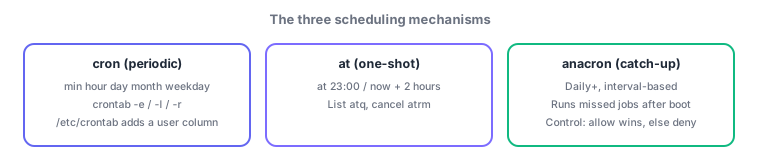
- crontab = min hour day month weekday (/etc/crontab adds a user column); stored in /var/spool/cron/, cron.d, cron.daily, etc.
- at = one-shot (atq/atrm), anacron = daily+ with power-off catch-up; control = allow wins, else deny
Sign in to track progress — Log in.
Quick check
(just a quick review)Q1. You want a backup script every Monday at 2:30 AM. Which crontab entry is correct?
Q2. On a machine shut down nightly, you want daily maintenance jobs to catch up after power-on. Which mechanism?
Q3. Both /etc/cron.allow and /etc/cron.deny exist; user suzuki appears only in cron.allow. Can suzuki use crontab?
Keep track of your progress
The full study guide is free to read. Sign up free to practice with the question bank, track what you have read, review your mistakes, and highlight passages.