

What's changed: Initial version (topic 1.08, subtopics 1.08.1–1.08.3)
3.1Account Management
Learn user and group management: useradd, userdel, usermod, groupadd, groupdel, groupmod, defaults (/etc/default/useradd) and the skeleton (/etc/skel/), the account databases (/etc/passwd, /etc/shadow, /etc/group), password management with passwd, and verification with getent and id.
Account management—every hire, transfer, and departure—is among an admin's most frequent duties (weight 5 within this topic). Master the commands and the three database files behind them and it becomes a reliable score source.
3.1.1User and group commands
- useradd creates users (
useradd -m user01also creates the home). Defaults come from /etc/default/useradd (default shell, etc.) and /etc/login.defs; the home template is /etc/skel/ (its files are copied into new homes). - usermod modifies (
-aG dev user01adds groups—with -a;-L/-Ulock/unlock;-schanges shell). userdel removes (-rdeletes the home too). - Groups: groupadd, groupmod (rename/GID), groupdel.
- passwd sets passwords (root can set others'). Verify with id (UID/GID/groups) and getent (
getent passwd user01resolves via NSS, including external sources like LDAP).
3.1.2The three account files
- /etc/passwd holds basic user info (name:x:UID:GID:comment:home:shell). World-readable, so no real passwords live here (x points to shadow).
- /etc/shadow holds hashed passwords and aging info (last change, expiry). Readable by root only.
- /etc/group holds group:x:GID:members. Supplementary group membership lives here (the primary group is the GID in passwd).
Top three: real passwords live in /etc/shadow (root-only), the x in /etc/passwd is a pointer, new-home template = /etc/skel/, add groups with usermod -aG (forgetting -a removes existing groups). The userdel -r (with home) vs bare userdel contrast is another staple.
Onboarding one new hire threads it all together. useradd -m -s /bin/bash tanaka creates the user and home—copying in /etc/skel/ (company-standard .bashrc, etc.). passwd tanaka sets the initial password; usermod -aG dev,docker tanaka adds project groups. Forget the -a and write -G dev alone, and the user's groups are replaced by just dev—the biggest real-world pitfall in this subtopic. Verify with id tanaka (uid/gid/groups at a glance) and getent passwd tanaka. getent matters because at scale accounts may live in external directories like LDAP—invisible to cat /etc/passwd but resolved through NSS. At offboarding, the safe two-step is usermod -L first (instant lock, data preserved), then userdel -r once procedures complete.
| File | Contents | Readability |
|---|---|---|
| /etc/passwd | UID/GID, home, shell | World-readable |
| /etc/shadow | Password hashes, aging | Root only |
| /etc/group | Groups and members | World-readable |
| /etc/skel/ | New-home template | Copied by useradd -m |
Trap: "user passwords are stored encrypted in /etc/passwd" is wrong (historically true, now split into /etc/shadow). "usermod -G dev adds the dev group" is dangerous too—it replaces all supplementary groups with dev; always use -aG to add. Watch for invented roles like "/etc/skel stores locked accounts" (it is the new-home template).
3.1.3Section summary
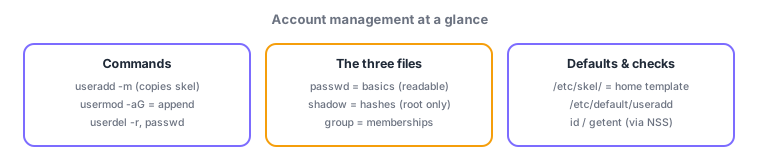
- Operate with useradd(-m), usermod(-aG, -L/-U), userdel(-r), group{add,mod,del}, passwd; verify with id, getent
- passwd = basics (readable), shadow = hashes (root only), group = membership; template = /etc/skel/, defaults = /etc/default/useradd
Sign in to track progress — Log in.
Quick check
(just a quick review)Q1. You must add user tanaka to the docker group while keeping current group memberships. Which command?
Q2. Which root-only file stores hashed passwords and password-aging information?
Q3. You want company-standard config files auto-distributed to every new user's home. Where do you place them?
Keep track of your progress
The full study guide is free to read. Sign up free to practice with the question bank, track what you have read, review your mistakes, and highlight passages.