

What's changed: Initial version (topic 1.07, subtopics 1.07.1–1.07.4)
2.4Client-Side DNS Configuration
Learn the DNS client settings a host uses: specifying resolvers in /etc/resolv.conf (nameserver, search), querying remote DNS servers (host, dig), the relationship with /etc/hosts, testing with getent, and changing the order via /etc/nsswitch.conf.
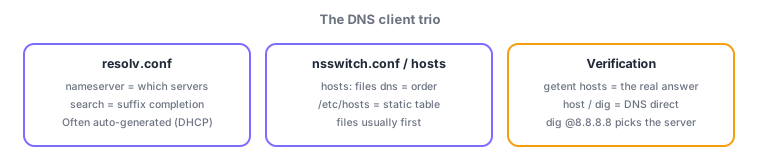
Once troubleshooting points at name resolution, inspect the client-side trio: the lookup order (nsswitch.conf), static entries (hosts), and which DNS servers to ask (resolv.conf). The division of labor among these three files is the heart of this section.
2.4.1The three configuration files
- /etc/resolv.conf names the DNS servers to query (
nameserver 8.8.8.8, up to three, tried in order).search example.comappends domain suffixes for short names. - /etc/hosts is the static table, typically consulted before DNS (order per nsswitch.conf).
- The
hosts: files dnsline in /etc/nsswitch.conf sets the order (files = /etc/hosts). Swap it to prefer DNS.
2.4.2Choosing the right lookup tool
- host does concise forward/reverse lookups (
host www.example.com/host 192.0.2.1), optionally against a specific server (host name 8.8.8.8). - dig shows detail (QUESTION/ANSWER sections, TTL, status). Specify the server with @ and the record type:
dig @8.8.8.8 example.com MX. - getent (
getent hosts name) resolves following nsswitch.conf order—"what applications actually see". By contrast host/dig ask DNS only (ignoring /etc/hosts).
Staples: resolvers = nameserver in resolv.conf, order = nsswitch.conf, real-world result incl. hosts = getent hosts, server selection in dig = @. host/dig never read /etc/hosts—that asymmetry powers the frequent "I added it to hosts but dig does not show it" question.
Weave the three files and three commands into one story. When an application (browser, ssh) resolves a name, it follows nsswitch.conf: first /etc/hosts, then the nameserver entries in resolv.conf over UDP/53. So after adding a test entry 192.0.2.10 www.example.com to hosts, the browser (and getent) go to the test server, while dig keeps returning the production IP because it asks DNS directly—the disagreement itself proves the hosts entry works. Conversely, if hosts entries seem ignored, check whether nsswitch.conf puts dns first. search example.com completes short names (ssh web01 → web01.example.com), trying multiple suffixes in order. And an operational classic: in cloud/DHCP environments resolv.conf is often auto-generated and overwritten, erasing manual edits—a staple root cause.
| Tool/file | Consults | Main use |
|---|---|---|
| getent hosts | nsswitch order (hosts→DNS) | What apps actually see |
| host / dig | DNS only | Verifying the DNS server |
| resolv.conf | nameserver, search | Which servers to ask |
| nsswitch.conf | hosts: files dns | Lookup order |
Trap: "entries added to /etc/hosts appear in dig results" is wrong—dig (and host) query DNS directly, ignoring /etc/hosts (getent includes it). And "resolv.conf decides the lookup order" is wrong—order belongs to nsswitch.conf; resolv.conf names which servers to ask.
2.4.3Section summary
- Division of labor: nsswitch.conf (order), hosts (static), resolv.conf (nameserver/search)
- Verify with getent hosts (the real answer) / host & dig (DNS direct; @ selects the server)
Sign in to track progress — Log in.
Quick check
(just a quick review)Q1. Which file and directive specify the DNS servers this host queries?
Q2. You added a test entry for www.example.com to /etc/hosts. Which command shows the resolution result including that entry?
Q3. You want to query Google Public DNS (8.8.8.8) directly for example.com's MX record. Which command?
Keep track of your progress
The full study guide is free to read. Sign up free to practice with the question bank, track what you have read, review your mistakes, and highlight passages.