

What's changed: Initial version (topic 1.07, subtopics 1.07.1–1.07.4)
2.1Internet Protocol Fundamentals
Learn the foundations of TCP/IP: IP addresses, subnet masks and CIDR notation, private vs public IP addresses, the natures of TCP, UDP, and ICMP, well-known ports (22/25/53/80/123/443), and the differences between IPv4 and IPv6.
A networked server means IP addresses and protocol basics are unavoidable. This is a memorization-friendly area—polish CIDR arithmetic, port numbers, and the TCP vs UDP contrast into reliable points.
2.1.1IP addresses and subnetting
- An IPv4 address is 32 bits in dotted quads (192.168.1.10). The subnet mask (255.255.255.0) sets the boundary between network and host parts.
- CIDR writes the mask as "/bits" (192.168.1.0/24 = mask 255.255.255.0 = 8 host bits → up to 254 hosts; /26 gives 62). Subnetting borrows host bits to split networks.
- Private IP ranges (10.0.0.0/8, 172.16.0.0/12, 192.168.0.0/16) are for internal use; they reach the internet only translated to public addresses via NAT.
- IPv6 is 128 bits in colon-hex (2001:db8::1)—the structural fix for address exhaustion, designed without NAT, with auto-configured link-local addresses (fe80::/10).
2.1.2TCP, UDP, ICMP, and ports
- TCP is connection-oriented (3-way handshake, delivery and ordering guaranteed)—for web, SSH, anything needing integrity.
- UDP is connectionless (no acknowledgment, light, fast)—DNS queries, NTP, streaming. ICMP is for control and diagnostics (ping, unreachable notices) and has no ports.
- The six must-know well-known ports: 22/SSH, 25/SMTP, 53/DNS, 80/HTTP, 123/NTP, 443/HTTPS.
Instant-answer items: /24 = 254 hosts, the three private ranges (10/8, 172.16/12, 192.168/16), need delivery guarantees = TCP, speed first = UDP, ping = ICMP, 22=SSH, 53=DNS, 123=NTP, 443=HTTPS. Distractors love shuffling port numbers (25↔22, 53↔80).
CIDR math needs one fact: with n host bits you get 2^n addresses, 2^n−2 usable (minus the network and broadcast addresses). /24 → 254, /26 → 62, /30 → 2 (the router-link staple). Strengthen the TCP/UDP contrast with reasons: DNS uses UDP because a one-round-trip query cannot justify connection setup; the web uses TCP because HTML breaks if one byte is lost. For IPv6, exams probe the mindset shifts: hosts can hold global addresses without NAT; ICMPv6 is core protocol machinery (neighbor discovery—block it even less than in v4); and every interface auto-configures an fe80:: link-local address for on-link traffic.
| Aspect | TCP | UDP |
|---|---|---|
| Connection | Connection-oriented (handshake) | Connectionless |
| Reliability | Delivery and order guaranteed | No guarantees (light, fast) |
| Examples | HTTP/HTTPS, SSH, SMTP | DNS queries, NTP |
| ICMP (reference) | — | Diagnostics/control (ping), no ports |
Trap: "a /24 supports 256 hosts" is wrong—excluding the network and broadcast addresses leaves 254. "172.31.0.0 is public" is wrong too—the private range 172.16.0.0/12 spans 172.16.0.0–172.31.255.255 (a classic under-reading of /12). And "ping uses TCP" is wrong—ping is ICMP.
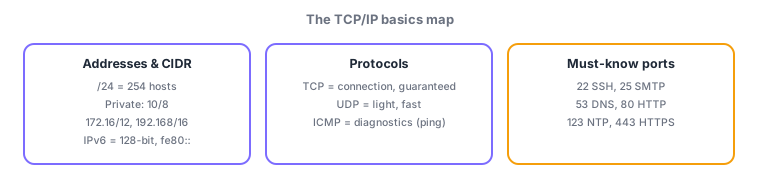
2.1.3Section summary
- CIDR = /n (usable hosts = 2^(32−n)−2); private ranges 10/8, 172.16/12, 192.168/16 (NAT to go outside)
- TCP = guarantees, UDP = light/fast, ICMP = diagnostics; the six ports 22 SSH, 25 SMTP, 53 DNS, 80 HTTP, 123 NTP, 443 HTTPS; IPv6 = 128-bit, NAT-free design, fe80:: link-local
Sign in to track progress — Log in.
Quick check
(just a quick review)Q1. You build an internal network as 192.168.10.0/24. How many addresses can actually be assigned to hosts?
Q2. Which protocol and port are standard for DNS name-resolution queries?
Q3. Which is a correct private IP address range, not directly routable on the internet?
Keep track of your progress
The full study guide is free to read. Sign up free to practice with the question bank, track what you have read, review your mistakes, and highlight passages.