

What's changed: Initial version (topic 1.07, subtopics 1.07.1–1.07.4)
2.2Basic Network Configuration
Learn to view and change host network settings: the ip command (ip addr, ip route) and legacy ifconfig/route, interface up/down (ifup, ifdown), NetworkManager's nmcli, the hostname (/etc/hostname), basic resolution files (/etc/hosts, /etc/nsswitch.conf), the default route, and reachability checks with ping.
This section turns IP theory (previous section) into actual host configuration. You must answer for two generations of tools: the current-standard ip family and the legacy ifconfig/route still in scope.
2.2.1Configuring and toggling interfaces
- Current standard = ip:
ip addr(show; abbreviatedip a),ip addr add 192.168.1.10/24 dev eth0(assign),ip link set eth0 up/down(toggle link). - Legacy = ifconfig (show, temporary settings) and ifup eth0 / ifdown eth0 (config-file based up/down).
- With NetworkManager, persist via nmcli (
nmcli connection modify …). ip/ifconfig changes vanish on reboot—persistence needs nmcli or config files. - The hostname persists in /etc/hostname (view/change at runtime with the hostname command).
2.2.2Routing and basic name resolution
- The default route (default gateway) is where packets leave for foreign networks. Show with
ip route(or route -n); set withip route add default via 192.168.1.1. - /etc/hosts is the static IP-to-name table, usually consulted before DNS—for small setups or test overrides.
- /etc/nsswitch.conf sets the resolution order (
hosts: files dns= hosts file, then DNS). - First reachability check = ping (ICMP echo). "IP works but the name does not → a name-resolution problem" is the classic isolation.
Staples: show addresses = ip addr (legacy ifconfig), show routes = ip route (legacy route), ip settings are temporary—persist via nmcli/config files, resolution order lives in nsswitch.conf. The old↔new mapping (ip addr ↔ ifconfig, ip route ↔ route) appears verbatim.
Memorize the diagnosis order for "the server cannot reach outside". First ip addr: your address and link state (is eth0 UP, does it have an address?). Then ip route: is there a default route?—without default via …, nothing leaves the local segment (ip route add default via <GW> is the first aid). If ping 192.168.1.1 (gateway) and ping 8.8.8.8 succeed but ping example.com fails, the IP layer is healthy and the problem is name resolution (next section's material). The other exam point is temporary vs persistent: ip addr add and ifconfig change memory only—gone after reboot. Persist with nmcli connection modify + nmcli connection up under NetworkManager, or in the distribution's config files (what ifup/ifdown read). Scenario questions about "settings vanished after reboot" test exactly this.
| Goal | Current (ip family) | Legacy |
|---|---|---|
| Show addresses | ip addr | ifconfig |
| Show routing table | ip route | route -n |
| Toggle interface | ip link set eth0 up/down | ifup / ifdown (config-based) |
| Persistent config | nmcli connection modify | Distribution config files |
Trap: "an address set with ip addr add survives reboot" is wrong—ip/ifconfig changes are temporary; persistence needs nmcli or config files. And "resolution tries DNS first, then /etc/hosts" is usually wrong—the order follows /etc/nsswitch.conf, and files (hosts) typically come first.
2.2.3Section summary
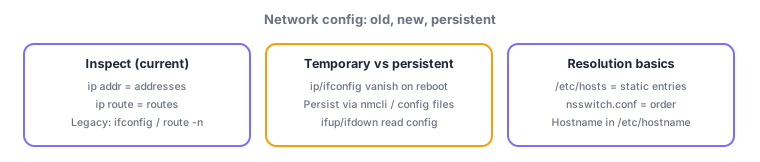
- Inspect with ip addr / ip route (legacy ifconfig / route); toggle with ip link set / ifup, ifdown
- ip changes are temporary → persist via nmcli/config files; resolution order in nsswitch.conf (usually files→dns); static entries in /etc/hosts
Sign in to track progress — Log in.
Quick check
(just a quick review)Q1. You want to check the routing table for a default gateway. Which current-standard command?
Q2. An address added with ip addr add vanished after reboot. How do you persist it (under NetworkManager)?
Q3. Which file decides whether /etc/hosts or DNS is consulted first for name resolution?
Keep track of your progress
The full study guide is free to read. Sign up free to practice with the question bank, track what you have read, review your mistakes, and highlight passages.