

What's changed: Initial version (topic 1.06, subtopics 1.06.1–1.06.2)
1.2Shell Scripting
Learn shell scripting—the heaviest topic on exam 102 (weight 6): the shebang (#!), execute permissions (chmod, chown), positional parameters ($0, $1..$n, $#, $*, $@, shift), exit status ($?, exit), conditionals (if, case), loops (for, while), shell functions, PATH-independent scripts, and debugging (bash -x, bash -v).
Shell scripts automate routine work and carry weight 6—the highest of any subtopic on exam 102. The goal is building parts that even non-Linux users can run safely; questions probe the behavior of arguments, return values, and branching, not rote syntax.
1.2.1The skeleton of a script
- The shebang (
#!/bin/bash) names the interpreter for this script—the same mechanism serves sh, python, etc. - Running needs read + execute permission (
chmod +x script.sh→./script.sh); manage ownership with chown. Without execute permission,bash script.shstill works (read is enough). - Positional parameters:
$0(script name),$1–$n(nth argument), $# (argument count), $*/$@ (all arguments). shift moves them left by one ($2 becomes $1). - Exit status: $? holds the last command's result (0 = success, non-zero = failure). A script sets its own with exit N.
1.2.2Branching, loops, functions
- if:
if [ "$1" = "start" ]; then …; elif …; else …; fi([ ]is the test command; closes with fi). - case branches one value by patterns:
case "$1" in start) …;; stop) …;; *) …;; esac(closes with esac; default is*)). - for iterates a list (
for f in *.log; do …; done); while repeats while true (while read line; do …; done < file). Both close with done. - A shell function names a routine (
backup() { tar czf "$1.tar.gz" "$1"; }; the function keyword also works). Inside,$1refers to the function's own argument. - PATH-independent scripts call commands by absolute path or set PATH themselves at the top (so user environments cannot break them). Debug with bash -x (prints each expanded command as executed) and bash -v (echoes lines as read).
Answer instantly: $# = argument count, $0 = script name, $? = last exit status (0 = success). Also standard: if→fi, case→esac, for/while→done, execution trace = bash -x, consuming arguments with shift in a loop. Beware distractors claiming exit 1 means success (0 does).
Assemble a 30-line practical script mentally—a service wrapper svc.sh start nginx: start with the shebang; then validate arguments with if [ $# -ne 2 ]; then echo "Usage: $0 {start|stop} name"; exit 1; fi (wrong count → print usage, fail). Then admit only allowed operations: case "$1" in start|stop) systemctl "$1" "$2";; *) exit 2;; esac. Callers can chain on $? via svc.sh start nginx && echo OK || echo NG—honoring "0 = success" is what makes a script a reusable part. Process many files with for f in "$@"; do process "$f"; done; consume arguments with while [ $# -gt 0 ]; do …; shift; done. When it misbehaves, bash -x svc.sh start nginx shows what each variable expanded to, line by line—the fastest route to the bug.
| Variable/syntax | Meaning | Pairs with |
|---|---|---|
| $0 / $1..$n / $# / $@ | Name / nth / count / all args | shift moves them left |
| $? / exit N | Last result / own status | 0 = success, non-zero = failure |
| if / case | Conditional / pattern branch | Close with fi / esac |
| for / while | List / condition loop | Close with done |
Trap: "$# counts arguments including the script name" is wrong—$# counts arguments only ($0 excluded). "Exit status 1 means success" is wrong—0 is success; non-zero is failure. Fabricated closers like "endcase"/"endif" are classic wrong options (correct: esac, fi).
1.2.3Section summary
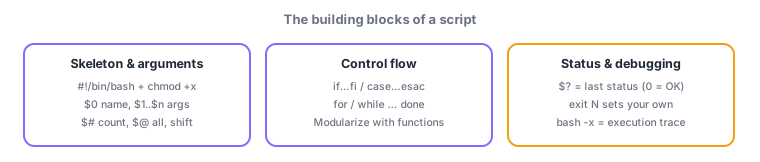
- Skeleton = #! shebang + chmod +x; arguments via $0/$1../$#/$@ and shift; status via $? (0 = success) and exit N
- Branch with if…fi / case…esac, loop with for/while…done, modularize with functions; debug with bash -x (trace)
Sign in to track progress — Log in.
Quick check
(just a quick review)Q1. You want to check the number of arguments and print usage when too few. Which special variable holds the count?
Q2. Inside a script you must test whether the previous command succeeded. What do you check, and what means success?
Q3. A script misbehaves; you want each executed command printed after variable expansion. How do you run it?
Keep track of your progress
The full study guide is free to read. Sign up free to practice with the question bank, track what you have read, review your mistakes, and highlight passages.