

What's changed: Initial version (topic 1.06, subtopics 1.06.1–1.06.2)
1.1Customizing the Shell Environment
Learn the configuration files read at login and shell startup: system-wide (/etc/profile, /etc/bash.bashrc) vs per-user (~/.bash_profile, ~/.bash_login, ~/.profile, ~/.bashrc, ~/.bash_logout) and their order, command substitution with alias, setting PATH, ./source, and lists (;, &&, ||).
"I added it to .bashrc but nothing changed", "I want it to run only at login"—every answer lies in which startup files bash reads, when, and in what order. A favorite topic on exam 102 and the basis for managing every user's environment.
1.1.1The startup files and their order
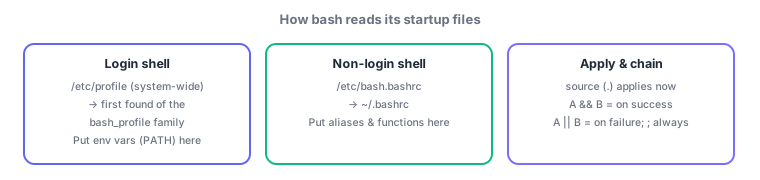
- A login shell (e.g., ssh login) reads the system-wide /etc/profile first, then searches ~/.bash_profile → ~/.bash_login → ~/.profile and reads only the first one found. On logout: ~/.bash_logout.
- A non-login shell (a new terminal tab) reads /etc/bash.bashrc (or /etc/bashrc) → ~/.bashrc. Convention: source .bashrc from .bash_profile to unify both.
- Apply edits with
.(dot) or source (source ~/.bashrc)—takes effect in the current shell without re-login. - Environment variables (PATH etc.) belong in profile files (once at login); aliases and functions belong in .bashrc (every shell). Append with
PATH=$PATH:/opt/app/bin.
1.1.2alias and list operators
- alias names a command (
alias ll='ls -l'); barealiaslists,unaliasremoves. An alias shadows a command of the same name (alias rm='rm -i'is the classic). - Lists chain commands:
A ; B(sequential, B regardless of A),A && B(B only if A succeeds),A || B(B only if A fails).
Staples: ssh logins read the profile family; new tabs read .bashrc, only the first of ~/.bash_profile → ~/.bash_login → ~/.profile is read, apply now = source (.), && = on success, || = on failure. Trouble questions like "PATH set in .bashrc but ssh login ignores it" test this exact system.
Solve two classic troubles.
① "Aliases do not work over ssh login": ssh starts a login shell, which reads only the profile family—your aliases live in ~/.bashrc. The fix: bridge with [ -f ~/.bashrc ] && . ~/.bashrc in ~/.bash_profile (most distributions ship this bridge).
② "Distribute proxy variables to all users": write them in the system-wide /etc/profile (or /etc/profile.d/*.sh) instead of every user's ~/.bash_profile. List operators star again in scripting: mkdir /backup && cp data /backup (copy only if creation succeeded), systemctl is-active nginx || systemctl start nginx (start only if not running)—conditional one-liners. Since ; ignores success, reserve it for cleanup where failure is acceptable.
| When | Files read | What belongs there |
|---|---|---|
| Login shell | /etc/profile → first of the bash_profile family | Environment variables (PATH) |
| Non-login shell | /etc/bash.bashrc → ~/.bashrc | Aliases, shell functions |
| On logout | ~/.bash_logout | Cleanup tasks |
| Apply immediately | source (.) | No re-login needed |
Trap: "both ~/.bash_profile and ~/.profile are read" is wrong—bash reads only the first found of the three profile files. And "A ; B runs B only when A succeeds" is wrong—; runs sequentially regardless of success; success-only is &&.
1.1.3Section summary
- Login = /etc/profile + first profile file / non-login = bash.bashrc + .bashrc; apply with source (.)
- Env vars in profile files, aliases/functions in .bashrc; chain with ; (always) / && (on success) / || (on failure)
Sign in to track progress — Log in.
Quick check
(just a quick review)Q1. You defined an alias in ~/.bashrc, but it does not work right after ssh login. Which is the correct cause?
Q2. You want the copy to run only if creating the backup directory succeeded. Which form?
Q3. You edited ~/.bashrc and want it applied to the current shell without re-login. Which command?
Keep track of your progress
The full study guide is free to read. Sign up free to practice with the question bank, track what you have read, review your mistakes, and highlight passages.