

What's changed: Initial version (topic 1.02, subtopics 1.02.1–1.02.4)
2.1File Ownership and Permissions
Learn to control file access with owners, groups, and permissions: reading ls -l, chmod (symbolic/octal), changing ownership with chown/chgrp, defaults at creation via umask, and SUID/SGID/the sticky bit.
Linux assumes many users share one system. Permissions decide per file who can read, write, and execute—a security foundation you touch in nearly every operational task.
2.1.1Reading and changing permissions
- The first 10 characters of ls -l = 1 type char + three rwx triplets (owner / group / others).
-rwxr-xr--= owner rwx, group r-x, others r--. - chmod octal mode: sum r=4, w=2, x=1 per triplet (
chmod 754 file= rwxr-xr--). Symbolic mode:chmod u+x,g-w,o=r filewith u/g/o/a and +/-/=. - Change ownership with chown (
chown user01 file, orchown user01:dev filefor owner and group together); group only with chgrp. - umask defines the bits removed at creation: files start from 666, directories from 777 (umask 022 → files 644, directories 755).
2.1.2SUID, SGID, and the sticky bit
- SUID (4000; s in the owner x slot) runs the program with the file owner's privileges (e.g.,
/usr/bin/passwd—how ordinary users update /etc/shadow). - SGID (2000; s in the group x slot): executables run with the group's privileges; on a directory, new files inherit the directory's group (the standard for shared directories).
- The sticky bit (1000; t in the others x slot) means only a file's owner can delete it within that directory (e.g.,
/tmp= drwxrwxrwt).
The big three: ordinary users changing passwords = SUID on passwd, group inheritance in shared dirs = SGID on the directory, cannot delete others' files in /tmp = sticky bit. Numerically prepend 4=SUID, 2=SGID, 1=sticky (e.g., chmod 2775 /shared). umask math (022 → 644/755) is another staple.
To stay oriented, sort the special bits by "who does it run as" and "where does it apply". SUID is an executable-only idea: while running, the program borrows the owner's (usually root's) power—which is why SUID files are audit targets (they return in 1.10 as find / -perm -4000). SGID on executables is the group version, but its practical star role is on directories: in a shared project folder, whoever creates a file, it belongs to group dev. The sticky bit is a directory-only restriction on deletion, keeping order in world-writable /tmp. umask is a login-shell default for new files only—it never changes existing ones. In ls -l, an uppercase S/T means the special bit is set but the corresponding execute bit x is missing.
| Special bit | Value / display | Effect |
|---|---|---|
| SUID | 4000; s in owner slot | Run as file owner (passwd) |
| SGID (executable) | 2000; s in group slot | Run as file group |
| SGID (directory) | 2000; s in group slot | New files inherit the group |
| Sticky bit | 1000; t in others slot | Only owners delete (/tmp) |
Trap: "umask 022 makes new files 755" is wrong—files start from 666 (no execute bit), so 644; directories (from 777) become 755. And "SUID on a directory inherits the owner" is wrong—there is no owner inheritance, only group inheritance via SGID on a directory.
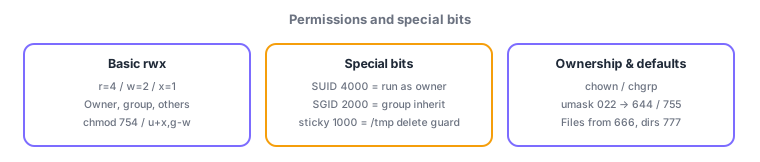
2.1.3Section summary
- r=4/w=2/x=1 triplets, prefixed by 4=SUID/2=SGID/1=sticky; change with chmod/chown/chgrp, defaults via umask (files 666−, dirs 777−)
- SUID = run as owner (passwd) / SGID dir = group inheritance / sticky = delete restriction in /tmp
Sign in to track progress — Log in.
Quick check
(just a quick review)Q1. You want a file to be read/write for the owner and read-only for group and others. Which command?
Q2. In shared directory /shared, files created by anyone should belong to the directory's group. Which special bit?
Q3. With umask 022, what permission does a newly created regular file get?
Keep track of your progress
The full study guide is free to read. Sign up free to practice with the question bank, track what you have read, review your mistakes, and highlight passages.