

What's changed: Initial version (topic 1.02, subtopics 1.02.1–1.02.4)
2.3Hard Links and Symbolic Links
Learn links—multiple names for one entity: how hard links differ from symbolic links (shared inode vs path reference), creating them with ln/ln -s, identifying them with ls -li, how links differ from copies, and their use in administration such as version switching.
A Linux filename is just a label on the actual data. The real registry entry is the inode (the file's metadata record), and links give one entity multiple names—the standard way to expose the same thing elsewhere without copying.
2.3.1The two kinds of links
- A hard link (
ln target name) is another name for the same inode. The names are equals; deleting one still leaves the data reachable via the other (data persists until the link count hits 0). - Constraints: same filesystem only, and not allowed on directories.
- A symbolic link (
ln -s target name) is a special file storing a path. It can point across filesystems and at directories, but breaks when the target is removed (a dangling link). - Identify: in ls -l a leading
landname -> target(symbolic); with ls -i, identical inode numbers mean hard links.-Fappends@to symlink names.
Three contrasts appear almost verbatim: only symlinks cross filesystems / point at directories, deleting the target breaks a symlink but not a hard link, same inode number = hard links. The ln argument order (target first, link name second) is another favorite.
In administration the workhorse is the symbolic link. Install versions side by side (/opt/app-1.2/, /opt/app-1.3/) and point a symlink /opt/app at the current one: switching versions (and instant rollback) is just re-pointing the link. Centralizing a config file and distributing it via ln -s is another staple. Hard links fit when you need the same entity reliably shared and resilient to one name being deleted (e.g., deduplicating backups). Versus copying: cp creates an independent entity, so later edits do not propagate; links share one entity, so edits are visible from every name. Disk usage: a copy doubles it, a hard link adds ~nothing, a symlink costs only the path string.
| Aspect | Hard link | Symbolic link |
|---|---|---|
| Entity | Another name for the inode | Special file holding a path |
| Across filesystems | No | Yes |
| Directories | No | Yes |
| If target deleted | Data survives (link count > 0) | Becomes dangling |
Trap: "deleting the original breaks its hard links" is wrong—hard links are equal names, so the data stays reachable via the remaining names. It is the symbolic link that breaks. Reversed ln -s arguments (link name first) are another classic wrong option.
2.3.2Section summary
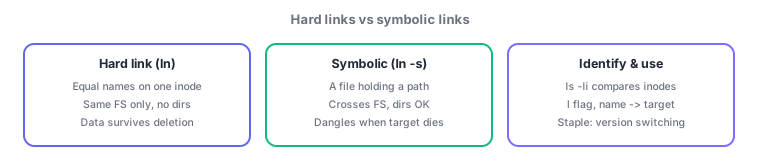
- Hard = equal names on one inode (same FS, no dirs, survives deletion) / symbolic = path reference (crosses FS, dirs OK, can dangle)
- Create with ln / ln -s (target, then link name); identify with ls -li. The admin staple: version switching via symlink
Sign in to track progress — Log in.
Quick check
(just a quick review)Q1. You want /opt/app to reference the directory /opt/app-1.3 via a link. Which command?
Q2. You create hard link B for file A, then delete A. What happens to B?
Q3. How do you check whether two filenames are hard links to the same entity?
Keep track of your progress
The full study guide is free to read. Sign up free to practice with the question bank, track what you have read, review your mistakes, and highlight passages.