

What's changed: Initial version (topic 1.02, subtopics 1.02.1–1.02.4)
2.2Performing Basic File Management
Learn the core file commands (ls, file, touch, cp, mv, rm, mkdir, rmdir), pattern matching with wildcards, conditional search and bulk operations with find, archiving with tar, compression with gzip/bzip2/xz, and dd.
Copy, move, delete, search, archive—the first steps in Linux and easy points on exam 101. Each is simple, but the exam tests precision with recursive options, wildcards, and combinations with find.
2.2.1Core commands and wildcards
- One-shot operations: ls (list), file (identify type), touch (create empty / update timestamp), cp (copy), mv (move = rename), rm (delete), mkdir/rmdir (create / remove empty directories).
- Recursive:
cp -r(copy a directory tree),rm -r(delete one;-fskips prompts).mkdir -pcreates intermediate directories. - Wildcards (shell globbing):
*(any run),?(exactly one char),[a-c](set/range). E.g.,rm log?.txt,cp *.conf /backup/.
2.2.2Searching and acting with find
- find walks a path in real time, matching conditions:
-name,-type(f/d),-size(+10M),-mtime(modified;-7= within 7 days),-user. - Act on matches with
-exec command {} \;(e.g.,find /var/log -name "*.old" -exec rm {} \;).
2.2.3Archiving and compression
- tar bundles files into one archive: create
tar cf, extracttar xf, listtar tf. Add compression withz(gzip),j(bzip2),J(xz)—e.g.,tar czf backup.tar.gz /etc. - Standalone compressors: gzip/gunzip (fast, standard), bzip2 (tighter), xz (tightest, slower). Each compresses one file (no bundling—hence tar + compressor).
- dd copies block by block (
dd if=/dev/sda of=disk.img)—a low-level tool for disk images and writing ISOs.
Staples: rmdir is for empty dirs only (else rm -r), tar's z/j/J map to gzip/bzip2/xz, find -mtime -7 = within 7 days, +7 = older, ? is one char, * is any run. Also: the argument right after tar czf is the archive name to create (tar czf /etc backup.tar.gz is wrong).
Bundle it as a backup workflow. To preserve a config tree: tar czf etc-$(date +%F).tar.gz /etc—c (create) + z (gzip) + f (archive name). Extract with tar xzf; peek with tar tzf. "Evacuate only big logs changed this week" is find territory: find /var/log -type f -size +100M -mtime -7 -exec cp {} /backup/ \;—conditions, then bulk action. mv is a rename within the same filesystem, not copy+delete, so it is instant even for huge files (crossing filesystems triggers a real copy). rm -rf deletes recursively without asking—irreversible, so double-check the path first. Compression ratio generally runs gzip < bzip2 < xz (speed the reverse): gzip for daily log rotation, xz to minimize distributables.
| Goal | Example | Note |
|---|---|---|
| Copy a tree | cp -r src/ dest/ | Directories refused without -r |
| Remove empty dir | rmdir olddir | Use rm -r if not empty |
| Create gzip archive | tar czf a.tar.gz dir/ | Extract xzf, list tzf |
| Find files changed in 7 days | find . -mtime -7 | +7 means older than 7 days |
Trap: "gzip can bundle multiple files into one archive" is wrong—gzip/bzip2/xz compress single files only; bundling is tar's job (hence the two-part .tar.gz extension). And "rmdir -r deletes a directory with contents" is wrong—rmdir has no recursive option; use rm -r.
2.2.4Section summary
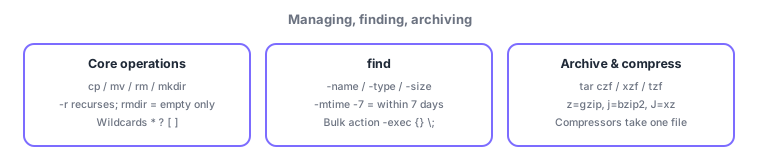
- Core ops = cp/mv/rm/mkdir/rmdir/touch/file with -r for recursion; patterns via \*, ?, [ ]
- find = search + bulk -exec / tar = bundle (z/j/J to compress) / gzip, bzip2, xz = single-file compression
Sign in to track progress — Log in.
Quick check
(just a quick review)Q1. You want to bundle all of /etc into the gzip-compressed archive backup.tar.gz. Which command?
Q2. You want files under /var/log modified within the last 7 days. Which command?
Q3. You must delete directory olddata, which still contains files. Which command?
Keep track of your progress
The full study guide is free to read. Sign up free to practice with the question bank, track what you have read, review your mistakes, and highlight passages.