

What's changed: Deepened MS-900 Chapter 2 to the AZ-900 baseline (productivity apps Exchange/SharePoint/OneDrive/Office + SharePoint vs OneDrive table; Teams/Viva/Loop/Forms + table; Intune MDM/MAM, Windows 365, update channels + table + Conditional Access link; scenarios, FAQ). Localized 3 figures
2.1Productivity Apps and Services
Understand Microsoft 365’s core productivity services—Office apps (Word/Excel/PowerPoint/Outlook), Exchange Online, SharePoint, and OneDrive.
Microsoft 365 is a productivity suite delivering documents, email, and file sharing in the cloud. Learn its core apps and services.
2.1.1Core apps and services
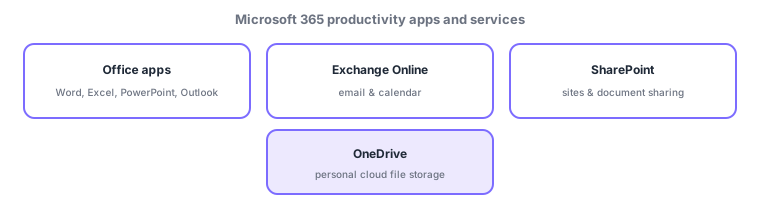
- Office apps (Microsoft 365 Apps): Word, Excel, PowerPoint, Outlook—synced to the cloud, usable on web/desktop/mobile.
- Exchange Online: cloud email and calendar (hosted mailboxes).
- SharePoint: sites and document sharing—the basis for team/org collaboration, with many people working on shared documents.
- OneDrive: personal cloud file storage and sync—keep your own files and share as needed.
A common confusion is SharePoint vs OneDrive. OneDrive is "personal file storage"; SharePoint is "documents and sites shared by a team/org." They actually share the same platform, and files shared in Teams are stored behind the scenes in SharePoint (teams) or OneDrive (1:1 chats). Unlike buy-once classic Office, Microsoft 365 Office apps stay always up to date via subscription and support co-authoring (simultaneous editing) thanks to cloud storage.
| Goal | Service |
|---|---|
| Email & calendar | Exchange Online |
| Team/org docs & sites | SharePoint |
| Personal file storage/sync | OneDrive |
| Create docs/sheets/slides | Office apps (Word/Excel/PowerPoint) |
Scenario: a project team’s documents. Shared minutes and specs live on a SharePoint team site for everyone to co-edit; personal drafts and notes go to OneDrive and are shared when ready; communication uses Exchange Online email and calendar; authoring/editing uses Office apps. Choose by role.
Watch the mix-ups: (1) OneDrive (personal files) vs SharePoint (team/org sharing). (2) Email = Exchange Online (Outlook is the app to read/write; Exchange hosts the mailbox). (3) Teams files are stored in SharePoint/OneDrive behind the scenes.
Q. SharePoint or OneDrive? OneDrive for personal files; SharePoint for team/org shared documents. Q. Outlook vs Exchange Online? Outlook is the client app for mail/calendar; Exchange Online is the service hosting the mailbox. Q. vs buy-once Office? Microsoft 365 is subscription, always up to date, with cloud co-authoring.
Common: email = Exchange Online, sites/document sharing = SharePoint, personal files = OneDrive, authoring = Office apps. Note SharePoint (team/org) vs OneDrive (personal), and that Teams files are stored in SharePoint/OneDrive.
2.1.2Section summary
- Office apps / Exchange Online (email) / SharePoint (sites & sharing) / OneDrive (personal)
- SharePoint = team/org, OneDrive = personal; Teams files are stored in SharePoint/OneDrive
Sign in to track progress — Log in.
Quick check
(just a quick review)Q1. Which Microsoft 365 cloud service provides email and calendar?
Q2. Which Microsoft 365 service stores and syncs personal files in the cloud?
Q3. Which Microsoft 365 service provides team/org sites and document sharing?