

What's changed: Deepened MS-900 Chapter 2 to the AZ-900 baseline (productivity apps Exchange/SharePoint/OneDrive/Office + SharePoint vs OneDrive table; Teams/Viva/Loop/Forms + table; Intune MDM/MAM, Windows 365, update channels + table + Conditional Access link; scenarios, FAQ). Localized 3 figures
2.2Collaboration and Communication
Understand collaboration centered on Microsoft Teams, employee experience tools like Microsoft Viva, and co-creation tools like Loop and Forms.
In Microsoft 365, Microsoft Teams is the hub of collaboration—chat, meetings, calls, and file sharing in one place.
2.2.1Collaboration services
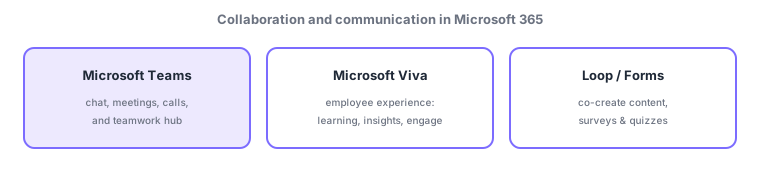
- Microsoft Teams: a hub for chat, meetings, calls, and teamwork—organize topics in channels, integrate apps, and share files.
- Microsoft Viva: an employee experience platform (Learning, Insights, Engage, Goals, etc.).
- Loop, Forms, Whiteboard: Loop for co-creating content, Forms for surveys/quizzes, Whiteboard for shared whiteboarding.
Microsoft Teams is the center of Microsoft 365 collaboration, uniting chat, online meetings, calls, and file sharing in one app. Teams is the hub; files are stored behind the scenes in SharePoint/OneDrive (previous section), and meetings integrate with Exchange calendars. Microsoft Viva is a separate category for the "employee experience"—not real-time conversation but learning, engagement, and work insights. Remember by role: "real-time conversation/meetings = Teams / employee experience = Viva."
| Goal | Service |
|---|---|
| Chat, meetings, calls, teamwork | Microsoft Teams |
| Learning, engagement, insights | Microsoft Viva |
| Co-create, surveys, whiteboard | Loop / Forms / Whiteboard |
Scenario: a hybrid team. Daily communication and standups use Teams (channels organize work; meetings link to calendars). Onboarding and company announcements use Viva (Learning/Engage). In-meeting brainstorming uses Whiteboard, attendee polls use Forms, shared notes use Loop. Shared files land in SharePoint via Teams.
Watch the mix-ups: (1) Teams (real-time conversation/meetings hub) vs Viva (employee experience = learning/engagement)—different categories. (2) Teams is a "hub"; files go to SharePoint/OneDrive and meetings link to Exchange calendars—Teams does not store everything by itself.
Q. Teams vs Viva? Teams is real-time collaboration (chat/meetings/calls); Viva is employee experience (learning, engagement, insights). Q. Where are Teams files? Channels in SharePoint, 1:1 chats in OneDrive. Q. Loop vs Forms? Loop is co-creation components; Forms is surveys/quizzes.
Common: chat/meetings/calls hub = Microsoft Teams, employee experience (learning/engage) = Microsoft Viva, co-create = Loop / surveys = Forms. Note Teams files are stored in SharePoint/OneDrive.
2.2.2Section summary
- Teams (chat/meetings/calls hub) / Viva (employee experience) / Loop・Forms・Whiteboard (co-create)
- Teams is a hub; files go to SharePoint/OneDrive and meetings link to Exchange
Sign in to track progress — Log in.
Quick check
(just a quick review)Q1. Which Microsoft 365 service brings chat, meetings, calls, and teamwork together?
Q2. Which Microsoft 365 service improves employee experience (learning, insights, engagement)?
Q3. Where are files shared in Microsoft Teams mainly stored?