

What's changed: Initial version (topic 1.01, subtopics 1.01.1–1.01.5)
1.2Virtual Machine and Container Concepts and Usage
Learn the technologies behind VMs and containers: the relationship between the kernel, the hypervisor, and VMs; hardware virtualization support; how VMs differ from containers (guest OS vs shared kernel); and starting/stopping VMs with virsh and containers with docker.
This topic on virtualization and containers is what sets LinuC Version 10.0 apart from older Linux certifications. In the cloud era Linux usually runs on a VM or in a container, not on bare metal, so the exam tests how the two differ and how to operate them.
1.2.1Hypervisors and virtual machines
- A hypervisor virtualizes the physical CPU/memory/disk and shares them among virtual machines (VMs). On Linux, KVM is provided as a kernel feature.
- Hardware virtualization support = CPU instructions dedicated to virtualization (Intel VT-x / AMD-V). Hypervisors rely on them to run VMs at practical speed.
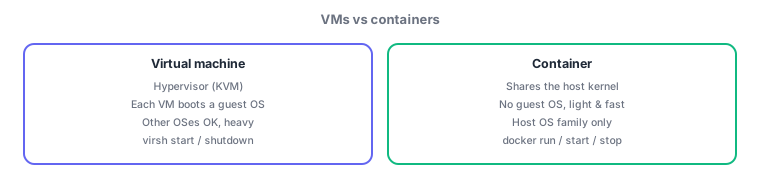
- Each VM boots an independent guest OS (including its own kernel). You can run a different OS from the host, but boot is slower and resource use is higher.
- Start/stop VMs with virsh (the libvirt CLI):
virsh start <name>/virsh shutdown <name>. Log in via the virtual console or SSH.
1.2.2Containers and the host OS
- A container shares the host OS kernel and isolates processes with namespaces. No guest OS boots, so containers are lightweight and fast to start.
- Because the kernel is shared, you cannot run a different OS family (e.g., Windows containers on a Linux host).
- Start/stop containers with docker:
docker runcreates and starts from an image;docker start/docker stopoperate on existing containers.
The classic contrast: VM = boots a guest OS / container = shares the host kernel. "Lightweight, fast start, tied to the host OS family" → container; "can run a different OS, needs a hypervisor" → VM. Bind the commands: VM = virsh / container = docker.
Bottom-up, virtualization stacks as: physical machine → host kernel (KVM acting as the hypervisor) → VMs, each booting a guest OS. Containers stack as: physical machine → host kernel → container runtime (docker, etc.) → containers, sitting directly on the kernel. This one difference explains every exam-tested contrast: VMs isolate strongly and can run other OSes but are heavy; containers start in seconds but isolate at the process level and depend on the host kernel. Operationally: VMs use virsh list --all, then virsh start / virsh shutdown (graceful stop via ACPI); containers use docker ps -a, then docker start / docker stop (SIGTERM then SIGKILL).
| Aspect | Virtual machine | Container |
|---|---|---|
| OS | Each VM boots a guest OS | Shares the host kernel |
| Startup / size | Slow / large | Fast / lightweight |
| Different OS | Possible (e.g., Windows) | Host OS family only |
| Main tool | virsh start / shutdown | docker run / start / stop |
Trap: "containers are lightweight VMs, each with its own kernel" is wrong—containers have no kernel of their own; they share the host's. Conversely, "VMs run on the host kernel" is wrong—a VM boots its own guest OS, kernel included. Watch for swapped attributes.
1.2.3Section summary
- VM = hypervisor + guest OS (strong isolation, other OSes, heavy) / container = shared kernel (light, fast, same OS family)
- Operate with virsh (VMs) / docker (containers); hardware support (VT-x/AMD-V) enables practical speed
Sign in to track progress — Log in.
Quick check
(just a quick review)Q1. Which statement about VMs vs containers is correct?
Q2. You want to gracefully stop the KVM virtual machine "web01". Which command?
Q3. Which CPU feature do hypervisors use to run VMs at practical speed?
Keep track of your progress
The full study guide is free to read. Sign up free to practice with the question bank, track what you have read, review your mistakes, and highlight passages.