

What's changed: Initial version (topic 1.01, subtopics 1.01.1–1.01.5)
1.1Installing, Booting, Connecting to, and Shutting Down Linux
Learn the basics of installing Linux on physical/virtual machines and starting, stopping, and connecting remotely: boot priority in UEFI/BIOS, install-time choices (package groups, time zone, GUI/CUI), stopping with shutdown/reboot/halt, and SSH public key authentication (authorized_keys, known_hosts).
The starting point of Linux server administration is the lifecycle: install, boot, connect, and stop correctly. Exam 101 tests these basics in practical form: installing from DVD/ISO images, connecting remotely over SSH, and shutting down safely from the command line.
1.1.1Installation and boot media priority
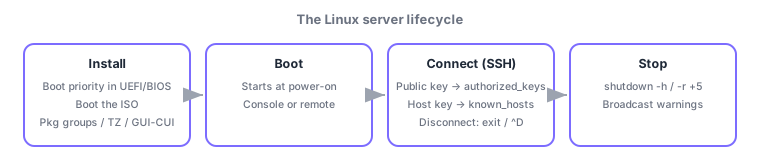
- Change the boot media priority in the UEFI/BIOS setup so the machine boots the DVD/USB installer. Putting optical/USB before the internal disk is the standard move.
- Key install-spec choices: package groups (for servers, minimal install plus required roles), time zone (e.g., Asia/Tokyo), root/user passwords, and GUI vs CUI.
- Servers usually run CUI (text console); GUI (desktop) is for workstation use. You can add package groups later.
1.1.2Start/stop and connect/disconnect
- Stop/restart commands: shutdown (the canonical way, with scheduling and warnings to logged-in users:
shutdown -h now,shutdown -r +5 "rebooting for maintenance"), reboot, and halt. - SSH public key authentication: create the private key
~/.ssh/id_rsaand public keyid_rsa.publocally, and register the public key in~/.ssh/authorized_keyson the server. The client's~/.ssh/known_hostsrecords the host key of servers you connect to. - Disconnect cleanly with logout, exit, or Ctrl+D (^D). Close sessions explicitly instead of leaving them open.
Exam staples: public key goes to the server's authorized_keys, host keys are recorded in the client's known_hosts, scheduled shutdown with warnings = shutdown, and prefer the proper stop procedure over cutting power. Always distinguish which machine each file lives on.
In practice: to stand up a new server, set the install media first in UEFI/BIOS, boot the ISO image, and complete installation per the spec (package groups, time zone, passwords, GUI/CUI). Day-to-day work is remote: ssh user01@server01. Accepting the fingerprint on first connect appends the host key to known_hosts; if that host's key later changes you get a warning (spoofing detection). For public key authentication—safer than passwords—generate id_rsa/id_rsa.pub with ssh-keygen and register only the public key in the server's authorized_keys. Stop with shutdown (-h halt, -r reboot, absolute/relative time, broadcast message). Note that halt may stop the CPU without powering off, and reboot is equivalent to shutdown -r now.
| File/command | Location / purpose | Key point |
|---|---|---|
| ~/.ssh/id_rsa | Client, private key | Never distribute |
| ~/.ssh/authorized_keys | Server, registered public keys | Append public keys to allow key auth |
| ~/.ssh/known_hosts | Client, records of host keys | Warns when a host key changes |
| shutdown -h / -r | Canonical stop/restart | Supports scheduling and warnings |
Trap: "register the private key (id_rsa) in the server's authorized_keys" is wrong—you register the public key (id_rsa.pub); the private key never leaves the client. "known_hosts lives on the server" is also wrong—it is a client-side record of server host keys.
1.1.3Section summary
- Install = boot priority in UEFI/BIOS, then follow the spec for package groups / time zone / GUI vs CUI
- Key auth = public key into the server's authorized_keys / host keys in the client's known_hosts / stop with shutdown
Sign in to track progress — Log in.
Quick check
(just a quick review)Q1. You want to enable SSH public key login to a remote server. Which file goes where on the server?
Q2. You want to warn logged-in users and stop the system in five minutes. Which command?
Q3. Connecting over SSH as usual, you get a warning that the host key has changed. What does this mean?
Keep track of your progress
The full study guide is free to read. Sign up free to practice with the question bank, track what you have read, review your mistakes, and highlight passages.