

What's changed: Expanded content (added diagrams)
1.6Using GitHub Efficiently (Search, Shortcuts, CLI)
Find the Issues, PRs, and code you want fast with search qualifiers, and speed up your work with keyboard shortcuts, the gh CLI, and GitHub Desktop / Mobile.
GitHub holds a vast number of repositories, Issues, and PRs. Knowing how to reach what you want fast and streamline repetitive actions makes daily work much more comfortable.
1.6.1Search and filtering (qualifiers)
In the search bar you can use search qualifiers to narrow by type, state, assignee, label, and more. Multiple qualifiers combine with AND.
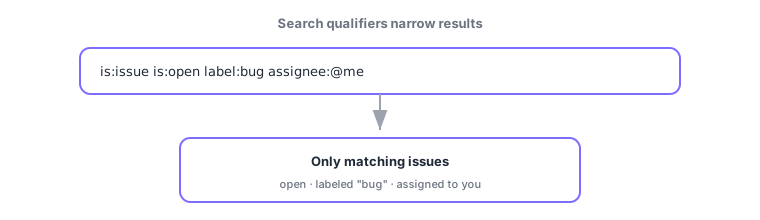
is:issue/is:pr: filter by type.is:open/is:closed: filter by state.label:bug: label;author:name/assignee:@me: author/assignee.in:title/in:body: where to match;repo:owner/name: target repository.
Bookmark the URL of a search you use often, or save it as a saved search, so you can reuse it without retyping.
1.6.2Keyboard shortcuts
On many pages, pressing ? shows the available shortcuts for that page. Examples: in a repo, t (file finder), . (open github.dev), and s or / (focus search).
1.6.3Command line and clients
- gh CLI: the official CLI to work with Issues, PRs, and repos from your terminal (it uses the GitHub API under the hood).
- GitHub Desktop: a GUI app for commits and branch operations.
- GitHub Mobile: an app to check notifications and review Issues/PRs on the go.
gh auth login                 # 認証
gh repo clone owner/repo      # クローン
gh issue list --label bug     # bug ラベルの Issue 一覧
gh pr create --fill           # 変更内容から PR を作成
gh pr checkout 123            # PR #123 をローカルに取得
Examples with the gh CLI
Common points: search qualifiers (is: / label: / author: / assignee:), . opens github.dev, gh CLI = work with Issues/PRs from the terminal, and Desktop = GUI / Mobile = on the go.
1.6.4Section summary
- Stack search qualifiers (
is:,label:,author:,assignee:) with AND to narrow quickly - Press
?for shortcuts,.for github.dev, andt/sto move fast - Use gh CLI (terminal), Desktop (GUI), and Mobile (on the go) as fits the situation
Sign in to track progress — Log in.
Quick check
(just a quick review)Q1. Which qualifier combination searches only open issues?
Q2. What opens when you press the "." key on a repository?
Q3. Which official tool lets you work with Issues and PRs from the terminal?
Keep track of your progress
The full study guide is free to read. Sign up free to practice with the question bank, track what you have read, review your mistakes, and highlight passages.