

What's changed: Expanded content (added diagrams)
1.5Learning Resources and Support
Learn how to reach answers on your own: when to use the official documentation (GitHub Docs), hands-on learning (GitHub Skills), the community, and GitHub support.
GitHub has many features, and at first it is easy to wonder "where do I even look?" Knowing the official sources and support you can rely on lets you move forward on your own before asking others—a skill that pays off in both learning and real work.
1.5.1Official docs and hands-on practice
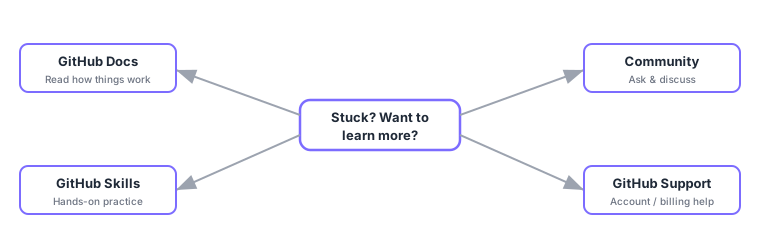
- GitHub Docs: the official documentation covering how features work—the primary source to search first.
- GitHub Skills: official hands-on courses where you learn by doing—great if you learn best by practicing.
1.5.2Learn and ask in the community
When the docs do not resolve your question, you can ask the community or learn from other people discussions.
- GitHub Community (forum): a place for general GitHub questions and idea sharing.
- A project Discussions: conversations about that specific project (use Issues to track bugs and work).
How to ask well: state what you want to do, what you tried, what actually happened (the error), and your environment. You will get answers faster. And never paste secrets like passwords or tokens.
1.5.3GitHub support
For account-specific problems like billing, contact GitHub Support. Support comes in several plans with different scope and response times (from free, community-oriented options to paid higher tiers). To check whether GitHub itself is running (incident status), use GitHub Status (the status page).
Remember the order: Docs (read) → Skills (practice) → Community (ask). For account/billing problems use Support, and check Status for service incidents. "Hands-on = Skills" and "incident info = Status" are especially common points.
1.5.4Section summary
- GitHub Docs is the primary reference; GitHub Skills is hands-on practice
- If unresolved, ask in Community / Discussions (be specific; never paste secrets)
- Use GitHub Support for account issues and GitHub Status for service incidents
Sign in to track progress — Log in.
Quick check
(just a quick review)Q1. Which is the official GitHub hands-on learning resource where you learn by doing?
Q2. Where do you check whether GitHub itself is running (incident status)?
Q3. When figuring out how a feature works, which official primary source should you check first?
Keep track of your progress
The full study guide is free to read. Sign up free to practice with the question bank, track what you have read, review your mistakes, and highlight passages.