

What's changed: Expanded content (added diagrams)
1.4Accounts, Plans, and Enterprise
Understand personal vs organization accounts, GitHub plans, and the structures used at scale: Enterprise (Cloud and Server), Enterprise Managed Users, and requiring 2FA across an organization.
To start using GitHub you create an account. The right account type and plan depend on whether you use it alone or as a team/company. This section surveys the structures that appear as you scale up.
1.4.1Types of accounts
- Personal account: an account for one individual, holding your own repositories and settings.
- Organization account: an account for managing members and repositories together. People join with their personal accounts, while the organization provides centralized billing, teams, and permissions.
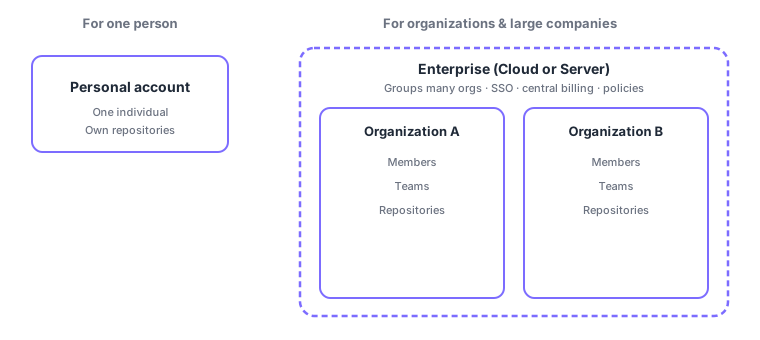
In an organization you group members into Teams and manage repository access per team (permission details are covered in Chapter 4). This keeps administration consistent as the number of people grows.
1.4.2GitHub plans
GitHub offers plans for different needs and scales. The exact free allowances change, but the simplest way to think about it is: the larger the scale, the more management, security, and governance features you get.
| Plan | Mainly for | Highlights |
|---|---|---|
| Free | Individuals / small teams | Public and private repos with core collaboration |
| Team | Organizations | Advanced collaboration and admin for organizations |
| Enterprise | Large organizations | SSO, advanced security, governance, centralized control |
1.4.3GitHub Enterprise
GitHub Enterprise targets large organizations: it groups multiple organizations for centralized management and provides governance features like SAML SSO (single sign-on), centralized billing, and policy management. It comes in two forms.
| Enterprise Cloud | Enterprise Server | |
|---|---|---|
| Hosting | Hosted by GitHub | Installed on your own infrastructure |
| Operation | Managed by GitHub | You operate and manage it |
| Good when | You want to start quickly | You have on-prem or regulatory needs |
- Enterprise Managed Users (EMU)
- A model where a company creates dedicated user accounts managed centrally through its own identity provider (IdP) within the enterprise. These are separate from users personal accounts, so the company fully controls them.
An organization can require two-factor authentication (2FA) for all members in its settings. GitHub itself has been moving toward requiring 2FA for many developers. Treat this as a baseline of safe operation.
"Cloud = hosted by GitHub, Server = self-hosted," "Enterprise groups multiple organizations," and "EMU = dedicated users managed centrally via an IdP" come up often. The difference between personal and organization accounts is also frequently asked.
1.4.4Section summary
- A personal account is for one person; an Organization centrally manages members, teams, and repos
- Plans add more management, security, and governance as scale grows (Free → Team → Enterprise)
- Enterprise groups multiple orgs, in two forms: Cloud (GitHub-hosted) / Server (self-hosted)
- EMU are dedicated users managed centrally via an IdP; an organization can require 2FA
Sign in to track progress — Log in.
Quick check
(just a quick review)Q1. What is the main difference between GitHub Enterprise Cloud and Server?
Q2. Which account type centrally manages multiple members and repositories?
Q3. Which correctly describes Enterprise Managed Users (EMU)?
Keep track of your progress
The full study guide is free to read. Sign up free to practice with the question bank, track what you have read, review your mistakes, and highlight passages.