

What's changed: Deepened DP-700 Chapter 1 (ja figures; comparison tables/scenarios/FAQ/traps/deep paragraphs in all sections)
1.3Workspace Security and Governance
Understand Fabric workspace roles (Admin/Member/Contributor/Viewer), item/row-level access control, sensitivity labels and governance with Purview, and deployment pipelines. Operate the analytics platform securely.
A data platform needs control over "who can do what to which data" and organization-wide governance. Fabric handles this with roles, labels, and Purview integration.
1.3.1Security and governance
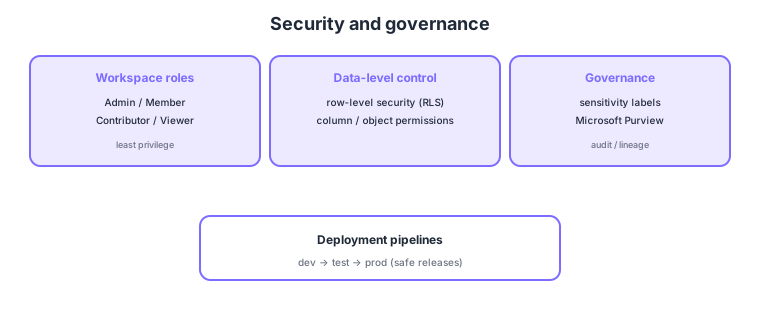
- Workspace roles: grant permissions via the Admin / Member / Contributor / Viewer hierarchy.
- Data-level control: fine-grained control via row-level security (RLS), column-level, and object permissions.
- Sensitivity labels/governance: classify data with sensitivity labels and use Microsoft Purview for auditing and lineage.
- Deployment pipelines: promote items across dev → test → prod stages for safe releases.
Common on DP-700: workspace permissions = four roles (Admin/Member/Contributor/Viewer), filter rows per user = RLS, data classification = sensitivity labels, auditing/lineage = Microsoft Purview, dev→test→prod promotion = deployment pipelines. Assign roles by least privilege.
Layer access control. Workspace roles are coarse: Admin (full management) > Member (share, almost all actions) > Contributor (create/edit) > Viewer (read-only). Narrow further with item permissions (share just a specific Lakehouse/Warehouse/report) and data-level RLS (row-level), column-level/object permissions (show a Viewer only minimal data). Governance uses Microsoft Purview and the Purview hub for classification (sensitivity labels via Information Protection, applying encryption/watermarks), lineage, auditing, and data catalog/search, improving compliance and discoverability. Manage releases with deployment pipelines (three stages dev→test→prod, promoting artifacts with diff comparison) and Git integration (connect a workspace to a repo for CI/CD). Tenant-wide feature availability is governed by admin-portal tenant settings. Summary: “coarse = workspace roles, fine = item permissions/RLS, org governance = Purview/tenant settings, releases = pipelines/Git.”
| Role | Main permissions | Use |
|---|---|---|
| Admin | Full mgmt, grant access | Administrators |
| Member | Share/reshare, almost all | Team leads |
| Contributor | Create/edit items | Developers |
| Viewer | Read-only (RLS can limit rows) | Consumers/viewers |
Scenario: show a report company-wide, but each department sees only its rows and sensitive columns only to some. → Grant viewers the Viewer role, restrict rows per department with RLS, and limit sensitive columns with column-level permissions. Classify data with sensitivity labels and track audit/lineage in Purview. Promote releases to prod via deployment pipelines.
FAQ: Q. Workspace role vs RLS? → A. Roles are coarse control of “what you can do in the workspace”; RLS is data-level control of “which rows you can see.” Use both. Q. Safe dev→prod releases? → A. Promote across three stages with deployment pipelines, or wire CI/CD via Git integration.
Trap: “the Viewer role automatically limits which rows each user sees” is wrong—row restriction is RLS (configured separately); roles are coarse action permissions. Also “sensitivity labels are the primary means to block access” is wrong—they classify/track/protect; access control is primarily roles/RLS.
1.3.2Section summary
- Permissions = workspace roles + RLS/column/object
- Governance = sensitivity labels, Purview, releases = deployment pipelines
Sign in to track progress — Log in.
Quick check
(just a quick review)Q1. Which are valid Fabric workspace roles for granting permissions?
Q2. You want to restrict which rows a user sees. What do you use?
Q3. Which Microsoft governance platform handles data classification, auditing, and lineage?
Keep track of your progress
The full study guide is free to read. Sign up free to practice with the question bank, track what you have read, review your mistakes, and highlight passages.