

What's changed: Deepened DP-700 Chapter 2 (ja figures; comparison tables/scenarios/FAQ/traps/deep paragraphs in all sections)
2.1Data Ingestion (Pipelines, Dataflows, Copy)
Understand ways to ingest data into Fabric—data pipelines (orchestration), Dataflows Gen2 (no-code transform with Power Query), the Copy activity, and shortcuts—and when to use each.
The first step in analytics is ingesting data into Fabric. Choose by purpose: orchestrating bulk copies, no-code transforms, or reference-only.
2.1.1Choosing an ingestion method
For batch ingestion, Mirroring replicates changes from external databases (Azure SQL Database, Cosmos DB, Snowflake, etc.) into Fabric in near real time, keeping an up-to-date copy in OneLake without writing ETL—ready for analysis.
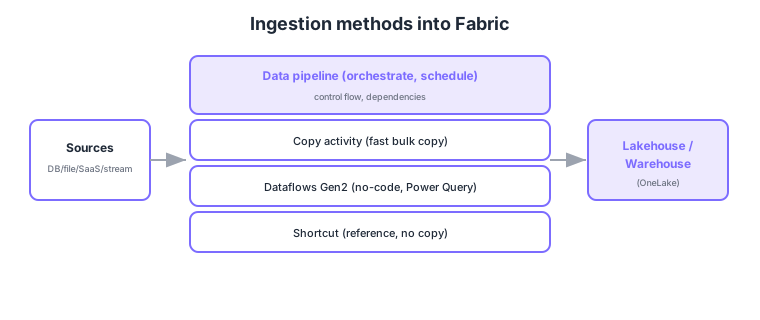
- Data pipeline: orchestrate multiple activities with scheduling, dependencies, and parameters.
- Copy activity: copy large data fast with many connectors.
- Dataflows Gen2: ingest with no-code transforms via Power Query (good for small/medium shaping).
- Shortcut: ingest by reference only into OneLake without physical copy (reduces duplication).
Common on DP-700: orchestrate/schedule multiple steps = data pipeline, fast bulk copy = Copy activity, no-code transform during ingest = Dataflows Gen2, reference without copy = shortcut. Use Dataflow for no-code transforms, pipelines for complex control flow.
A pipeline can orchestrate activities like Dataflows, notebooks, and Copy. Think of Dataflow as transform-centric and pipeline as workflow-centric.
A Fabric data pipeline (Data Factory experience) links activities—Copy, Dataflow, notebook, stored procedure, and control flow (ForEach, If, Lookup, wait)—driven by triggers/schedules, parameters, and success/failure dependencies. The Copy activity moves large data fast via many connectors, choosing full vs incremental (delta) loads. Dataflows Gen2 do no-/low-code shaping with Power Query M and write to a destination (Lakehouse/Warehouse). Shortcuts reference without copying (internal = other workspaces; external = ADLS Gen2/S3/GCS). Eventstream (Real-Time Intelligence) handles streaming ingestion. Decision axes: “complex control flow/scheduling = pipeline,” “no-code shaping = Dataflows Gen2,” “bulk simple copy = Copy,” “reference without moving = shortcut,” “real-time = Eventstream.” For incremental ingestion, use a watermark column or last-modified time to pull only the delta, cutting cost and time.
| Method | Strength | Code |
|---|---|---|
| Data pipeline | Control flow, schedule, dependencies | Low-code |
| Copy activity | Fast bulk movement | No-code |
| Dataflows Gen2 | No-code shaping (Power Query) | No-code |
| Shortcut | Reference without copy | Config only |
Scenario: nightly, ingest only the delta from several sources, shape it, aggregate in a notebook, and retry on failure. → Schedule a data pipeline, do incremental Copy via a watermark column, shape with Dataflows Gen2, aggregate in a notebook, chaining activities by dependency. For real-time needs, use Eventstream separately.
FAQ: Q. Pipeline vs Dataflows Gen2? → A. A pipeline orchestrates multiple steps (workflow); Dataflows Gen2 is the transform itself (Power Query). Pipelines can call Dataflows. Q. Should I full-load everything each time? → A. No—incremental ingestion via a watermark column saves cost and time.
Trap: “shortcuts physically copy data on ingest” is wrong—shortcuts are reference only (no copy); physical copy is the Copy activity. Also “a pipeline alone does no-code shaping” is wrong—the shaping itself is Dataflows Gen2; the pipeline orchestrates.
2.1.2Section summary
- Ingest = pipeline (control) / Copy (bulk) / Dataflows Gen2 (no-code transform) / shortcut (reference)
- Choose by purpose (control vs transform vs reference)
Sign in to track progress — Log in.
Quick check
(just a quick review)Q1. You want to orchestrate multiple activities with scheduling and dependencies. What do you use?
Q2. You want no-code ingestion with Power Query transforms. What do you use?
Q3. You want to reference external data from OneLake without copying it. What do you use?
Keep track of your progress
The full study guide is free to read. Sign up free to practice with the question bank, track what you have read, review your mistakes, and highlight passages.