

What's changed: Deepened DP-700 Chapter 1 (ja figures; comparison tables/scenarios/FAQ/traps/deep paragraphs in all sections)
1.1Overview of Microsoft Fabric
Understand Microsoft Fabric as a single SaaS unifying data integration, analytics, and BI, plus workspaces, capacity, and its experiences (Data Engineering, Data Factory, Data Warehouse, Real-Time, Power BI). The starting point for DP-700.
Microsoft Fabric lets you ingest, store, transform, analyze, and visualize data in one unified SaaS, with role-specific "experiences."
1.1.1Fabric building blocks
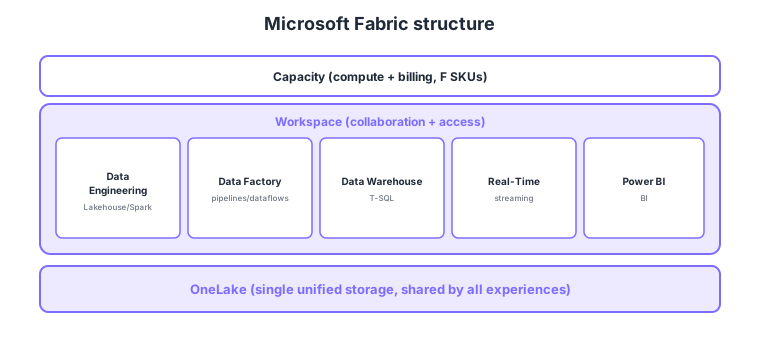
- Capacity: the unit of compute and billing (e.g., F SKUs); assigned to workspaces.
- Workspace: groups items for collaboration and access management.
- Experiences: role-specific feature sets—Data Engineering, Data Factory, Data Warehouse, Real-Time Intelligence, Power BI, etc.
- OneLake: the single unified storage shared by all of Fabric (detailed later).
Common on DP-700: unified SaaS analytics = Microsoft Fabric, compute/billing = capacity (F SKUs), collaboration/access unit = workspace, role-specific features = experiences, shared storage = OneLake. Key point: Fabric is SaaS and experiences share OneLake.
Fabric capacity can be paused/resumed to cut cost during idle periods; it also relates to Power BI Premium.
Fabric is SaaS—you don’t manage infrastructure. The hierarchy is “capacity → workspace → items.” Capacity is an F SKU (F2–F2048, pay-as-you-go/reserved) or Power BI Premium P SKU, and all experiences consume compute in shared capacity units (CU) (smoothed and allowed to burst briefly via smoothing/bursting). Items include Lakehouse, Warehouse, pipeline, notebook, KQL database, semantic model, report, etc. Tenant-wide policy is governed in the admin portal (tenant settings), and workspaces manage access via workspace roles (Admin/Member/Contributor/Viewer). Crucially, every experience’s artifacts live in OneLake, enabling cross-use without extra copies—Fabric’s defining trait. Unlike the traditional approach of stitching separate PaaS (Synapse/ADF), Fabric is unified into one SaaS.
| Layer | Meaning | Example |
|---|---|---|
| Capacity | Compute + billing unit (CU) | F2–F2048, P SKU |
| Workspace | Collaboration + access unit | Per department/project |
| Item | Artifacts in a workspace | Lakehouse/Warehouse/notebook |
Scenario: give a department’s data team ingestion, transformation, DW, and BI together while cutting overnight cost. → Create a department workspace, assign an F-SKU capacity, and use Data Factory/Data Engineering/Warehouse/Power BI experiences. They all share OneLake, so no copies are needed. Pause the capacity overnight to save cost.
FAQ: Q. Is Fabric PaaS? → A. No—it’s SaaS; no infrastructure management, just assign capacity and use experiences. Q. Is each experience’s data stored separately? → A. No—everything lives in OneLake for cross-use without extra copies.
Trap: “Fabric is a set of IaaS/PaaS services you configure yourself” is wrong—Fabric is a unified SaaS with capacity → workspace → items. Also “each experience has separate storage” is wrong—all experiences share OneLake.
1.1.2Section summary
- Fabric = unified SaaS (capacity → workspace → experiences)
- All experiences share OneLake
Sign in to track progress — Log in.
Quick check
(just a quick review)Q1. Which Microsoft analytics platform unifies ingest, store, transform, analyze, and BI in one SaaS?
Q2. What represents the compute and billing unit (e.g., F SKUs) in Fabric?
Q3. What groups items for collaboration and access management in Fabric?
Keep track of your progress
The full study guide is free to read. Sign up free to practice with the question bank, track what you have read, review your mistakes, and highlight passages.