

What's changed: Deepened DP-700 Chapter 1 (ja figures; comparison tables/scenarios/FAQ/traps/deep paragraphs in all sections)
1.2OneLake and Data Stores (Lakehouse, Warehouse)
Understand OneLake (the single shared storage; Delta/Parquet, shortcuts) and the two main data stores—Lakehouse and Warehouse—and how to choose between them.
Fabric data lives in a single lake, OneLake. On top of it you choose between the Lakehouse (files + tables) and the T-SQL-centric Warehouse.
1.2.1OneLake and the two stores
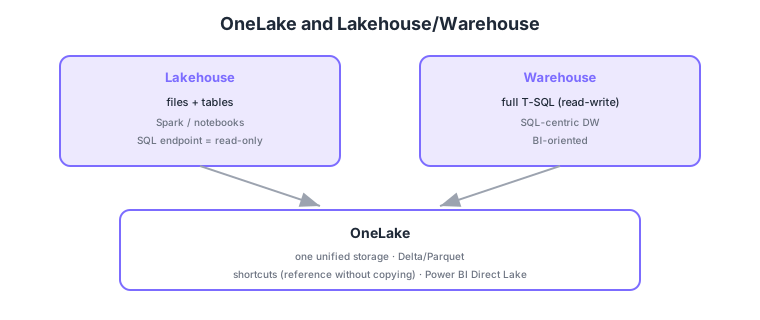
- OneLake: one unified storage per org; Delta/Parquet is standard; shortcuts reference external data without copying.
- Lakehouse: handles files + tables, processed with Spark/notebooks; the SQL analytics endpoint is read-only.
- Warehouse: a full T-SQL (read-write) data warehouse; suited to SQL-centric DW workloads.
- Direct Lake: a Power BI mode that reads OneLake data fast without import or DirectQuery.
Common on DP-700: one unified org storage = OneLake, reference without copying = shortcut, files + Spark = Lakehouse (SQL is read-only), full T-SQL read-write = Warehouse, fast Power BI read = Direct Lake. Choose Lakehouse for Spark/data-science, Warehouse for T-SQL DW.
Shortcuts let you use data in ADLS Gen2 or other workspaces from OneLake without physical copies, reducing duplication and movement cost.
OneLake is one logical data lake per org (ADLS Gen2-compatible internally); tables are stored as Delta Lake (Parquet + a transaction log) with ACID and time travel. Shortcuts are links that reference without copying internal (other workspaces) or external data (ADLS Gen2, Amazon S3, Google Cloud Storage), avoiding duplication and movement cost. A Lakehouse has Files (unstructured/raw) and Tables (Delta tables), processed with Spark/notebooks; its auto-generated SQL analytics endpoint is read-only T-SQL (write via Spark). A Warehouse is a DW with full T-SQL (INSERT/UPDATE/DELETE, multi-table transactions), also storing data as Delta in OneLake. Power BI’s Direct Lake reads OneLake Delta directly without import or DirectQuery, combining import-like speed with live data. Decision axes: “Spark/data-science/unstructured = Lakehouse,” “T-SQL DW / write-heavy = Warehouse,” “both store in OneLake and are read by Power BI via Direct Lake.”
| Aspect | Lakehouse | Warehouse |
|---|---|---|
| Primary tooling | Spark / notebooks | T-SQL |
| SQL writes | No (SQL read-only) | Full T-SQL read-write |
| Data shape | Files + tables (unstructured ok) | Structured tables |
| Best for | Data engineers/scientists | SQL devs/BI |
Scenario: analyze large data already in ADLS Gen2 in Fabric without moving it, and finally show it fast in Power BI. → Reference ADLS Gen2 via a OneLake shortcut (no copy), shape it with Spark in a Lakehouse into Delta tables, and have Power BI read those tables directly and fast via Direct Lake.
FAQ: Q. Can I write via a Lakehouse SQL analytics endpoint? → A. No—it’s read-only; write with Spark/notebooks. For T-SQL writes, use a Warehouse. Q. Direct Lake vs DirectQuery/import? → A. Direct Lake reads OneLake Delta directly—no import, no DirectQuery—combining speed and live data.
Trap: “you can write via T-SQL on a Lakehouse SQL endpoint” is wrong—Lakehouse SQL is read-only (write with Spark, or use a Warehouse). Also “shortcuts copy data into OneLake” is wrong—they reference without copying.
1.2.2Section summary
- OneLake = one unified storage (Delta/Parquet, shortcuts)
- Lakehouse = files + Spark, Warehouse = full T-SQL (read-write)
Sign in to track progress — Log in.
Quick check
(just a quick review)Q1. What is the single unified storage shared across the org in Microsoft Fabric?
Q2. You want to reference external data from OneLake without physically copying it. What do you use?
Q3. Which correctly distinguishes a Lakehouse from a Warehouse?
Keep track of your progress
The full study guide is free to read. Sign up free to practice with the question bank, track what you have read, review your mistakes, and highlight passages.