

What's changed: Deepened AZ-700 Chapter 2 (ja figures; comparison tables/scenarios/FAQ/traps/deep paragraphs in all sections)
2.3Large-Scale Networking with Virtual WAN
Understand Azure Virtual WAN, which unifies many sites, VNets, and remote users over the Microsoft backbone for centralized management—a managed service for operating hub-and-spoke at scale.
As sites and VNets grow, managing connections individually gets complex. Virtual WAN centralizes VPN, ExpressRoute, and VNet connections around a managed hub.
2.3.1Virtual WAN structure
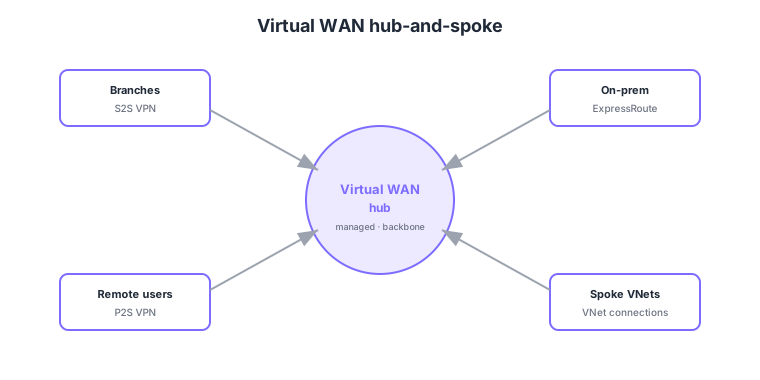
- Virtual WAN hub: a managed hub that aggregates VPN, ExpressRoute, and VNet connections over the Microsoft backbone.
- Centralized management: configure and operate many sites, VNets, and remote users together.
- Scale: better suited to large-scale, global connectivity than hand-built hub-and-spoke.
- Secured hub: a Secured Virtual Hub with Azure Firewall built in enables centralized inspection.
Common on AZ-700: centralize many sites/VNets/users with a managed hub = Virtual WAN, large-scale global hub-and-spoke = Virtual WAN, firewall in the hub for central inspection = Secured Virtual Hub. Choose hand-built hub-and-spoke for small scale, Virtual WAN for large scale.
Virtual WAN has two SKUs—Basic (S2S VPN only) and Standard (full features: ExpressRoute, P2S, hub-to-hub, Secured Hub). In-hub routing is controlled by hub route tables and connection labels, governing which connections (VNet/VPN/ER) learn and propagate which routes. Unlike hand-built hub-and-spoke, the in-hub routers and gateways are managed; you simply register spoke VNets as “VNet connections” and they reach each other (the hub transits, avoiding the non-transitivity problem). A Secured Virtual Hub embeds Azure Firewall (or a supported third-party NVA) in the hub and uses Firewall Manager to centrally manage policy across hubs, inspecting both East-West (VNet-to-VNet) and North-South (internet) directions. Multiple hubs placed globally are auto-meshed over the Microsoft backbone, keeping connectivity consistent across geographically distributed sites.
| Aspect | Hand-built hub-and-spoke | Virtual WAN |
|---|---|---|
| Hub management | You build VNet/gateways/UDRs | Managed (auto-configured per hub) |
| Scale | Small–medium | Large-scale, global |
| Central security | Manually place a firewall in the hub | Secured Hub + Firewall Manager |
Scenario: connect 50 global sites and many VNets and centrally inspect all traffic. → Adopt Standard-SKU Virtual WAN, place a hub per region connecting sites (S2S), remote users (P2S), VNets, and ExpressRoute, and make each hub a Secured Virtual Hub with Firewall Manager applying policy centrally. Operational overhead drops sharply versus hand-built.
FAQ: Q. With Virtual WAN, can spoke VNets talk without the non-transitivity problem? → A. Yes—the hub transits, so spokes attached to the hub reach each other per the route configuration. Q. Basic vs Standard? → A. Basic is S2S VPN only; ExpressRoute, P2S, hub-to-hub, and Secured Hub require Standard.
Trap: “Basic-SKU Virtual WAN supports ExpressRoute and Secured Hub” is wrong—those are Standard-SKU features. Also “Virtual WAN is ideal for a small single-VNet connection” is wrong—small scale is fine with hand-built hub-and-spoke; Virtual WAN targets large, multi-site deployments.
2.3.2Section summary
- Virtual WAN = centralize connections with a managed hub (large-scale, global)
- Secured Virtual Hub = built-in firewall for central inspection
Sign in to track progress — Log in.
Quick check
(just a quick review)Q1. Which Azure service centrally manages many sites, VNets, and remote users via a managed hub?
Q2. Which configuration builds Azure Firewall into a Virtual WAN hub for centralized traffic inspection?
Q3. Compared to small hand-built hub-and-spoke, when is Virtual WAN especially suited?
Keep track of your progress
The full study guide is free to read. Sign up free to practice with the question bank, track what you have read, review your mistakes, and highlight passages.