

What's changed: Deepened AZ-700 Chapter 3 (ja figures; comparison tables/scenarios/FAQ/traps/deep paragraphs in all sections)
3.1System Routes and User-Defined Routes (UDR)
Understand the system routes Azure provides automatically, user-defined routes (UDR) that override them, and the route table that bundles them. Controlling the "next hop" of traffic is the basis of routing.
Traffic in a VNet flows automatically via system routes by default. To intentionally change this, you override the next hop with a UDR (user-defined route).
3.1.1How routing works
For routing, Azure Route Server exchanges routes dynamically via BGP between NVAs or ExpressRoute/VPN gateways and the VNet, removing manual management of static user-defined routes (UDRs) by auto-propagating routes.
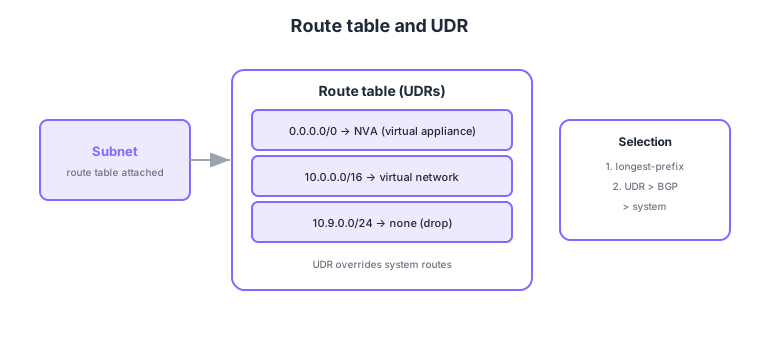
- System routes: Azure provides automatically for intra-VNet, peering, gateways, etc. (default).
- UDR: define destination prefix → next hop, overriding system routes.
- Next hop: specify a virtual appliance (NVA), virtual network gateway, internet, or none, etc.
- Route table: bundles UDRs and is applied by associating it to a subnet.
Common on AZ-700: default routes = system routes, override routes = UDR (destination → next hop), route table is associated to a subnet, selection by longest-prefix match; ties resolved UDR > BGP > system. To send traffic through an NVA, set the UDR next hop to the NVA.
Setting the next hop to "None" drops traffic to that destination—useful for intentionally blocking it.
Azure’s automatic system routes include intra-VNet (e.g., 10.0.0.0/16), peering, gateways (VPN/ExpressRoute), and a default internet route (0.0.0.0/0 → Internet). Enabling service endpoints also injects optimized service-tag routes to the target PaaS prefixes. A UDR’s next-hop types are five: virtual appliance (VirtualAppliance) (explicit IP), virtual network gateway, VNet, internet, and none. Route selection is decided by (1) longest-prefix match, then (2) for equal length, UDR > BGP > system (between two 0.0.0.0/0 routes, the UDR wins). A UDR with VirtualAppliance won’t actually forward unless IP forwarding is enabled on the NVA. To make a UDR reliably win over BGP-learned routes, disable gateway route propagation on the route table. Note that NSGs (allow/deny) and UDRs (path) are independent—both must permit a flow for it to succeed.
| Next-hop type | Meaning | Typical use |
|---|---|---|
| Virtual appliance | Forward to an NVA IP | Firewall inspection, service chaining |
| Virtual network gateway | To VPN/ExpressRoute GW | On-prem-bound, forced tunneling |
| Internet | Azure default egress | PaaS/public destinations |
| None | Drop (blackhole) | Intentionally block a destination |
Scenario: by default VMs egress straight to the internet, but you want all outbound to pass through an inspection NVA. → Associate a route table to the subnet and add a UDR 0.0.0.0/0 → virtual appliance (NVA IP). Enable IP forwarding on the NVA and, if needed, disable BGP propagation so the UDR reliably wins.
FAQ: Q. If system, BGP, and a UDR all have 0.0.0.0/0, which is used? → A. Same prefix length, so precedence decides and the UDR wins. Q. UDR or NSG first? → A. Different roles—UDR is the path (where to send), NSG is allow/deny. A flow needs both to permit it.
Trap: “a UDR alone permits traffic without an NSG” is wrong—UDR is the path, NSG is allow/deny; they’re separate. Also “setting the next hop to a virtual appliance forwards automatically” is wrong—IP forwarding must be enabled on the NVA.
3.1.2Section summary
- Override default system routes with UDRs (destination → next hop)
- Route tables are associated to subnets; selection by longest-prefix match
Sign in to track progress — Log in.
Quick check
(just a quick review)Q1. You want to override default system routes to control the next hop of traffic. What do you use?
Q2. To apply UDRs, a route table is associated with what?
Q3. You want all outbound (0.0.0.0/0) to pass through an inspection appliance. What next hop in the UDR?
Keep track of your progress
The full study guide is free to read. Sign up free to practice with the question bank, track what you have read, review your mistakes, and highlight passages.