

What's changed: Deepened AZ-700 Chapter 1 (ja figures; comparison tables/scenarios/FAQ/traps/deep paragraphs in all sections)
1.3Load Balancing (Load Balancer, App Gateway, Front Door)
Understand how to choose among Azure load balancing services that distribute traffic to backends: Azure Load Balancer (L4), Application Gateway (L7, regional), Front Door (L7, global), and Traffic Manager (DNS-based).
For availability and scale, you distribute traffic across multiple backends. Azure has several load balancers differing by layer (L4/L7) and scope (regional/global).
1.3.1Choosing a load balancer
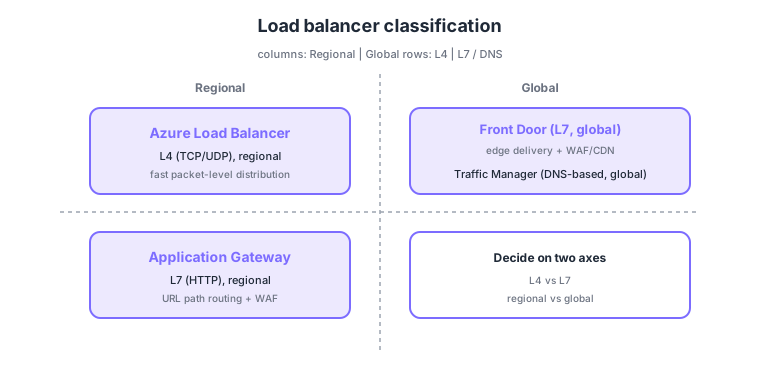
- Azure Load Balancer: distributes regional traffic fast at L4 (TCP/UDP).
- Application Gateway: distributes regionally at L7 (HTTP) with URL path-based routing and a WAF.
- Front Door: L7, global; serves from edges near users worldwide with WAF/CDN.
- Traffic Manager: DNS-based global routing by geography/priority, etc.
Common on AZ-700: L4 regional = Load Balancer, L7 URL-based with WAF, regional = Application Gateway, L7 global with WAF/CDN = Front Door, DNS-based global = Traffic Manager. Decide on two axes: L4 vs L7, regional vs global.
Both Application Gateway and Front Door can integrate a WAF. Choose App Gateway for regional and Front Door for global delivery—decide by scope.
The four aren’t exclusive—you combine them. A common layered design is “Front Door (global L7 + WAF) → per-region Application Gateway (L7 + WAF) → Azure Load Balancer (L4) → VMs.” Load Balancer comes in public (external) and internal (VNet-only) flavors, uses health probes to drop unhealthy backends, and is built from a backend pool, load-balancing rules, and NAT rules. The Standard SKU (zone-redundant, secure by default) is recommended; legacy Basic is limited. Application Gateway flows listener → rule → backend pool and offers path-based/multi-site routing, SSL termination, and autoscale (v2). Front Door and Traffic Manager are easily confused, but Front Door is a reverse proxy (real traffic traverses the edge; caching/WAF possible) while Traffic Manager only returns DNS answers (real traffic goes straight to the backend). Traffic Manager routing methods include priority, weighted, performance, and geographic.
| Service | Layer | Scope | Key feature |
|---|---|---|---|
| Load Balancer | L4 (TCP/UDP) | Regional | Fast; internal/public; health probes |
| Application Gateway | L7 (HTTP) | Regional | Path-based, SSL termination, WAF |
| Front Door | L7 (HTTP) | Global | Edge delivery, WAF, CDN (reverse proxy) |
| Traffic Manager | DNS | Global | Routes via DNS answers (direct traffic) |
Scenario: deliver to global users with low latency while, within each region, routing /api and /img to different backends by URL path and spreading across VMs at L4. → Receive at the edge with Front Door (global, WAF), do path-based routing at the nearest region’s Application Gateway, and spread to VMs via Azure Load Balancer (L4) behind it.
FAQ: Q. The decisive difference between Front Door and Traffic Manager? → A. Front Door is a reverse proxy whose edge carries real traffic (caching/WAF possible); Traffic Manager only returns DNS answers and real traffic goes straight to the backend. Q. L4 balancing for internal-only use? → A. Use an internal Load Balancer (no public IP).
Trap: “Traffic Manager relays real traffic to balance load” is wrong—it only routes via DNS; real traffic goes client→backend directly (Front Door is the one that relays). Also “use Azure Load Balancer to route by HTTP URL path” is wrong—L4 doesn’t see URLs (App Gateway/Front Door operate at L7).
1.3.2Section summary
- Load Balancer (L4) / App Gateway (L7 regional) / Front Door (L7 global) / Traffic Manager (DNS)
- Decision axes = L4 vs L7, regional vs global
Sign in to track progress — Log in.
Quick check
(just a quick review)Q1. You want fast L4 (TCP/UDP) load balancing within a region. What do you use?
Q2. You want HTTP URL path-based routing with a WAF within a region. What do you use?
Q3. You want global L7 load balancing from edges near users worldwide (with WAF/CDN). What do you use?
Keep track of your progress
The full study guide is free to read. Sign up free to practice with the question bank, track what you have read, review your mistakes, and highlight passages.