

What's changed: Deepened AZ-700 Chapter 1 (ja figures; comparison tables/scenarios/FAQ/traps/deep paragraphs in all sections)
1.1Virtual Networks (VNet) and Subnets
Understand the virtual network (VNet) as the foundation of Azure networking, plus subnets, address space (CIDR), and VNet peering. The starting point for "core networking infrastructure" in AZ-700.
A virtual network (VNet) is the logical network that privately connects Azure resources—analogous to an on-prem LAN, divided internally into subnets.
1.1.1VNet building blocks
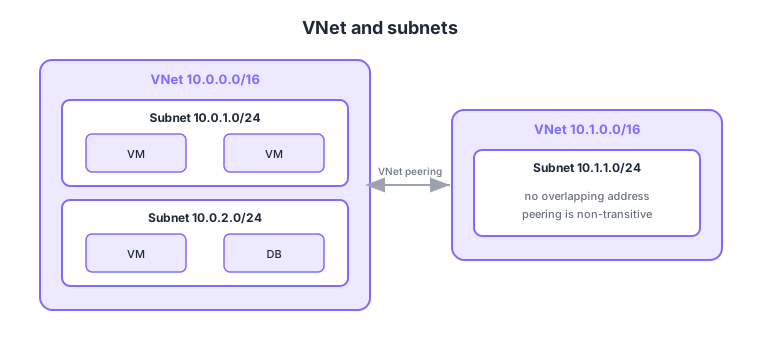
- VNet: a private network within a region; its address space is defined with CIDR (e.g., 10.0.0.0/16).
- Subnet: a division of the VNet where resources are placed and NSGs/routes are associated.
- VNet peering: connects two VNets privately with low latency (same or different regions).
- Watch for overlap: design so address spaces do not overlap with peered/connected VNets or on-prem.
Common on AZ-700: private network within a region = VNet, address space = CIDR, connect two VNets privately = VNet peering, don’t overlap address spaces. Note peering is non-transitive (A-B and B-C don’t give A-C).
Azure reserves the first few IPs in each subnet, so usable IPs are fewer than expected—account for this when sizing subnets.
Each subnet reserves 5 IPs (the first four and the last)—e.g., in 10.0.1.0/24: the network address, the default gateway, two for Azure DNS, and broadcast. A VNet’s address space can be added/expanded later and subnets added, but shrinking an in-use subnet isn’t easy, so size generously up front. Peering is non-transitive by default (A-B and B-C don’t give A-C), but you can transit by placing a gateway or Azure Firewall in a hub VNet and routing each spoke through it with route tables (UDRs). Gateway transit on a peering lets spokes share the hub’s VPN/ExpressRoute gateway to reach on-prem. Some services (Azure Firewall, Bastion, VPN Gateway) require a dedicated subnet with a fixed name (e.g., AzureFirewallSubnet).
| Connectivity | Use | Notes |
|---|---|---|
| VNet peering | Private VNet ↔ VNet | Low latency, high bandwidth, non-transitive |
| VPN Gateway | On-prem ↔ VNet (encrypted tunnel) | Over the internet, moderate bandwidth |
| ExpressRoute | Dedicated on-prem ↔ Azure | Bypasses the internet, high SLA |
Scenario: in a hub-and-spoke setup, two spoke VNets (A and C) must talk to each other. → Peering is non-transitive, so either peer A-C directly, or place an Azure Firewall in the hub (B) and route A’s and C’s traffic for each other through the firewall. This assumes A, B, and C address spaces don’t overlap.
FAQ: Q. Can a VNet span multiple regions? → A. No—a VNet belongs to a single region (and subscription). Cross-region connectivity uses global VNet peering or ExpressRoute. Q. Can I change the address space later? → A. You can add/expand, but you can’t shrink in a way that overlaps in-use subnets—size with headroom.
Trap: “peering A-B and B-C automatically lets A-C communicate” is wrong—peering is non-transitive; transit needs a hub firewall/gateway plus UDRs. Also “peered VNets can share the same address space” is wrong—overlap is not allowed.
1.1.2Section summary
- VNet = private network within a region (CIDR, subnets)
- Peering = private VNet-to-VNet connection (non-transitive)
Sign in to track progress — Log in.
Quick check
(just a quick review)Q1. Which is the logical, in-region network that privately connects Azure resources?
Q2. You want to connect two VNets privately with low latency. What do you use?
Q3. What should you avoid by design when peering VNets?
Keep track of your progress
The full study guide is free to read. Sign up free to practice with the question bank, track what you have read, review your mistakes, and highlight passages.