

What's changed: Deepened AZ-700 Chapter 1 (ja figures; comparison tables/scenarios/FAQ/traps/deep paragraphs in all sections)
1.2Name Resolution in Azure (DNS)
Understand public DNS (hosting public domains), private DNS zones (name resolution inside a VNet), and Azure-provided default resolution. Resolving names to addresses is fundamental to networking.
Communication uses IP addresses, but people use names. DNS performs that name → address translation. Azure offers DNS for both public and private use.
1.2.1Public DNS and private DNS
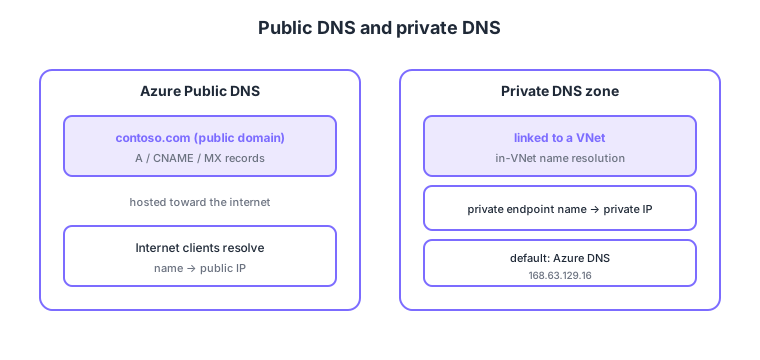
- Azure Public DNS: host DNS records for a public domain (e.g., contoso.com) on Azure.
- Private DNS zone: private name resolution within VNets; link the VNet to use it.
- With private endpoints: used to resolve private endpoint names to their private IPs.
- Default resolution: inside a VNet, Azure-provided DNS (168.63.129.16) handles basic resolution.
Common on AZ-700: host public-domain DNS = Azure Public DNS, private name resolution in a VNet = private DNS zone, private endpoint name → private IP = link a private DNS zone.
To resolve private endpoint names from on-prem, the common approach is a DNS Private Resolver or conditional forwarders.
When you create a private endpoint, the PaaS public FQDN (e.g., mystore.blob.core.windows.net) is changed via a CNAME to point at privatelink.blob.core.windows.net. For VNet clients to resolve that to the private IP, create the matching private DNS zone (privatelink.blob.core.windows.net), link it to the VNet, and let the endpoint auto-register its A record. On-prem can’t reach Azure DNS (168.63.129.16) directly, so the standard approach is a conditional forwarder to an inbound endpoint of the Azure DNS Private Resolver. A centralized hub DNS design that reuses the same private zone across VNets is also common. Use record types by purpose: CNAME for aliases, A for IPv4, MX for mail, and TXT for ownership/SPF. Traffic Manager, which routes via DNS, builds on these mechanics.
| DNS type | Resolves | Scope |
|---|---|---|
| Azure Public DNS | Public domain name → public IP | Internet |
| Private DNS zone | VNet/private-endpoint name → private IP | Linked VNets |
| Azure-provided default DNS | Basic in-VNet resolution | VNet (168.63.129.16) |
| DNS Private Resolver | On-prem ↔ Azure forwarding | Hybrid |
Scenario: resolve an Azure Storage private endpoint name from an on-prem server. → On the Azure side, set up the privatelink.blob.core.windows.net private DNS zone and a DNS Private Resolver (inbound endpoint), then conditional-forward *.blob.core.windows.net from on-prem DNS to the resolver. On-prem can now resolve to the private IP.
FAQ: Q. Does creating a private endpoint make DNS correct automatically? → A. If you link the private DNS zone to the VNet and enable auto-registration, in-VNet resolution is automatic; from on-prem you still need a resolver/forwarder. Q. What is 168.63.129.16? → A. Azure’s fixed virtual DNS (and health-probe) IP provided inside every VNet.
Trap: “use Azure Public DNS to resolve private endpoint names” is wrong—resolving to a private IP is the private DNS zone’s job; Public DNS is for public domains. Also “query 168.63.129.16 directly from on-prem” is wrong—it’s unreachable from outside the VNet; you need a resolver.
1.2.2Section summary
- Public DNS = public domains, private DNS zone = in-VNet resolution
- Use a private DNS zone to resolve private endpoint names
Sign in to track progress — Log in.
Quick check
(just a quick review)Q1. You want to resolve names of VNet resources/private endpoints to private IPs. What do you use?
Q2. You want to host DNS records for your public domain (contoso.com) on Azure. What do you use?
Q3. What is the basic role of DNS?
Keep track of your progress
The full study guide is free to read. Sign up free to practice with the question bank, track what you have read, review your mistakes, and highlight passages.