

What's changed: Deepened AZ-500 Chapter 3 (ja figures; comparison tables/scenarios/FAQ/traps/deep paragraphs in all sections)
3.3Securing Compute and Defender for Cloud
Understand secure VM operations (Just-In-Time VM access, disk encryption, update management) and Microsoft Defender for Cloud (secure score, workload protection) for visualizing and strengthening cloud-wide posture.
Compute like VMs is a common foothold for attacks, so protect it by not leaving management ports open and encrypting disks. Use Defender for Cloud to surface weaknesses across the estate.
3.3.1Compute protection and posture management
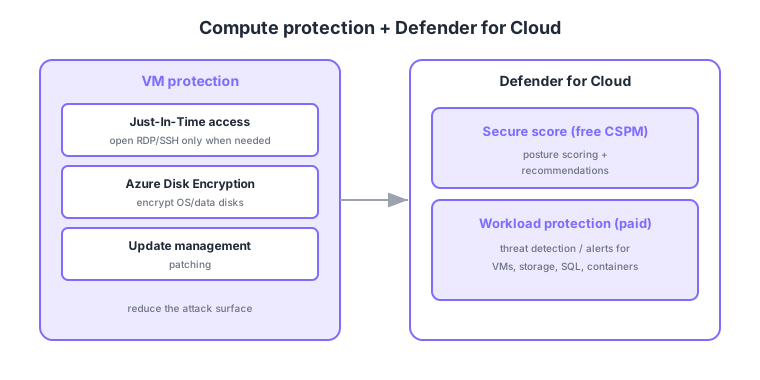
- Just-In-Time VM access: open management ports (RDP/SSH) only when needed, keeping them closed otherwise.
- Disk encryption: encrypt OS/data disks with Azure Disk Encryption.
- Secure score: Defender for Cloud scores your posture and offers improvement recommendations.
- Workload protection: provides threat detection (alerts) for VMs, storage, SQL, containers, and more.
Common on AZ-500: open management ports only when needed = Just-In-Time VM access, posture scoring + recommendations = secure score (Defender for Cloud), threat detection for VMs/SQL/storage = Defender workload protection, disk encryption = Azure Disk Encryption.
Defender for Cloud splits into free CSPM (posture management, secure score) and paid Defender plans (workload protection); threat-detection alerts come with the latter.
Secure score is computed from how many security recommendations you meet, and those recommendations derive from Azure Policy built-in initiatives (the Microsoft Cloud Security Benchmark). The regulatory compliance dashboard shows conformance against standards like PCI DSS and ISO 27001. Disk encryption has two families: Azure Disk Encryption (ADE), which uses BitLocker/DM-Crypt inside the guest OS, and encryption at host / server-side encryption (SSE), which encrypts transparently at the storage platform—both support CMK. For detection, it’s common to funnel Defender for Cloud alerts into Microsoft Sentinel (SIEM/SOAR) for correlation and automated response. VM configuration drift is assessed via Machine Configuration (formerly guest configuration), and JIT works internally by inserting time-bound rules into the NSG/Firewall.
| Tier | What you get | Billing |
|---|---|---|
| CSPM (foundational) | Secure score, recommendations, regulatory compliance | Free |
| Defender plans | Per-workload threat-detection alerts (VM/SQL/Storage/containers) | Per-resource usage |
| Sentinel integration | Aggregate/correlate alerts + automated response (SOAR) | Ingestion-based |
Scenario: show leadership cloud “safety” at a glance and detect suspicious SQL logins. → Share Defender for Cloud’s secure score as the posture metric and work down the recommendations. Then enable Defender for SQL (paid) to receive anomalous-login and SQL-injection alerts, optionally funneling them into Sentinel to automate response.
FAQ: Q. Is a high secure score enough to be safe? → A. It’s a good metric but about posture (configuration); actual attack detection is workload protection (Defender plans). Use both. Q. ADE vs encryption at host? → A. Use ADE to keep it within the OS; use encryption at host to transparently cover all disks (including temp disks) at the platform.
Trap: “a high secure score means you’ll get threat-detection alerts” is wrong—secure score is free CSPM posture; threat alerts require enabling the paid Defender plans. Also “JIT fully isolates the VM” is wrong—it temporarily opens management ports when needed, not isolation itself.
3.3.2Section summary
- Compute = JIT access, disk encryption, update management
- Defender for Cloud = secure score (posture) + workload protection (detection)
Sign in to track progress — Log in.
Quick check
(just a quick review)Q1. You want VM RDP/SSH ports closed by default and opened only temporarily when needed. What do you use?
Q2. Which Defender for Cloud feature scores your cloud-wide security posture and offers recommendations?
Q3. Which Defender for Cloud area provides threat-detection alerts for VMs, storage, SQL, and containers?
Keep track of your progress
The full study guide is free to read. Sign up free to practice with the question bank, track what you have read, review your mistakes, and highlight passages.