

What's changed: Deepened AZ-500 Chapter 3 (ja figures; comparison tables/scenarios/FAQ/traps/deep paragraphs in all sections)
3.2Securing Storage and Databases
Understand storage account access control (SAS, disabling keys, Entra authorization) and network restrictions, plus Azure SQL authentication, firewall, Transparent Data Encryption (TDE), and Always Encrypted. Defend the data layer in depth.
Data is often the attacker’s ultimate goal. It’s vital to minimize access to storage and SQL and protect data at rest and in use with encryption.
3.2.1Protecting storage and SQL
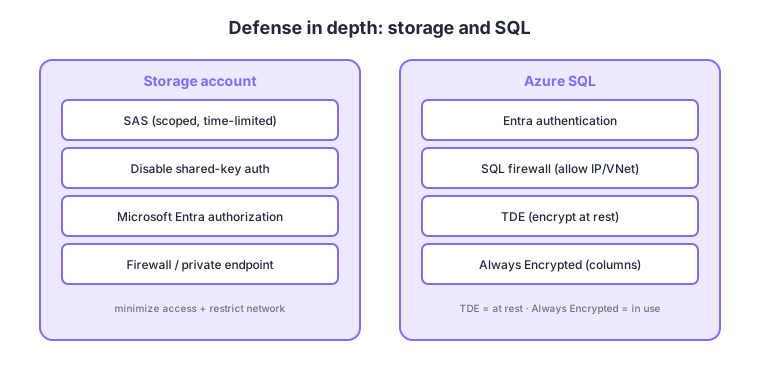
- Storage access: share with scoped, time-limited SAS; prefer disabling shared-key auth and using Entra authorization.
- Storage network: restrict public access with a firewall or private endpoints.
- SQL auth/perimeter: prefer Microsoft Entra authentication and limit allowed IP/VNet with the SQL firewall.
- SQL encryption: TDE (encrypts the database at rest, on by default) and Always Encrypted (encrypts sensitive columns client-side so the server never sees plaintext).
Common on AZ-500: scoped, time-limited sharing = SAS, DB encryption at rest = TDE (default), hide sensitive columns even from the server = Always Encrypted, prefer Entra auth + SQL firewall for DBs. Note: TDE protects at rest; Always Encrypted also protects in use.
Storage account keys are overly powerful; use user-delegation SAS (Entra-based) or disable keys to reduce the attack surface.
There are three SAS types. An account SAS applies broadly to the account, a service SAS is scoped to a service (Blob/Queue, etc.), and a user-delegation SAS is signed with Entra ID credentials—so it uses no shared key and aligns with Entra RBAC. Shared-key auth can be disabled with allowSharedKeyAccess=false, after which leaning on Entra authorization (roles like Storage Blob Data Reader) is robust. On Azure SQL, prefer Entra authentication over SQL auth and make the server admin an Entra group to avoid dependence on individual accounts. The TDE protector can switch from the default service-managed key to a CMK (BYOK), while Always Encrypted keeps keys (the column master key) client-side or in Key Vault, and SECURE ENCLAVES enables some server-side operations (e.g., range queries) over encrypted columns. For detection, Microsoft Defender for SQL and Defender for Storage flag anomalous access and SQL-injection indicators.
| Protection | What it protects | Server sees plaintext? |
|---|---|---|
| TDE | At rest (files/backups) | Yes (decrypted in processing) |
| Always Encrypted | Sensitive columns end-to-end | No (decrypted client-side) |
| TLS (in transit) | The network path | N/A (encrypts the path) |
Scenario: give an external partner read-only access to one blob for just one hour without handing over storage keys. → Issue a user-delegation SAS scoped to read, a one-hour expiry, and that specific blob. Keep shared-key auth disabled and optionally add an IP restriction.
FAQ: Q. With TDE, do I still need Always Encrypted? → A. Different goals—TDE protects disk/backups at rest, but DBAs and the server can handle plaintext. For columns even a DBA shouldn’t see, use Always Encrypted. Q. What if a SAS leaks? → A. Revoke via the associated stored access policy, or rotate the shared/user-delegation key to invalidate them en masse.
Trap: “TDE encrypts data in transit” is wrong—TDE is at rest; TLS handles in transit. Also “Always Encrypted lets the server query freely” is generally wrong—since it never sees plaintext, queries are limited (e.g., equality); range operations need Secure Enclaves.
3.2.2Section summary
- Storage = SAS, Entra authorization, network restrictions
- SQL = Entra auth, firewall, TDE, Always Encrypted
Sign in to track progress — Log in.
Quick check
(just a quick review)Q1. You want to grant scoped, time-limited access to a specific blob. What do you issue?
Q2. Which feature encrypts an Azure SQL database at rest and is enabled by default?
Q3. You want to encrypt sensitive columns (e.g., credit card numbers) client-side so the SQL server never sees plaintext. What do you use?
Keep track of your progress
The full study guide is free to read. Sign up free to practice with the question bank, track what you have read, review your mistakes, and highlight passages.