

What's changed: Deepened AZ-500 Chapter 3 (ja figures; comparison tables/scenarios/FAQ/traps/deep paragraphs in all sections)
3.1Key Vault and Encryption
Understand Azure Key Vault for safely storing keys/secrets/certificates and the basics of encryption at rest. Combined with managed identity, keeping no credentials in code is core to AZ-500.
Hardcoding passwords or API keys in code or config files raises leak risk. Store them centrally in Key Vault and have apps retrieve them via managed identity for safe handling.
3.1.1Key Vault and encryption building blocks
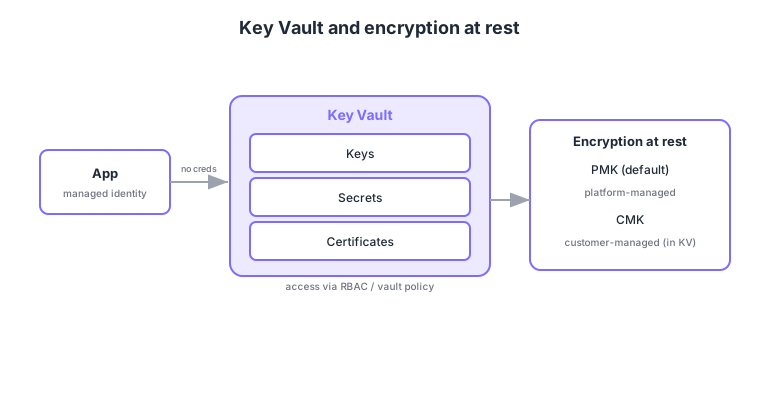
- Key Vault: centrally store keys, secrets, certificates; HSM-backed protection levels are available.
- Access control: authorize who can read what via RBAC or vault access policies.
- Managed identity: apps hold no credentials and fetch secrets from Key Vault via their identity.
- Encryption at rest: PMK (platform-managed keys) by default; use CMK (customer-managed keys) in Key Vault when you must control the key (e.g., compliance).
Common on AZ-500: central store for keys/secrets/certs = Key Vault, no credentials in code = managed identity + Key Vault, control your own key = CMK, default encryption = PMK. Note the trend toward RBAC for Key Vault access.
Enable soft delete and purge protection on Key Vault to protect keys from accidental deletion or malicious purge.
Key Vault offers two authorization models. Vault access policies are the legacy, operation-category model (“this principal may do key ops / get secrets”) applied to the whole vault. Azure RBAC assigns roles like Key Vault Secrets User at management-group/subscription/resource-group/individual-secret scope and integrates with PIM and Conditional Access, so it’s now recommended. For protection levels there is software-backed Standard, hardware-backed Premium (HSM-backed), and Managed HSM where keys never leave the vault. A typical CMK use is switching Storage encryption keys or the SQL TDE protector to a CMK in Key Vault so you control rotation and revocation. Managed identities come as system-assigned (tied to and sharing the lifetime of one resource) and user-assigned (shareable across resources with an independent lifetime).
| Aspect | Vault access policy | Azure RBAC |
|---|---|---|
| Granularity | Whole vault, by operation category | Per scope (down to a single secret) |
| PIM / Conditional Access | Not integrated | Integrated |
| Recommendation | Legacy | Recommended today |
Scenario: compliance requires “we own the encryption key, rotate it yearly, and can revoke it anytime.” → Create a CMK in Key Vault (with purge protection), switch Storage/SQL encryption to the CMK, configure key-version rotation, limit access via RBAC (e.g., Key Vault Crypto Officer), and track operations in audit logs.
FAQ: Q. Secret vs key? → A. A secret is any string (connection strings, passwords); a key is a crypto key for encryption/signing, with key operations (wrap/sign) performed inside Key Vault. Q. System- vs user-assigned identity? → A. System-assigned for a single resource; user-assigned to share the same identity and permissions across multiple resources.
Trap: “CMK is cryptographically stronger than PMK” is wrong—the algorithm is the same; the difference is who manages the key (PMK = Azure, CMK = customer). Also “with a managed identity you don’t need Key Vault” is wrong—a managed identity is the auth method; secrets still live in Key Vault.
3.1.2Section summary
- Key Vault = central store for keys/secrets/certs (fetched via managed identity)
- Encryption = PMK by default / CMK for self-managed keys
Sign in to track progress — Log in.
Quick check
(just a quick review)Q1. Which Azure service centrally and securely stores keys, secrets, and certificates?
Q2. What lets an app fetch secrets from Key Vault without credentials in code?
Q3. You must control your own encryption key and keep it in Key Vault (e.g., compliance). Which approach?
Keep track of your progress
The full study guide is free to read. Sign up free to practice with the question bank, track what you have read, review your mistakes, and highlight passages.