

What's changed: Deepened AZ-500 Chapter 1 to Associate depth (tables, scenarios, FAQ, traps; localized figures)
1.3RBAC and Privileged Identity Management (PIM)
Understand role-based access control (RBAC) that defines "who can do what," and Privileged Identity Management (PIM) that activates powerful roles only when needed—supporting least privilege.
After authentication (who) comes authorization (what you can do). Azure uses RBAC to assign roles at a scope, and PIM to elevate powerful admin roles only when needed—preserving least privilege.
1.3.1RBAC and PIM
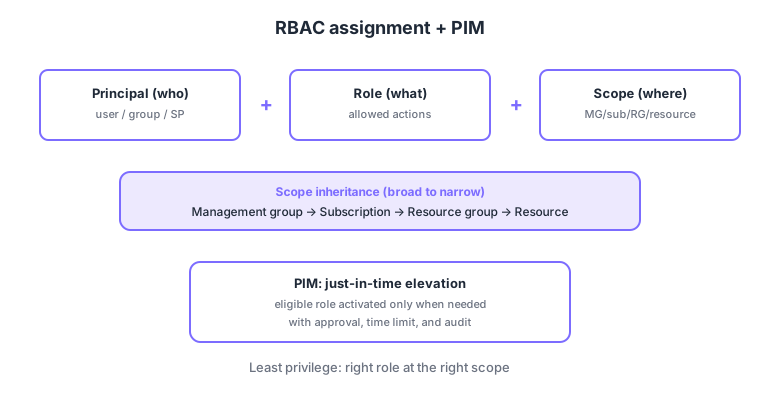
- RBAC assignment = principal (who) + role (what) + scope (where)—three parts.
- Scope: inherited down management group → subscription → resource group → resource.
- Least privilege: assign the minimum necessary role at the minimum necessary scope.
- PIM: just-in-time, time-bound elevation of strong roles (e.g., Owner, Global Administrator) with approval, expiry, and audit.
Common on AZ-500: who can do what = RBAC (principal + role + scope), elevate only when needed instead of standing access = PIM JIT, least privilege = right role at the right scope. RBAC authorizes Azure resources; Entra roles authorize the directory.
Authorization principle: "least privilege, only when needed." An Azure RBAC assignment has three parts—principal (who) + role definition (what) + scope (where)—and scope inherits management group → subscription → resource group → resource. Key roles: Reader (read), Contributor (create/modify but cannot manage access = grant roles), Owner (full + manage access), User Access Administrator (manage permissions only). Use a custom role when built-ins don’t fit; an explicit deny assignment overrides allows. PIM (Privileged Identity Management, P2) keeps strong roles like Owner/Global Administrator eligible and elevates them just-in-time with approval, expiry, MFA, and audit, with access reviews for periodic cleanup. RBAC (Azure resource authorization) and Entra directory roles (tenant/identity admin) are separate layers. The axes: "who/what/where = RBAC," "no standing access, elevate when needed = PIM," "read = Reader / create-modify = Contributor / manage perms = Owner."
| Goal | Use |
|---|---|
| Read-only | Reader |
| Create/modify (no granting) | Contributor |
| Full + manage access | Owner |
| Strong roles only when needed | PIM (JIT elevation, P2) |
Scenario: give operators read-only normally and Owner only in emergencies. Assign Reader normally and make Owner eligible via PIM. In emergencies, elevate just-in-time with approval + MFA + a few-hour expiry, logging actions to the audit log. Scope assignments minimally (the target resource group) and run quarterly access reviews. Keep standing Owner/Global Administrator to a minimum.
Q. Who/what/where? RBAC (principal + role + scope). Q. Read only? Reader. Q. Create/modify but no granting? Contributor. Q. Full + manage access? Owner. Q. Strong roles only when needed? PIM (JIT, P2). Q. RBAC vs Entra roles? Resource authorization vs directory admin.
Traps: (1) Contributor cannot grant roles (manage access)—that’s Owner/User Access Administrator. (2) Scope inherits, so an over-broad higher assignment over-grants—assign at the narrowest scope. (3) PIM needs P2. (4) Deny assignments override allows.
Assigning Global Administrator or Owner permanently to many users is risky. Make them "eligible" via PIM and elevate only when needed.
1.3.2Section summary
- RBAC = principal + role + scope (with inheritance)
- PIM = just-in-time elevation when needed (least privilege)
Sign in to track progress — Log in.
Quick check
(just a quick review)Q1. Which authorization mechanism defines "who can do what at which scope" for Azure resources?
Q2. You want to elevate powerful admin roles just-in-time with approval and expiry instead of standing access. What do you use?
Q3. Which is the correct RBAC scope inheritance order (broad → narrow)?
Keep track of your progress
The full study guide is free to read. Sign up free to practice with the question bank, track what you have read, review your mistakes, and highlight passages.