

What's changed: Deepened AZ-500 Chapter 1 to Associate depth (tables, scenarios, FAQ, traps; localized figures)
1.1Identity Management with Microsoft Entra ID
Understand Microsoft Entra ID (formerly Azure AD), the starting point of Azure security: tenants/users/groups, hybrid identity (sync), and external identities (B2B, plus Microsoft Entra External ID for customers; the older Azure AD B2C is closed to new tenants since May 2025). The basis of "Manage identity and access" in AZ-500.
Cloud security begins with "who is accessing" (identity). Azure’s cloud identity platform is Microsoft Entra ID, which centrally handles authentication for users, groups, and apps.
1.1.1Entra ID building blocks
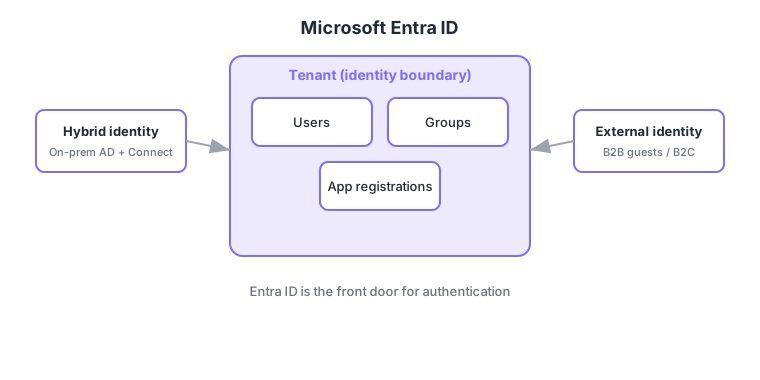
- Tenant: the organization’s identity boundary; an Azure subscription is tied to one tenant.
- Users/groups: the principals that authenticate; assigning roles/permissions to groups simplifies management.
- Hybrid identity: sync on-prem AD users via Entra Connect so the same credentials work in the cloud.
- External identity: handle outside users via B2B (invite partners as guests) and B2C (customer identities).
Common on AZ-500: cloud identity platform = Microsoft Entra ID, sync on-prem AD to cloud = Entra Connect, invite partners as guests = B2B, customer-facing identities = B2C. Also remember tenant = identity boundary.
Security starts with identity. Microsoft Entra ID holds users/groups/app registrations (service principals) in a tenant (the org’s identity boundary; an Azure subscription ties to one tenant); assigning roles to groups simplifies management (dynamic groups auto-populate by attribute rules). Integrate on-prem AD via Microsoft Entra Connect (password-hash sync / pass-through auth / federation) for hybrid identity. Outside users go through external identity—B2B (invite partners as guests) and B2C (customer-facing, Entra External ID). Use managed identities for credential-less app/VM identities, Entra roles (directory roles like Global Administrator) for strong admin rights, and Identity Protection (P2) to score user/sign-in risk. The axes: "cloud identity platform = Entra ID," "on-prem sync = Entra Connect," "partners = B2B," "customers = B2C," "app identity = managed identity/service principal." Note Entra roles (directory) and Azure RBAC (resources) are separate layers.
| Goal | Use |
|---|---|
| Sync on-prem AD to cloud | Entra Connect (hybrid identity) |
| Invite partners as guests | B2B collaboration |
| Customer-facing identities | B2C (External ID) |
| Keyless app/VM identity | Managed identity |
Scenario: internal users on on-prem AD, partners as guests, customers in a separate app. Sync internal users via Entra Connect (hybrid identity, same credentials). Invite partners with B2B and grant least privilege via groups. Use B2C for customers in a separate directory. Authenticate backend automation keylessly with a managed identity, and detect risky sign-ins with Identity Protection feeding Conditional Access.
Q. Cloud identity platform? Microsoft Entra ID. Q. On-prem sync? Entra Connect. Q. Partner guests? B2B. Q. Customer identities? B2C. Q. Keyless app identity? Managed identity. Q. What is a tenant? The org’s identity boundary (a subscription ties to one tenant).
Watch the mix-ups: (1) B2B (partner guests) ≠ B2C (customers)—don’t swap use cases. (2) Entra roles (directory admin) and Azure RBAC (resource authorization) are separate layers—Global Administrator ≠ Owner. (3) Tenant and subscription are distinct (a subscription trusts one tenant). (4) Managed identities relate to service principals but only managed identities avoid key management.
Azure AD was renamed to Microsoft Entra ID. Exams and docs may use either name; they refer to the same thing.
1.1.2Section summary
- Entra ID = cloud identity platform (tenant = boundary)
- Hybrid identity (sync) / external identity (B2B, B2C)
Sign in to track progress — Log in.
Quick check
(just a quick review)Q1. Which service is the foundation for identity and access in Azure cloud?
Q2. You want to sync on-prem Active Directory users into Entra ID to reuse credentials. What do you use?
Q3. You want to invite partner-company users as guests to access your resources. Which feature?
Keep track of your progress
The full study guide is free to read. Sign up free to practice with the question bank, track what you have read, review your mistakes, and highlight passages.