

What's changed: Deepened AZ-500 Chapter 1 to Associate depth (tables, scenarios, FAQ, traps; localized figures)
1.2MFA and Conditional Access
Understand multi-factor authentication (MFA) beyond passwords alone, and Conditional Access that controls access based on sign-in context (user, location, device, risk)—the core of Zero Trust.
Passwords leak easily, so we protect access with MFA (an extra proof of identity) and Conditional Access that decides allow/block/extra-auth based on context.
1.2.1How Conditional Access works
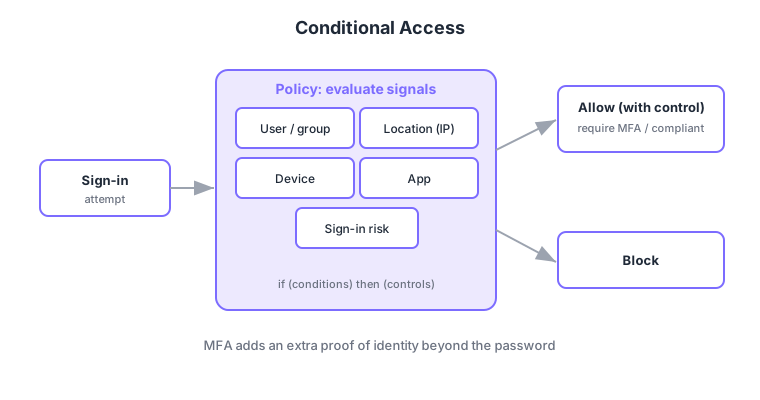
- MFA: verify identity with another factor—app notification, one-time code, biometrics—beyond the password (knowledge).
- Conditional Access: if-then policies—"if (conditions) … then (controls)"—to decide access.
- Signals: evaluate user/group, location (IP), device compliance, app, and sign-in risk.
- Controls: allow/block, or grant with conditions like require MFA or require compliant device.
Common on AZ-500: control access by context = Conditional Access, extra identity proof = MFA, auto MFA/block on risky sign-ins = Conditional Access + Identity Protection. Conditional Access requires Entra ID P1 or higher.
The core of Zero Trust is MFA and Conditional Access. MFA verifies identity with a second factor beyond the password (knowledge)—Authenticator approval/TOTP, FIDO2 security keys, Windows Hello, SMS/phone (phishing resistance: FIDO2/passkey > app > SMS). Conditional Access uses if (conditions = signals) → then (controls) policies: signals include user/group, location (named locations/country), device compliance (Intune), client app, and sign-in/user risk; controls include allow/block, require MFA, require compliant device, app protection policy, and session controls (e.g., sign-in frequency). Risk-based policies integrate with Identity Protection (P2), auto-requiring MFA or blocking on leaked credentials/impossible travel. Roll out with report-only mode to assess impact before enabling, and exclude break-glass accounts. P1 enables Conditional Access; P2 enables risk-based/PIM. The axes: "control access by context = Conditional Access," "extra identity proof = MFA," "auto-respond by risk = Identity Protection."
| Requirement | Means |
|---|---|
| Control access by context | Conditional Access (if-then) |
| Extra identity proof | MFA (FIDO2/app > SMS) |
| Auto-respond to risky sign-ins | Identity Protection (P2) + Conditional Access |
| Assess impact before enabling | Report-only mode |
Scenario: keep it smooth normally and tighten only on risk. In Conditional Access, set "skip MFA from trusted locations/compliant devices" and "require MFA or block on high sign-in risk / unknown location" (risk from Identity Protection). Prefer FIDO2/Authenticator, limit SMS. Enable after checking impact in report-only mode, excluding break-glass accounts to avoid lockout.
Q. Control access by context? Conditional Access. Q. Extra identity proof? MFA (FIDO2/app safer than SMS). Q. Auto MFA/block on risk? Identity Protection (P2) + Conditional Access. Q. Pre-prod check? Report-only mode. Q. Avoid lockout? Exclude break-glass. Q. License for CA? P1+.
Watch the mix-ups: (1) Conditional Access needs P1+; risk-based/PIM/Identity Protection need P2—not on free tenants. (2) A CA that blocks all users locks you out too—always exclude break-glass and validate in report-only. (3) SMS MFA is weak to phishing/SIM-swap—prefer FIDO2/passkeys. (4) Conditional Access governs sign-in authorization—separate from Azure resource RBAC.
Beyond "require MFA for all users," you can combine conditions (e.g., skip MFA from trusted locations) to balance security and usability.
1.2.2Section summary
- MFA = identity proof via another factor (mitigates leaked passwords)
- Conditional Access = if-then access control (signals → controls)
Sign in to track progress — Log in.
Quick check
(just a quick review)Q1. What strengthens identity verification with an app approval or one-time code in addition to a password?
Q2. You want to allow/block/require-MFA based on sign-in location, device, and risk. What do you use?
Q3. Which is NOT a "signal" evaluated by Conditional Access?
Keep track of your progress
The full study guide is free to read. Sign up free to practice with the question bank, track what you have read, review your mistakes, and highlight passages.