

What's changed: Deepened AZ-500 Chapter 2 (ja figures; comparison tables/scenarios/FAQ/traps/deep paragraphs in all sections)
2.1Traffic Control with NSGs and ASGs
Understand network security groups (NSGs) that allow/deny traffic at subnet/NIC level, and application security groups (ASGs) that group VMs by app role. The basis for minimizing traffic within a virtual network.
Traffic inside a virtual network (VNet) can be permissive by default. With NSG rules you allow only needed traffic and deny the rest, reducing the attack surface.
2.1.1NSG rules and ASGs
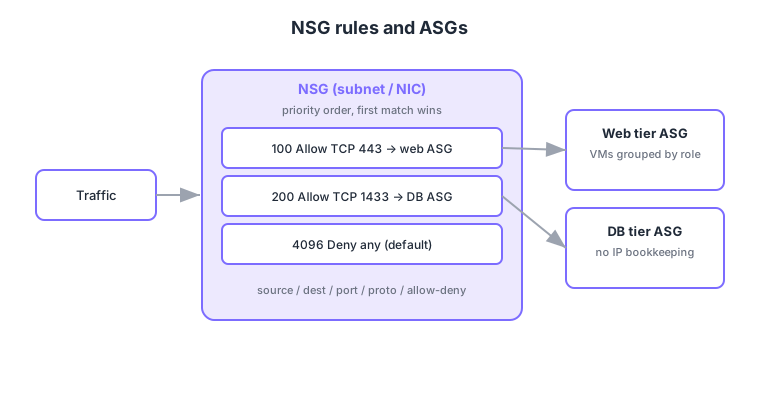
- NSG: associate to a subnet or NIC to allow/deny inbound/outbound traffic.
- Rules: defined by priority (lower = first), source, destination, port, protocol, allow/deny; the first matching rule wins.
- ASG: group VMs by app role (web tier, DB tier) and use them as source/destination in NSG rules (no IP bookkeeping).
- Default rules: defaults (allow intra-VNet, deny inbound from internet, etc.) are evaluated last.
Common on AZ-500: allow/deny at subnet/NIC = NSG, rules are priority-ordered and first match wins, group VMs by role to simplify rules = ASG. Note NSGs operate at L3/L4 (IP/port).
NSGs control by IP/port only. Defense based on HTTP content (URLs, headers) is the role of a WAF, covered in a later section.
In a rule’s source/destination you can use a service tag (logical names like Internet, AzureLoadBalancer, Storage, Sql whose IP ranges Azure maintains) or an ASG instead of an IP. Service tags auto-update their ranges, so you never chase PaaS IPs by hand. If an NSG is on both subnet and NIC, inbound is evaluated subnet→NIC and outbound NIC→subnet, and a deny at either point blocks the flow. When unsure which rule is taking effect, check the effective security rules; track allow/deny records with NSG flow logs (stored in Storage, analyzed via Traffic Analytics).
| Targeting method | What it is | When to use |
|---|---|---|
| IP / CIDR | A fixed IP or range directly | Allow on-prem or a specific host |
| Service tag | Logical name whose ranges Azure maintains | Allow PaaS (Storage/Sql) or Azure infra without IP chasing |
| ASG | Logical group of VMs by role | Simplify tier-to-tier rules like web→DB |
Scenario: only web-tier VMs may reach DB-tier VMs on TCP 1433, and other intra-VNet traffic should be denied. → Put VMs in two ASGs asg-web and asg-db, add an NSG rule “source asg-web, destination asg-db, TCP 1433, allow” at a higher priority (lower number), and below it a rule denying intra-VNet traffic. Scaling VMs only changes ASG membership; the rules stay the same.
FAQ: Q. Does deleting an NSG deny everything? → A. No. A subnet/NIC with no NSG simply has no NSG control and follows Azure defaults (allow intra-VNet, deny inbound internet, etc.). Q. NSG vs route table (UDR)? → A. NSG allows/denies; a UDR decides the path (e.g., send all traffic to Azure Firewall). They’re used together.
Trap: “higher priority number wins” is wrong—lower number is evaluated first and the first match applies. Also, NSGs don’t inspect HTTP content, so “use an NSG to block SQL injection” is wrong (that’s a WAF).
2.1.2Section summary
- NSG = allow/deny rules at subnet/NIC (priority-ordered, first match)
- ASG = group VMs by role to simplify rules
Sign in to track progress — Log in.
Quick check
(just a quick review)Q1. Which Azure mechanism allows/denies inbound/outbound traffic at subnet/NIC level?
Q2. When multiple NSG rules could match, which rule applies?
Q3. You want to group VMs by app role (web/DB tier) for NSG rules instead of listing IPs. What do you use?
Keep track of your progress
The full study guide is free to read. Sign up free to practice with the question bank, track what you have read, review your mistakes, and highlight passages.