

What's changed: Deepened AZ-305 Chapter 2 (added comparison tables, scenarios, FAQs, exam traps, deep-dive paragraphs to each section; localized figures to Japanese)
2.1Designing Relational Databases
Understand choosing relational data—Azure SQL Database/SQL Managed Instance/SQL on VM, service tiers, and Azure Database for PostgreSQL/MySQL. Pick the managed DB that fits requirements.
Choose relational data by trading off management overhead vs compatibility. Fully managed Azure SQL Database is the default.
2.1.1Relational options
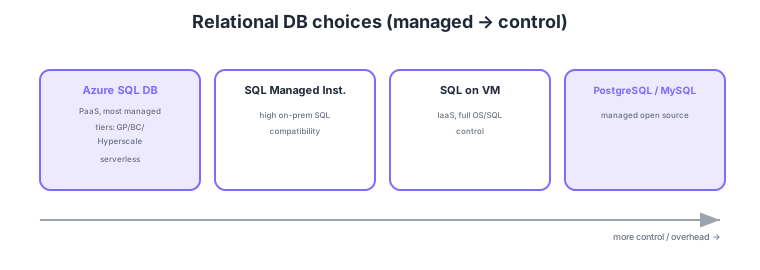
- Azure SQL Database: fully managed PaaS; choose service tiers (GP/BC/Hyperscale) or serverless.
- SQL Managed Instance: high compatibility with on-prem SQL Server (instance features, SQL Agent).
- SQL on VM: full control of OS/SQL (IaaS); highest management overhead.
- PostgreSQL/MySQL: managed DBs for open-source engines.
Common on AZ-305: default fully managed = Azure SQL Database, need on-prem SQL Server feature compatibility = SQL Managed Instance, full OS/SQL control = SQL on VM, very large/fast scale = Hyperscale. Prefer the lowest-overhead PaaS when possible.
AZ-305 data design probes "which SQL service and configuration to choose from compatibility, scale, availability, and cost requirements." Azure SQL Database offers single databases and elastic pools (share DTU/vCore across DBs for cost), with purchase models vCore (flexible; bring your own license via Hybrid Benefit) and DTU (simple bundles). Service tiers: General Purpose (balanced), Business Critical (low-latency local SSD + read replicas + zone redundancy for high availability), Hyperscale (up to ~100TB, fast backup/restore, read scale-out). For intermittent demand, serverless (auto-pause) helps. SQL Managed Instance suits migrations needing instance-scope features (SQL Agent, cross-DB queries, CLR, linked servers) or near-full T-SQL compatibility, placed inside a VNet. SQL on VM trades self-managing OS/patching for full control. PostgreSQL/MySQL flexible server supports zone redundancy and flexible maintenance. Design availability with zone redundancy or failover groups (geo), and plan migration with Azure Database Migration Service plus compatibility assessment. The key is to start from the most managed option and only descend to Managed Instance / VM when compatibility or control demands it.
| Requirement | Choice | Key point |
|---|---|---|
| New app, minimal overhead | Azure SQL Database | PaaS; serverless/elastic pool |
| Migrate with SQL feature parity | SQL Managed Instance | SQL Agent/cross-DB; in VNet |
| Full OS/SQL control | SQL on VM | IaaS; highest overhead |
| Very large / fast scale | Hyperscale tier | ~100TB; read scale-out |
Scenario: Migrate on-prem SQL Server that depends on SQL Server Agent jobs, cross-database queries, and linked servers, with minimal changes. → These are instance-scope features, so choose SQL Managed Instance (single-DB Azure SQL Database lacks some). Place it in a VNet and migrate near-online with Azure Database Migration Service. Add zone redundancy or a failover group if availability is required.
FAQ: General Purpose vs Business Critical? For cost and balance, General Purpose (remote storage). For mission-critical workloads needing low latency (local SSD), a built-in read replica, and higher availability (zone redundancy), Business Critical. For very large capacity or fast restore, consider Hyperscale separately.
Exam trap: Choosing SQL on VM for a "reduce management overhead" requirement is wrong—IaaS means self-managing OS/patching/backups, the highest overhead. Evaluate in order: Azure SQL Database first, Managed Instance if feature parity is needed, and VM only when full control is truly required.
2.1.2Section summary
- Default = Azure SQL Database (PaaS) / compatibility = Managed Instance
- Full control = SQL on VM / OSS = PostgreSQL/MySQL
Sign in to track progress — Log in.
Quick check
(just a quick review)Q1. You want a relational DB with minimal management overhead. Default Azure choice?
Q2. Migrate on-prem SQL Server keeping instance features and SQL Agent compatibility. What?
Q3. You must fully control the OS and SQL Server configuration. Which option?
Keep track of your progress
The full study guide is free to read. Sign up free to practice with the question bank, track what you have read, review your mistakes, and highlight passages.